
Description
Network
Performance
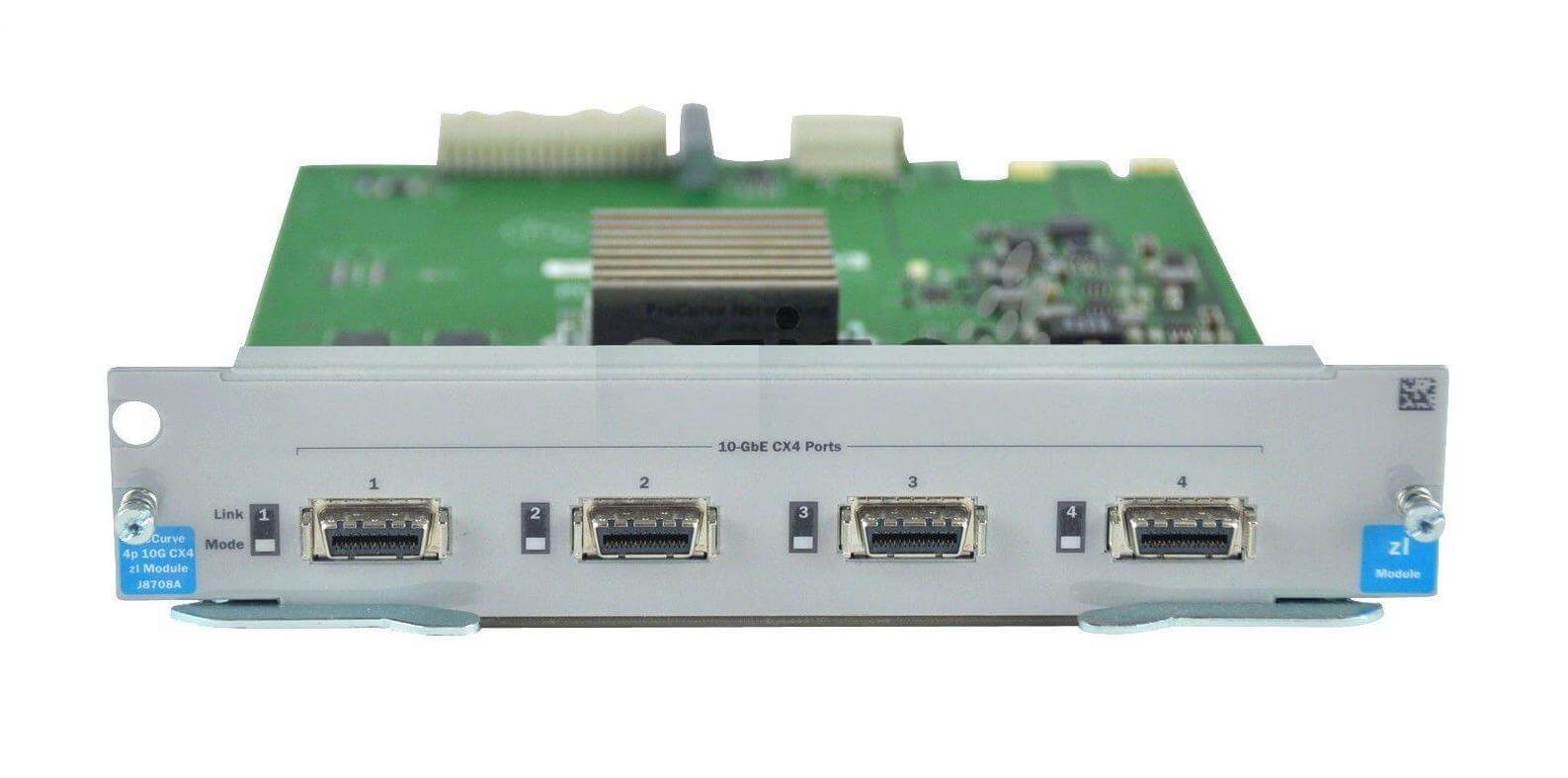
J8708-61001 is an HP ProCurve Networking 4 Ports 10GB Ethernet Expansion Module that is designed to improve the network performance of ProCurve switches. This module provides four 10 Gigabit Ethernet ports that can be used to connect high-speed devices such as servers, storage devices, and other switches.
The 10 Gigabit Ethernet standard provides ten times the speed of traditional Gigabit Ethernet, making it ideal for high-bandwidth applications such as video streaming, large file transfers, and virtualization. With this module, the ProCurve switch can support up to four 10 Gigabit Ethernet connections, which can significantly increase network throughput and reduce latency.
The J8708-61001 module is easy to install and configure, and it supports a wide range of network protocols and features such as jumbo frames, flow control, and VLAN tagging. It is compatible with a range of ProCurve switches, including the ProCurve 5400, 8200, and 3500 series switches.
The J8708-61001 HPE ProCurve Networking 4 Ports 10GB Ethernet Expansion Module is a plug-and-play device that can be easily installed and configured in a ProCurve switch. Here are the steps for installing and configuring the module:
Install the module:
- First, ensure that the ProCurve switch is powered off and unplugged from the power source.
- Remove the switch’s rear cover by releasing the latches on the top and bottom of the cover.
- Locate the empty expansion module slot and insert the J8708-61001 module into the slot, making sure that it is securely seated and the connectors are properly aligned.
- Replace the rear cover and secure the latches.
- Plug the switch back into the power source and turn it on.
Configure the module:
- Connect to the switch’s console or web interface and log in with the appropriate credentials.
- Navigate to the “config” menu and enter the command “module <module number>”. Replace <module number> with the number of the expansion module.
- Configure the ports on the module using the “interface <port number>” command. Replace <port number> with the number of the port on the expansion module.
- Set the port’s speed and duplex settings using the “speed <speed>” and “duplex <duplex>” commands.
- Enable or disable the port using the “enable” or “disable” command.
- Repeat the above steps for each port on the expansion module.
Troubleshooting and Maintenance
The J8708-61001 HPE ProCurve Networking 4 Ports 10GB Ethernet Expansion Module is a device that allows for the expansion of network connectivity by adding four 10GB Ethernet ports to a compatible HPE ProCurve switch. In order to troubleshoot and maintain this device, the following steps can be taken:
- Verify that the device is properly connected and powered on. Ensure that all cables are securely plugged in and that the power supply is functioning properly.
- Check for any error messages or status indicators on the device. The LED lights on the front of the device can indicate if there are any issues with the module or the connections.
- Check the device’s firmware and software. Make sure that the device is running the latest version of the firmware and that the software is compatible with the switch it is connected to.
- Check the switch’s configuration. Ensure that the switch is configured to recognize the expansion module and that all necessary settings are configured correctly.
- Check network connectivity. Verify that the devices connected to the expansion module are able to communicate with the rest of the network.
- Perform regular cleaning and maintenance on the device. Dust and debris can accumulate on the device over time, causing issues with cooling and connectivity. Clean the device regularly to ensure optimal performance.
- Perform regular backups of the device’s configuration. This will allow for quick and easy restoration in case of any issues or hardware failure.
- If all the above troubleshooting steps have been attempted and the device is still not functioning properly, contact HPE for support and further assistance.
Main Specification about the HP J8708-61001
- Manufacturer: HP
- Part Number or SKU # J8708-61001
- Device Type : Expansion Module
Networking
- Connectivity Technology : Wired
- Cabling Type : Ethernet 10G Base-Cx4
- Data Link Protocol : 10 Gigabit Ethernet
- Data Transfer Rate : 10 GBPS
- Compliant Standards : IEEE 802.3ak
Expansion / Connectivity
- Interfaces : 4 X Network – Ethernet 10G Base-Cx4
- Compatible Slots : 1 X Expansion Slot