

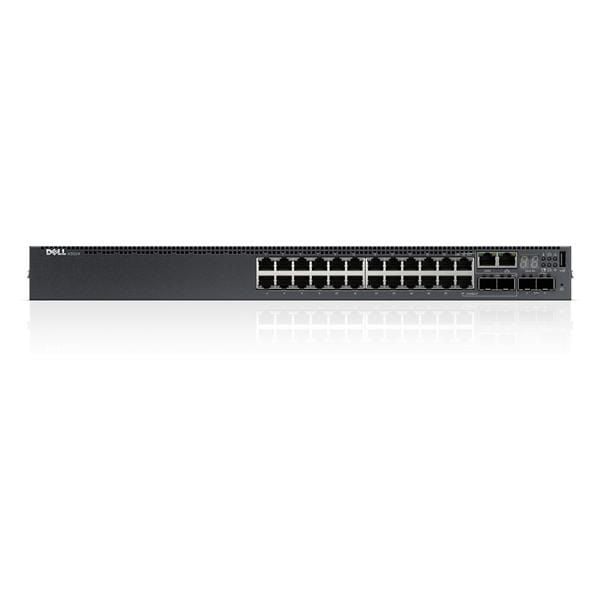

Description
Switch Port and Connectivity Options
The “Switch Port and Connectivity Options” section of the Dell Networking S3124p switch refers to the different types of ports available on the switch and the ways in which they can be used to connect devices to the network. This section would typically include information on the number and types of Ethernet ports (e.g. Gigabit Ethernet, 10 Gigabit Ethernet, etc.), as well as any additional connectivity options such as SFP+ or SFP slots for fiber optic connections, or stacking ports for connecting multiple switches together. It may also include information on the configuration of each port, such as support for various network protocols, VLANs, Quality of Service (QoS) settings, and other advanced features. The goal of this section is to provide an overview of the connectivity options available on the switch, to help users understand how the switch can be integrated into their existing network infrastructure and what types of devices it can be used to connect.Network Management and Performance
The “Network Management and Performance” section of the Dell Networking S3124p switch refers to the ways in which the switch can be managed and monitored, as well as its capabilities for optimizing network performance. This section would typically include information on the switch’s management interface, such as a web-based graphical user interface (GUI) or a command-line interface (CLI), and any management protocols supported (e.g. SNMP, Telnet, etc.). It may also include information on features such as network security, traffic monitoring and analysis, and troubleshooting tools.
In terms of performance, this section would typically highlight the switch’s capabilities for optimizing network traffic, such as support for VLANs and Quality of Service (QoS) settings, and its capabilities for handling high-bandwidth applications. The section may also include information on the switch’s capacity for forwarding and filtering packets, as well as its maximum throughput and any limitations or restrictions. The goal of this section is to provide an overview of the switch’s network management capabilities and its performance characteristics, so that users can understand how it will impact the overall performance of their network.
Power over Ethernet (PoE)
Power over Ethernet (PoE) is a technology that allows network devices to receive electrical power through the same cables that are used to transmit data. This eliminates the need for separate electrical power connections, making it easier and more cost-effective to install and maintain network devices such as IP phones, wireless access points, and security cameras.
In a PoE system, a central switch or midspan device provides power to the end devices over the Ethernet cables. The end devices are equipped with PoE-enabled network interfaces, which receive the power and use it to operate. This allows devices to be placed in locations where electrical outlets are not readily available, making it easier to deploy and maintain a wide variety of network devices.
PoE is supported by the IEEE 802.3af and 802.3at standards, which specify the power levels and other technical requirements for PoE-enabled devices. The 802.3af standard provides up to 15.4 watts of power per port, while the 802.3at standard provides up to 30 watts of power per port. This allows a wide range of devices to be powered over Ethernet, including high-power devices such as PTZ (pan-tilt-zoom) security cameras.
Overall, Power over Ethernet is a convenient and flexible technology that enables network administrators to simplify their network infrastructure and reduce costs by eliminating the need for separate power connections.
Specifications
- Manufacturer: Dell
- MPN: 1CWJ6
- Type: Networking
- Switch Type: Network Switch 24 Port
- SKU: 1CWJ6
Key Features
- Device Type : Switch – 24 Ports – L3 – Managed – Stackable
- Enclosure Type : Rack-mountable 1u
- Subtype : Gigabit Ethernet
- Ports : 24 X 10/100/1000 (poe+) + 2 X 10 Gigabit Sfp+ + 2 X Combo Gigabit Sfp
- Power Over Ethernet (poe) : Poe+
- Poe Budget : 30.8 W
- Performance : Switching Fabric Bandwidth: 212 Gbps Forwarding Performance: 158 Mpps
- Capacity : Mac Addresses: 32000 Ipv4 Routes: 1024 Ipv6 Routes: 1024 Ipv4 Routes (dynamic): 8160 Ipv6 Routes (dynamic): 4096 Links Per Group: 16 Priority Queues Per Port: 8 Layer 2 Vlans: 4000 Mstp Instances: 64 Vrf-lite Instances: 64 Host Table Entries (ipv4): 40000 Host Table Entries (ipv6): 8000 Multicast Table Entries (ipv4): 8000
- Mac Address Table Size : 32k Entries
- Routing Protocol : Vrrp, Ospfv2, Igmpv3, Msdp
- Remote Management Protocol : Snmp 1, Snmp 2, Rmon 1, Rmon 2, Rmon 3, Rmon 9, Snmp 3
- Authentication Method : Radius
- Features : Mdi/mdi-x Switch, Port Mirroring, Front To Back Airflow
- Compliant Standards : Ieee 802.3u, Ieee 802.3z, Ieee 802.1d, Ieee 802.1q, Ieee 802.3ab, Ieee 802.1p, Ieee 802.3x, Ieee 802.3ad (lacp), Ieee 802.1w, Ieee 802.1x, Ieee 802.3ae, Ieee 802.3ac, Ieee 802.1s, Ieee 802.1ab (lldp)
- Ram : 2 Gb
Expansion / Connectivity
- Interfaces :
- 24 X Gigabit Lan – Rj-45 – Poe+ – 30.8 W
- 2 X 10gbit Lan – Sfp+
- 2 X Gigabit Lan – Rj-45/sfp
- 1 X Usb – Type A
- 1 X Serial (rs-232) – Rj-45 – Management
- 1 X 1000base-t – Rj-45 – Management
Power
- Power Device : Internal Power Supply – Hot-plug
- Installed Qty : 1 (installed) / 2 (max)
- Power Redundancy : Optional
- Power Redundancy Scheme : 1+1 (with Optional Power Supply)
- Power Provided : 715 Watt


