

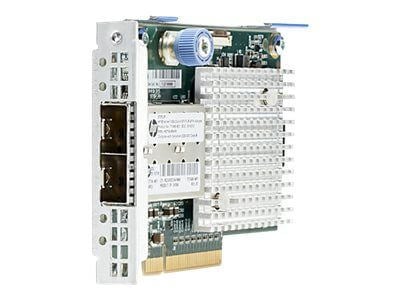
Description
Features and Functionality
The 733386-001 HPE 571FLR SFP+ Network Adapter is a high-performance, low-latency Ethernet adapter that is designed to provide high-speed connectivity for server and storage systems. This adapter is based on the Intel 82599 controller and is capable of supporting speeds of up to 10 Gbps.
Some of the key features of the HPE 571FLR SFP+ Network Adapter include:
- Dual-port connectivity: The adapter comes with two SFP+ ports that can be used to connect to a variety of optical or copper cables.
- High-speed performance: The adapter is capable of delivering speeds of up to 10 Gbps, making it ideal for high-performance computing applications.
- Low-latency design: The adapter features a low-latency design that helps to reduce network delays and improve overall system performance.
- Scalable design: The adapter is designed to be scalable and can support up to 32 virtual functions (VFs), allowing it to be used in a variety of different deployment scenarios.
- Advanced network features: The adapter supports a range of advanced network features, including virtualization, quality of service (QoS), and traffic management.
Management and Monitoring Capabilities
The 733386-001 HPE 571FLR SFP+ Network Adapter is a high-performance network adapter that supports 10 Gigabit Ethernet (GbE) connectivity for HPE ProLiant Gen8 and Gen9 server platforms. The adapter comes with advanced management and monitoring capabilities that allow network administrators to optimize network performance, troubleshoot issues, and ensure high availability of critical network resources.
The 733386-001 HPE 571FLR SFP+ Network Adapter supports various management protocols, including Simple Network Management Protocol (SNMP), Intelligent Platform Management Interface (IPMI), and Remote Monitoring (RMON). These protocols enable administrators to monitor network activity, track performance metrics, and detect potential issues in real-time.
Additionally, the adapter comes with HPE Systems Insight Manager (SIM), a management tool that provides comprehensive monitoring and management capabilities for HPE servers and other network devices. SIM enables administrators to monitor the health and performance of the server and network devices, track system and component events, and automate tasks to streamline network operations.
The 733386-001 HPE 571FLR SFP+ Network Adapter also supports advanced features such as Quality of Service (QoS), which enables administrators to prioritize network traffic and ensure that critical applications receive the necessary bandwidth. The adapter also supports Virtual LAN (VLAN) tagging, which allows administrators to segment the network into smaller subnets for improved security and performance.
Installation and Configuration
The HPE 571FLR SFP+ Network Adapter (part number 733386-001) is a high-performance adapter designed for use in Hewlett Packard Enterprise (HPE) servers. It supports 10 Gbps Ethernet connectivity and uses small form-factor pluggable (SFP+) transceivers to provide flexible and reliable network connections.
Here’s a general outline for installing and configuring the HPE 571FLR SFP+ Network Adapter:
- Install the adapter
- Ensure that the server is turned off and all cables are disconnected.
- Open the server and insert the adapter into an available PCIe slot.
- Secure the adapter to the chassis with the retaining screw.
- Connect the cables to the transceivers.
- Install the driver
- Boot the server into the operating system.
- Download and install the latest driver for the HPE 571FLR SFP+ Network Adapter from the HPE website.
- Follow the instructions provided by the installation wizard.
- Configure the network settings
- Open the network settings control panel on the operating system.
- Select the HPE 571FLR SFP+ Network Adapter from the list of available network interfaces.
- Configure the IP address, subnet mask, default gateway, and other settings as required for your network.
- Save the changes and close the control panel.
- Verify connectivity
- Run a network diagnostic tool, such as ping, to verify that the adapter is able to connect to the network.
- Monitor the adapter’s performance using system tools or third-party network management software.
It’s important to follow the steps in the correct order and to consult the HPE 571FLR SFP+ Network Adapter User Guide for more detailed instructions and information.
Specifications
- Brand Name: HPE
- Part Number or SKU#733386-001
- Type: Networking
- Sub-Type: Network Adapter 10 Gigabit
- Device Type : Network Adapter
- Form Factor : Plug-In Card – Low Profile
- Interface (Bus) Type : Pci Express 2.0 X8
- Pci Specification Revision : Pcie 2.0
- Ports : 10 Gigabit Sfp+ X 2
- Data Link Protocol : 10 Gigabit Lan
- Data Transfer Rate : 10 GBPS
- Processor : 1 X Sfc9020 – Solarflare
- Compliant Standards : IEEE 802.3, IEEE 802.1q, IEEE 802.3x, IEEE 802.3ad (Lacp), IEEE 802.3ae, IEEE 802.3p, IEEE 802.1ab (Lldp)
- System Requirements : Red Hat Enterprise Linux 6.2, Suse Linux Enterprise Server 10 Sp4, Suse Linux Enterprise Server 11 Sp2, Red Hat Enterprise Linux 5.8, Red Hat Enterprise Linux 5.9, Red Hat Enterprise Linux 6.3
- Designed For Proliant Dl360p Gen8, Dl360p Gen8 Base, Dl360p Gen8 Cms, Dl360p Gen8 Entry, Dl360p Gen8 High Performance, Dl360p Gen8 Performance, Dl380p Gen8, Dl380p Gen8 Base, Dl380p Gen8 Entry, Dl380p Gen8 High Performance, Dl380p Gen8 Performance, Dl380p Gen8 Special


