


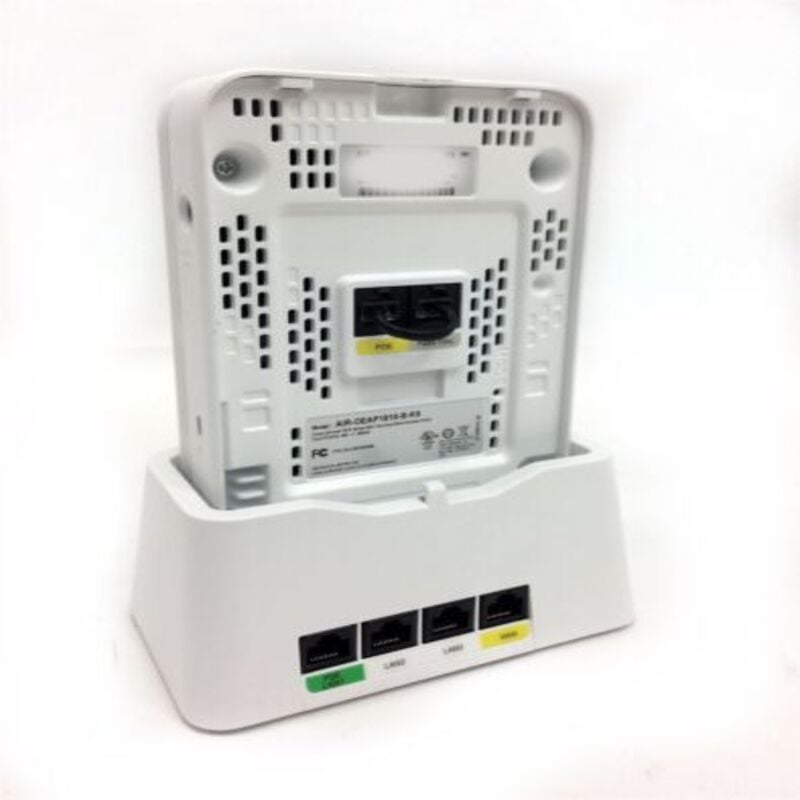
Description
Advanced Networking Features
The AIR-OEAP1810-A-K9 Cisco Aironet IEEE 802.11ac 866.70Mbit/s Wireless Access Point provides a range of advanced networking features to help optimize network performance, improve security, and enhance the user experience.
One such feature is Quality of Service (QoS), which prioritizes different types of traffic on the network to ensure that important traffic such as voice and video receive sufficient bandwidth and do not suffer from delays or dropped packets. The AP supports various QoS mechanisms, such as packet classification, marking, and queuing, to ensure that the network operates smoothly.
Another advanced feature is load balancing, which distributes traffic evenly across the wireless network to avoid overloading certain access points and ensure that all users have a consistent experience. The AP supports both client-based and network-based load balancing, allowing for a flexible and efficient load balancing solution.
The AIR-OEAP1810-A-K9 AP also supports link aggregation, which combines multiple physical links to increase throughput and provide redundancy. This feature enables the network to handle more traffic and provides increased availability by providing alternate paths for data transmission in case of link failures.
Additionally, the AP supports multiple SSIDs (Service Set Identifiers), allowing the administrator to create multiple virtual networks using a single access point. This feature is useful in environments where there is a need for segmentation, such as in a large enterprise, a hospital, or a university.
Finally, the AP also supports VLAN tagging, which allows the creation of virtual LANs to segment the network into smaller, more manageable groups. This feature provides greater control over network traffic and improves network security by restricting access to specific parts of the network.
Management and Deployment Options
The AIR-OEAP1810-A-K9 is a wireless access point (AP) manufactured by Cisco, designed for enterprise-grade wireless networking. It supports the latest wireless networking standard, IEEE 802.11ac, which provides high-speed wireless connectivity with speeds of up to 866.70 Mbit/s. This makes it ideal for high-bandwidth applications such as video conferencing, large file transfers, and high-quality streaming.
One of the key features of the AIR-OEAP1810-A-K9 is its support for multiple deployment options. It can function as a standalone AP or be managed centrally through a wireless LAN controller (WLC) or cloud-based management system. This flexibility allows organizations to choose the management and deployment option that best fits their needs.
The AIR-OEAP1810-A-K9 also supports a range of advanced features, including beamforming technology, which directs the wireless signal to specific devices to improve performance and range, and 3×3 multiple-input multiple-output (MIMO) technology, which enables multiple data streams to be transmitted simultaneously for increased throughput.
Troubleshooting Wireless Access Points
The AIR-OEAP1810-A-K9 Cisco Aironet Wireless Access Point is designed to provide high-speed wireless connectivity to network devices within a specific coverage area. However, like any other technology, it may encounter problems that affect its performance or availability. Here are some troubleshooting tips to help you identify and fix issues with your wireless access point:
- Check the power supply: Ensure that the access point is receiving power from the electrical outlet or Power over Ethernet (PoE) switch. If the device does not turn on, it may indicate a power supply issue.
- Verify the connection: Ensure that the access point is properly connected to the network switch or router. Check the cables and ports to confirm that there are no physical damages or loose connections.
- Check the firmware: Make sure that the access point is running the latest firmware version provided by the manufacturer. The latest firmware may fix known bugs or issues that could affect the device’s performance.
- Analyze wireless interference: Analyze the area where the access point is deployed to identify sources of wireless interference, such as microwave ovens, Bluetooth devices, and other wireless access points. Move or disable these devices to reduce interference and improve signal quality.
- Adjust the configuration: Review the configuration settings of the access point, including the channel, encryption, and SSID. Incorrect configurations can cause connectivity issues or limit network performance.
- Test with a different device: If none of the above troubleshooting steps work, test the access point with a different wireless device to determine if the issue is with the access point or the client device.
In conclusion, troubleshooting a wireless access point requires a systematic approach to identify and fix the issue. By following these tips, you can improve the performance and availability of your AIR-OEAP1810-A-K9 Cisco Aironet Wireless Access Point.
General
Information about this Cisco AIR-OEAP1810-A-K9
- Manufacturer Cisco
- Part Number or SKU# AIR-OEAP1810-A-K9
- Product Type Wireless
Access Point
Technical Information of Cisco Wireless Access Point
- Wireless LAN Standard IEEE 802.11ac
- Frequency Band 5 GHz ,2.40 GHz
- Wireless Transmission Speed 866.70 Mbit/s
- MIMO Technology Yes
- Wireless Type : WAN Access
Interfaces/Ports of Cisco Aironet AP
- Ethernet Technology Gigabit Ethernet
- Number of Network (RJ-45) Ports 4
- PoE (RJ-45) Port Yes
- VGA No
- HDMI No
- USB No
- Powerline No
- Management Port Yes
Dimension and Weight
- Form Factor Desktop
- Wall Mountable
- Height 1.6 Inch
- Width 6.5 Inch
- Depth 4.5 Inch
- Weight (Approximate) 1.20 lbs
Please contact us over the phone or ask for live chat/help if you have any questions about the estimated time of arrival for any “lead time required” item.


