


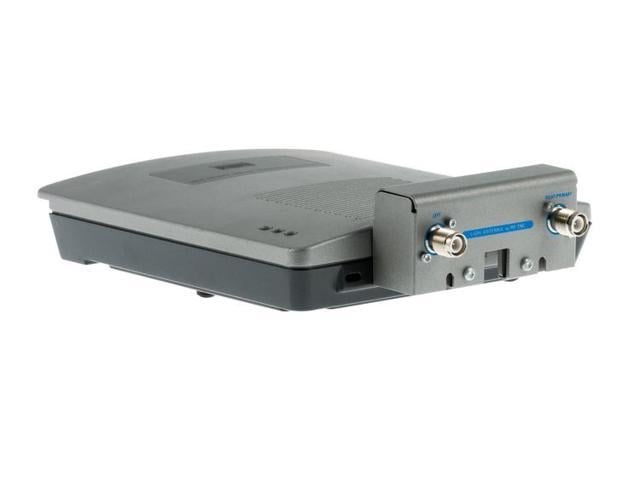
Description
Performance and Throughput
Performance and throughput are two important metrics when it comes to evaluating the capabilities of wireless access points, such as the AIR-AP1232AG-A-K9 Cisco Aironet 1232AG.
Performance refers to how well the access point can handle the processing and transmission of data. This includes its processing power, memory, and the speed and quality of its wireless radio. The AIR-AP1232AG-A-K9 is capable of supporting data rates of up to 54 Mbps, which is in line with the 802.11a/g wireless standards. It also includes a 400 MHz processor and 64 MB of DRAM memory, which enable it to handle multiple wireless connections and data streams simultaneously.
Throughput, on the other hand, refers to the actual amount of data that can be transmitted over the wireless network. This takes into account factors such as network congestion, interference, and distance between the access point and connected devices. The actual throughput of the AIR-AP1232AG-A-K9 will depend on a number of factors, such as the number of devices connected to the network, the type of data being transmitted, and the wireless environment in which it is being used.
Firmware and Software Updates
Firmware and software updates are important for maintaining the performance, security, and functionality of the AIR-AP1232AG-A-K9 Cisco Aironet 1232AG Wireless Access Point.
Firmware refers to the low-level software that is embedded in the hardware of the access point. It controls the basic functions of the device, such as its startup process and communication with connected devices. Firmware updates are typically released by the manufacturer to address bugs, security vulnerabilities, and to introduce new features or improvements. Updating the firmware can improve the stability, security, and performance of the access point.
Software refers to the higher-level programs and applications that run on the access point. This includes the device’s operating system and any software applications that are installed. Software updates are released by the manufacturer to address bugs, add new features or functionality, and improve performance. Updating the software can improve the user experience, add new capabilities, and ensure that the access point is compatible with the latest devices and technologies.
To update the firmware or software of the AIR-AP1232AG-A-K9, you will need to download the update from the manufacturer’s website and follow the instructions provided. This typically involves connecting to the access point’s web-based management interface and uploading the update file. It is important to follow the manufacturer’s instructions carefully and to ensure that the access point is not powered off or disconnected during the update process.
Troubleshooting Tips
Here are some troubleshooting tips for the AIR-AP1232AG-A-K9 Cisco Aironet 1232AG Wireless Access Point:
- Check the Power: The first thing to do when troubleshooting an access point is to check its power. Ensure that the access point is properly connected to a power source and that the power adapter is functioning properly.
- Check the Connections: Ensure that all cables and connections are properly seated and connected. Check the Ethernet cables connecting the access point to the network switch, and ensure that they are properly plugged in and undamaged.
- Check the Configuration: Check the access point’s configuration settings, such as SSID, security settings, and VLAN configuration. Ensure that they are properly configured and compatible with the devices and network you are using.
- Check for Interference: Interference from other wireless devices or appliances can disrupt the wireless signal and cause connectivity issues. Ensure that the access point is not located near sources of interference such as microwaves, cordless phones, and other wireless devices.
- Check the Firmware: Ensure that the access point’s firmware is up to date. Check the manufacturer’s website for any available updates and install them as necessary.
- Check the Logs: Access the access point’s log files to look for any error messages or indications of issues. This can help identify the cause of any connectivity or performance issues.
- Reset to Factory Settings: As a last resort, reset the access point to its factory settings. This will erase all configuration settings and restore the access point to its default state. Be sure to back up any important configuration settings before resetting the device.
These are some of the troubleshooting tips for the AIR-AP1232AG-A-K9 Cisco Aironet 1232AG Wireless Access Point. If these steps do not resolve the issues, consult the manufacturer’s documentation or support resources for further assistance.
General Information
- Manufacturer Cisco Systems, Inc
- MPN: AIR-AP1232AG-A-K9
- Product Line Aironet
- Product Series 1200
- Product Model 1232AG
- Product Name Aironet 1232AG Wireless Access Point
- Product Type Wireless Access Point
- SKU: AIR-AP1232AG-A-K9
Technical Information
- Wireless LAN Standard IEEE 802.11a/b/g
- ISM Band Yes
- UNII Band Yes
- ISM Minimum Frequency 2.41 GHz
- ISM Maximum Frequency 2.40 GHz
- UNII Minimum Frequency 5.15 GHz
- UNII Maximum Frequency 5 GHz
- Antenna Connector Dual RP-TNC Connector
- Indoor Antenna Range 500 ft
- Outdoor Antenna Range 950 ft
- Wireless Transmission Speed 54 Mbit/s
Wireless Security:
- WPA
- WPA2 (802.11i)
- IEEE 802.11 WEP
- 802.1X EAP
Interfaces / Ports:
- Fast Ethernet Port Yes
Management & Protocols
- Management-
- BootP
- Secure Shell (SSH) Protocol
- Secure HTTP (HTTPS)
- Trivial File Transfer Protocol (TFTP)
- FTP
- Telnet
- console port
- Simple Network Management Protocol (SNMP)
- MIB I and MIB II
- Cisco Works Resource Manager Essentials (RME)
- Cisco Works Software Image Manager (SWIM)
- Cisco Works Campus Manager
- Cisco Works Cisco View
- Cisco Works WLSE
Power Description:
- Input Voltage 110 V AC
- Input Voltage 220 V AC
- Input Voltage 48 V DC
- Power Source Power Supply
Dimensions & Weight
- Height 1.6 Inch
- Depth 7.2 Inch
- Weight (Approximate) 1.72 lbs
Miscellaneous
- Package Contents-
- Access point power pack
- Mounting bracket
- Mounting hardware kit
- Quick start guide
- Product registration card
Additional Information
- Antennas-
- 2.4 GHz Dual RP-TNC connectors
- 5 GHz Dual RP-TNC connectors
- Certifications & Standards
- Safety-
- UL 60950-1
- CAN/CSA-C22.2 No. 60950-1
- IEC 60950-1
- EN 60950-1
- UL 2043
- NIST FIPS 140-2 level 2 validation FIPS 140-2 Pre-Validation List
- Common Criteria (Cisco IOS Software only)
- Radio Approvals-
- FCC Part 15.247
- RSS-210 (Canada)
- EN 300.328, EN 301.893 (Europe)
- ARIB-STD 33 (Japan)
- ARIB-STD 66 (Japan)
- ARIB-STD T71 (Japan)
- AS/NZS 4771, 4268.2 (Australia and New Zealand)
- FCC Part 15.107 and 15.109
- ICES-003 (Canada)
- VCCI (Japan)
- EN 301.489-1 and -17 (Europe)
- AS/NZS 3548
- Security-
- 802.11i, WPA2, WPA
- 802.1X
- AES, TKIP
- Other-
- IEEE 802.11a
- IEEE 802.11b
- IEEE 802.11g
- FCC Bulletin OET-65C
- RSS-102


