

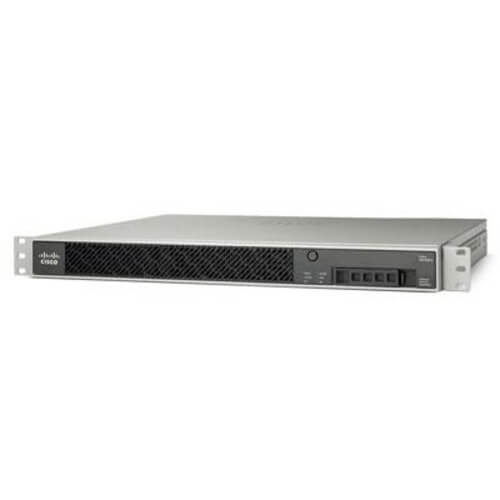
Description
Monitoring Network Traffic
The ASA5525-CU-K9 is a firewall appliance manufactured by Cisco Systems, which is designed to provide security to networks by controlling incoming and outgoing traffic. In addition to acting as a firewall, the ASA5525-CU-K9 also has the ability to monitor network traffic, allowing administrators to gain insight into what is happening on their network.
There are several ways in which the ASA5525-CU-K9 can monitor network traffic:
- Packet capture: The ASA5525-CU-K9 can capture packets passing through it and store them in a buffer for later analysis. This feature is useful for troubleshooting network issues or investigating security incidents.
- NetFlow: The ASA5525-CU-K9 can export NetFlow records to a NetFlow collector, which provides information about the source and destination of network traffic, as well as the amount of data transferred.
- Syslog: The ASA5525-CU-K9 can send syslog messages to a syslog server, which can be used for monitoring and alerting.
- SNMP: The ASA5525-CU-K9 can be monitored using SNMP, which allows administrators to gather information about the device’s performance and status.
Creating Customized Security Profiles
The Cisco ASA 5525-X Firewall Appliance is a high-performance security solution that provides advanced protection against network threats. One of its key features is the ability to create customized security profiles that can be tailored to meet the specific needs of your organization.
With the ASA5525-CU-K9 model, you can create multiple security profiles that can be assigned to different users, groups, or departments. Each profile can include a variety of security settings and policies that can be customized to match the unique needs of your organization.
For example, you may want to create a security profile for your finance department that includes more stringent security policies, such as tighter access controls and stricter password requirements. Alternatively, you may want to create a profile for your marketing department that allows more relaxed security settings, such as more open access to social media sites.
To create a custom security profile, you will need to access the ASA 5525-X’s web-based management interface. From there, you can navigate to the “Security Profiles” section, where you can create new profiles, edit existing profiles, and assign profiles to users or groups.
Within each security profile, you can configure a wide range of security settings, including access controls, intrusion prevention rules, and content filtering policies. You can also specify which types of traffic are allowed or blocked, and create customized rules to handle specific types of traffic.
Ensure the Reliability and Performance
The Cisco ASA 5525-X Firewall Appliance is designed to provide reliable and high-performance network security services for medium to large-sized organizations. Here are some tips to ensure the reliability and performance of this device:
- Keep the firmware up-to-date: Cisco regularly releases firmware updates for its devices to fix security vulnerabilities, add new features, and improve performance. Make sure to download and install the latest firmware version for your ASA 5525-X to ensure optimal performance and security.
- Configure appropriate firewall policies: The ASA 5525-X firewall is designed to provide granular control over network traffic. Configure appropriate firewall policies based on your organization’s security requirements to ensure that only authorized traffic is allowed to pass through the firewall.
- Optimize network performance: The ASA 5525-X has a range of performance optimization features that can help improve network performance. For example, you can configure traffic shaping policies to prioritize certain types of traffic over others, or enable load balancing to distribute traffic across multiple servers.
- Monitor system logs: The ASA 5525-X generates system logs that can help you identify security threats and network performance issues. Make sure to monitor these logs regularly and take appropriate action when necessary.
- Implement redundancy: The ASA 5525-X supports high availability and failover configurations, which can help ensure that your network remains up and running even in the event of a hardware or software failure. Implementing redundancy is critical for ensuring the reliability of your network security infrastructure.
Product Features
- Brand Name: Cisco
- Manufacturer: Cisco Systems, Inc
- Manufacturer Part Number: ASA5525-CU-K9
- Product Line: ASA
- Product Series: 5500
- Product Model: ASA 5525-X
- Product Name: ASA 5525-X Firewall Appliance
- Product Type: Network Security/Firewall Appliance
Technical Information
- Virtualization-
- 750 x IPsec VPN Peers
- 2 x Premium AnyConnect VPN Peers
- 500000 x Concurrent Connections
- 20000 x New Connections/Second
- 200 x Virtual Interfaces (VLANs)
- 2 x Security Contexts
- Firewall Protection Antivirus
- Firewall Protection Malware Protection
- Firewall Protection Worm Scanning
- Firewall Protection Anti-spyware
- Firewall Protection Intrusion Prevention
- Firewall Protection Remote Access Authentication
- Firewall Protection Access Control
- Firewall Protection Content Filtering
- Firewall Protection Application Layer Filtering
- Encryption Standard 3DES
- Encryption Standard AES
Interfaces/Ports
- Total Number of Ports: 8
- USB: Yes
Network & Communication
- Ethernet Technology: Gigabit Ethernet
- Network Standard: 10/100/1000Base-T
Wireless Specifications
- Wireless LAN: No
- I/O Expansions:
- Number of Total Expansion Slots: 1
Memory
- Standard Memory: 8 GB
- Flash Memory: 8 GB
Power Description
- Input Voltage: 110 V AC
- Input Voltage: 220 V AC
- Power Source: Power Supply
Miscellaneous
- Package Contents-
- ASA 5525-X Firewall Appliance
- 1 x AC Power Supply
Please contact us over the phone or ask for live chat/help if you have any questions about the estimated time of arrival for any “lead time required” item.


