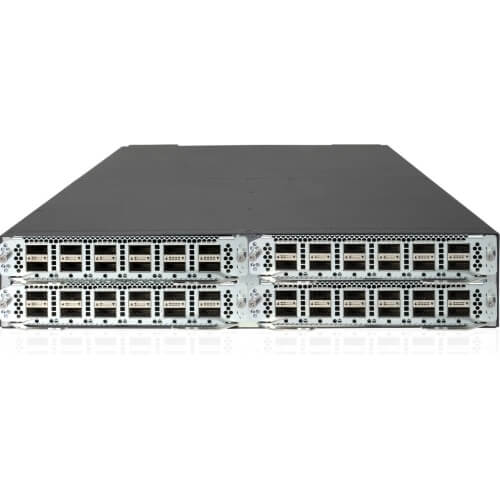
Description
Performance and Scalability
The Cisco C1-N9KC9372PXEB18Q is a highly capable and powerful switch designed for enterprise-level networking. It features 48 ports, each capable of handling data at speeds of up to 10 Gbps, and supports a wide range of network protocols, including IPv4, IPv6, and Multiprotocol Label Switching (MPLS).
In terms of performance, the C1-N9KC9372PXEB18Q switch is capable of delivering high-speed data transfer rates with low latency, making it ideal for demanding applications such as real-time video streaming, high-performance computing, and large-scale data analysis. It also includes advanced features such as Quality of Service (QoS) and network segmentation, which allow network administrators to prioritize traffic and secure critical data.
In terms of scalability, the C1-N9KC9372PXEB18Q switch is designed to be highly flexible and easily expandable, making it a good choice for businesses that expect to grow their network infrastructure over time. It supports a range of modular expansion options, including the ability to add additional ports or upgrade to higher-speed interfaces as needed.
Simple Network Management Protocol (SNMP) Configuration
Simple Network Management Protocol (SNMP) is a protocol used to manage and monitor network devices, such as routers, switches, and servers. In the case of the C1-N9KC9372PXEB18Q Cisco 48 Ports Manageable Switch, SNMP can be used to configure and monitor the switch’s performance.
To configure SNMP on the C1-N9KC9372PXEB18Q switch, follow these steps:
- Connect to the switch using a terminal or SSH client.
- Enter privileged EXEC mode by entering the enable command and providing the appropriate credentials.
- Enter global configuration mode by entering the configure terminal command.
- Configure SNMP by entering the following commands:
snmp-server community <community-string> RO snmp-server enable traps snmp authentication linkdown linkup snmp-server host <IP address> <community-string>
The first command sets the community string for SNMP read-only access. The second command enables SNMP traps for authentication and link status changes. The third command sets the SNMP server host IP address and community string for receiving traps.
- Save the configuration by entering the write memory command.
Once SNMP is configured on the C1-N9KC9372PXEB18Q switch, you can use SNMP management tools to monitor the switch’s performance, such as traffic statistics, interface status, and error logs.
Power over Ethernet (PoE) Features
Power over Ethernet (PoE) is a technology that allows the transmission of electrical power and data over a single Ethernet cable. PoE-enabled switches can provide power to devices such as IP phones, wireless access points, and security cameras without the need for a separate power source. This not only simplifies the installation process but also helps to reduce cabling and infrastructure costs.
The C1-N9KC9372PXEB18Q Cisco 48 Ports Manageable Switch is likely to support PoE and PoE+ (also known as 802.3af and 802.3at standards). It means that the switch can provide power up to 15.4 watts per port or up to 30 watts per port, depending on the PoE standard. This high power output is ideal for supporting devices that require a significant amount of power, such as pan-tilt-zoom cameras, outdoor access points, and video conferencing systems.
Moreover, a manageable PoE switch offers advanced features to help IT administrators monitor and control their network. Some of the features may include Quality of Service (QoS) to prioritize network traffic, VLANs to segment the network, and port mirroring to troubleshoot network issues.
In conclusion, PoE features in a manageable switch like the C1-N9KC9372PXEB18Q Cisco 48 Ports switch can simplify the installation and management of network devices while providing advanced capabilities for network administrators.
General Information:
- Manufacturer Cisco Systems, Inc
- Manufacturer Part Number C1-N9KC9372PXEB18Q
- Brand Name Cisco
- Product Line Nexus
- Product Series 9000
- Product Model 9372PX-E
- Product Name Nexus 9372PX-E Switch
- Product Type Layer 3 Switch
Interfaces/Ports
- Uplink Port Yes
- Modular Yes
- Stack Port No
- Port/Expansion Slot Details 6 x 40 Gigabit Ethernet Expansion Slot
- Port/Expansion Slot Details 48 x 10 Gigabit Ethernet Expansion Slot
Performance:
- Media Type Supported Optical Fiber
- Ethernet Technology 10 Gigabit Ethernet
- Ethernet Technology 40 Gigabit Ethernet
- Network Technology 10GBase-X
- Network Technology 40GBase-X
I/O Expansions:
- Number of Total Expansion Slots 54
- Expansion Slot Type QSFP+
- Expansion Slot Type SFP+
- Number of SFP+ Slots 48
Network & Communication:
- Layer Supported 3
Management & Protocols
- Manageable Yes
Power Description:
- Power Source Power Supply
- Redundant Power Supply Supported Yes