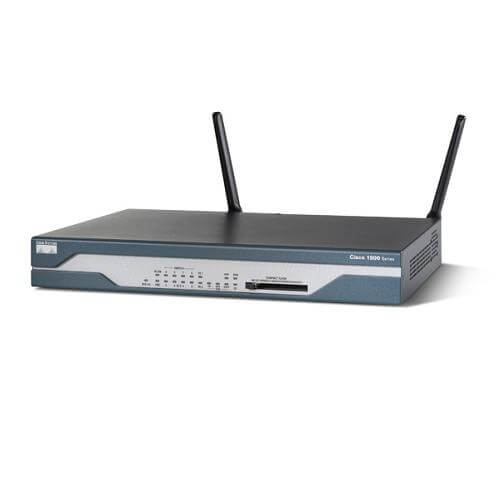
Description
Troubleshooting and Maintenance of Services Router
Troubleshooting and maintenance of the Cisco 881W wireless router involves identifying and resolving any issues that may arise with the device. Some common troubleshooting steps include:
- Checking the status of the router’s LED indicators to determine the status of various components and connections.
- Verifying that the router is properly configured and that all necessary settings are in place.
- Testing the connectivity of the router to ensure that it is properly connected to the internet and that all devices are able to connect to it.
- Checking for any error messages in the router’s logs to determine the cause of any connectivity issues.
- Performing a power cycle on the router to reset it and resolve any temporary issues.
Maintenance of the Cisco 881W wireless router includes:
- Keeping the router’s firmware up to date by downloading and installing any available updates.
- Regularly backing up the router’s configuration settings to ensure that they can be restored in case of failure.
- Cleaning the router’s vents and ensuring that there is proper airflow around the device to prevent overheating.
- Monitoring the router’s performance and usage to identify any issues or trends that may indicate a problem.
- Checking and replacing the router’s power supply and any other components as needed.
It is also recommended to consult the Cisco 881W router user manual for more detailed information on troubleshooting and maintenance procedures.
Features and Specifications
The Cisco 881W is a wireless router that supports the IEEE 802.11n standard for wireless connectivity. It is designed for small to medium-sized businesses and enterprise branch offices. Some of its key features and specifications include:
- Wireless connectivity: The Cisco 881W supports wireless speeds of up to 300 Mbps and has built-in support for 2.4GHz and 5GHz bands. It also supports multiple SSIDs and wireless security protocols such as WPA2-Enterprise.
- WAN connectivity: The router has built-in support for Gigabit Ethernet WAN connectivity, allowing for high-speed internet access.
- Security: The Cisco 881W includes advanced security features such as firewall, VPN, and intrusion prevention.
- Quality of Service (QoS): The router has built-in QoS features to prioritize traffic and ensure that critical applications receive the bandwidth they need.
- VLAN support: The Cisco 881W supports VLANs, allowing for segmentation of network traffic.
- Power over Ethernet (PoE): The router supports PoE, allowing it to be powered by an Ethernet cable, eliminating the need for an additional power supply.
- Management and monitoring: The router includes a web-based interface for easy configuration and management, as well as the ability to monitor network performance and usage.
- Hardware: The router has 4 Gigabit Ethernet ports, 1 RJ-45 console port, 1 USB port, and 1 slot for a network module.
- Power consumption: The router requires a power consumption of 15.4W
- Physical specifications: The router dimensions are 1.75 x 10.5 x 8.5 in, weight 1.7 lbs
These are some of the key features and specifications of the Cisco 881W wireless router. It’s also recommended to consult the Cisco 881W router user manual for more detailed information.
Wireless Connectivity Options
The Cisco 881W wireless router offers a variety of options for wireless connectivity to support your network needs. Some of the key wireless connectivity options include:
- IEEE 802.11n standard: The Cisco 881W supports the IEEE 802.11n standard for wireless connectivity, which allows for wireless speeds of up to 300Mbps.
- Dual-band support: The router supports both the 2.4GHz and 5GHz frequency bands, which can help to reduce interference and increase the number of available wireless channels.
- Multiple SSIDs: The router supports multiple SSIDs, allowing you to set up multiple wireless networks with different configurations and security settings.
- Wireless security: The Cisco 881W includes wireless security features such as WPA2-Enterprise, which can help to protect your wireless network from unauthorized access.
- Wireless Quality of Service (QoS): The router supports wireless QoS, which allows you to prioritize wireless traffic to ensure that critical applications receive the bandwidth they need.
- Wireless VLAN: The router can support wireless VLAN, which allows you to segment wireless network traffic and provide separate access to different devices.
- Wireless client isolation: The router can provide client isolation, a feature that prevents wireless clients from communicating with each other.
- Wireless signal strength: The router can use the built-in antennas to emit the wireless signal in a range of up to 328 feet (100 meters) indoors, and up to 984 feet (300 meters) outdoors.
These are some of the key wireless connectivity options available on the Cisco 881W wireless router. It’s also recommended to consult the Cisco 881W router user manual for more detailed information on configuring and managing wireless connectivity options.
General Information about this Cisco C881WD-A-K9
- Manufacturer Cisco Systems, Inc
- Manufacturer Part Number C881WD-A-K9
- Brand Name Cisco
- Product Series 880
- Product Model 881W
- Product Name 881W Wireless Integrated Services Router
- Product Type Wireless Integrated Services Router
Wireless Specifications for Series-880 Router
- Broadband Transmission Technology Ethernet
- Wireless LAN Standard IEEE 802.11n
- ISM Band Yes
- UNII Band No
- ISM Maximum Frequency 2.40 GHz
- Total Number of Antennas 3
- Antenna Gain 2 dBi
- Antenna Type Dipole Antenna
- Wireless Transmission Speed 54 Mbps
- Wireless Security
- WPA
- WPA2
- WPA-PSK
- LEAP
- EAP-TTLS
- EAP-FAST
- EAP-MD5
- HREAP
- PEAP
- WEP
- EAP-TLS
- IEEE 802.11i
- IEEE 802.1x
- Features MIMO Technology
- Features Quality of Service (QoS)
Interfaces/Ports
- Number of Network (RJ-45) Ports 4
- Network (RJ-11) No
- VGA No
- Serial No
- USB Yes
- Powerline No
- PoE (RJ-45) Port Yes
- Management Port Yes
- Number of Broadband (RJ-45) Ports 1
Network & Communication
- Ethernet Technology Fast Ethernet
Management & Protocols
- Management
- Cisco Configuration Professional
- Telnet
- MIB
- Cisco IOS Embedded Event Manager (EEM)
- SNMP v3
- CLI
- Web-based Management
- Telnet
- VLAN
- CiscoWorks
- Cisco Configuration Express
- Security Features
- DES
- 3DES
- 128/192/256 bit AES
- PKI
- IPSec
- Zone-based Policy Firewall
- Stateful Inspection Transparent Firewall
- RADIUS
- TACACS+
- Content Filtering
- L2TP
- NAT
- ACL
- Cisco Security Manager
- SSH
- Flexible Packet Matching
- SSL
- MAC Filtering
- URL Blocking
- Keyword Blocking
- PPPoE
Power Description
- Input Voltage 48 V DC
- Power Source AC Adapter
Miscellaneous
- Certifications & Standards
- FCC
- IEEE 802.3
- IEEE 802.3u
- IEEE 802.11b
- IEEE 802.11g
- IEEE 802.11n
- IEEE 802.11i
- IEEE 802.3ah
- IEEE 802.3d
- IEEE 802.3ag
- IEEE 802.1x
- ITU G.993.2
- ITU G.992.5
- ITU G. 992.1
- ITU G.992.3
- G.994.1 ITU G.hs
- ETSI
- Emissions:
- 47 CFR Part 15: 2006
- CISPR22: 2005
- EN300386: V1.3.3: 2005
- EN55022: 2006
- EN61000-3-2: 2000
- EN61000-3-3: 1995
- ICES-003 Issue 4: 2004
- KN 22: 2005
- VCCI: V-3/2006.04
Immunity
- CISPR24: 1997
- EN300386: V1.3.3: 2005
- EN50082-1: 1992
- EN50082-1: 1997
- EN55024: 1998
- EN61000-6-1: 2001