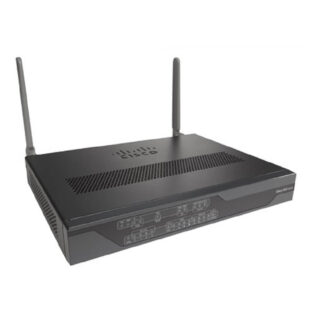
Description
Advanced Wireless Features for Multi-mode Router
The Cisco C887VAMG+7-K9 is a multi-mode router that supports VDSL2/ADSL2+ over POTS and offers advanced wireless features to support large enterprise and service provider networks. Here are some of the advanced wireless features of the C887VAMG+7-K9:
- Wireless Controller: The C887VAMG+7-K9 can act as a wireless controller, allowing for the management and monitoring of multiple Cisco wireless access points. This simplifies wireless network deployment and improves network performance.
- Wireless Mesh: The C887VAMG+7-K9 supports wireless mesh, allowing for wireless clients to connect to the network through multiple access points. This improves coverage and network performance.
- Quality of Service (QoS) : The C887VAMG+7-K9 supports Quality of Service (QoS) features to help manage network traffic and ensure that critical applications receive the bandwidth they need.
- Advanced Security : The C887VAMG+7-K9 supports advanced security features such as WPA2-Enterprise, 802.1X, and others to provide secure wireless connectivity.
- Wireless Access Point Integration: The C887VAMG+7-K9 supports wireless access point integration, allowing for centralized management and monitoring of the wireless network.
- Advanced RF Management : The C887VAMG+7-K9 supports advanced RF management features such as dynamic channel assignment, load balancing, and interference avoidance.
- Advanced Mobility : The C887VAMG+7-K9 supports advanced mobility features such as fast roaming, wireless bridging, and wireless mesh.
- Location Services: The C887VAMG+7-K9 supports location services features such as wireless location and Cisco CMX, which allow for the location tracking of wireless clients on the network.
These advanced wireless features allow the C887VAMG+7-K9 to manage wireless network effectively and ensure that critical applications receive the bandwidth they need. This helps to improve network performance and ensure that important business applications are delivered with the necessary quality of service.
Troubleshooting and Maintenance
Troubleshooting and maintenance of the Cisco C887VAMG+7-K9 Multi-mode VDSL2/ADSL2+ Over POTS Secure Router involve a variety of steps and procedures to ensure that the router is operating correctly and to address any issues that may arise.
- Monitoring: The first step in troubleshooting and maintenance is to monitor the router to identify any issues or errors. This can be done using Cisco IOS, the industry-leading network management software, which provides detailed information on the router’s performance and status.
- Logs and Event Messages: The router keeps log and event messages that can be used to troubleshoot and identify issues. These logs and messages can be viewed and analyzed to determine the cause of the problem and to find a solution.
- Firmware and Software Updates: Keeping the router’s firmware and software up-to-date is an important aspect of maintenance. These updates often address known issues and vulnerabilities and improve the overall performance of the router.
- Backups: Regularly backing up the router’s configuration is an important step in maintenance. This ensures that if a problem occurs and the router needs to be restored, the configuration can be easily restored from a backup.
- Physical Maintenance: The router should be kept in a clean and cool environment to ensure proper operation. The fans and other components should be kept clean and free of dust to prevent overheating and other issues.
Powering and Mounting
The Cisco C887VAMG+7-K9 Multi-mode VDSL2/ADSL2+ Over POTS Secure Router requires proper powering and mounting to ensure proper operation. Here are some steps for powering and mounting the C887VAMG+7-K9:
- Powering: The C887VAMG+7-K9 requires a DC power supply to operate. It can also support redundant power supply to ensure the system will not go down in case of failure of one power supply.
- Connecting the power cords: Connect the power cords to the power supply and plug them into an electrical outlet. Make sure to connect the power cords to the correct power supply units.
- Verifying power status: Verify that the power supply units are providing power to the router by checking the status LEDs on the power supply units.
- Mounting: The C887VAMG+7-K9 can be mounted on a 19-inch rack using the mounting brackets provided with the router.
- Placement: The router should be placed in a secure and temperature-controlled environment. It should be placed in a location with good ventilation to prevent overheating.
- Grounding: The C887VAMG+7-K9 should be grounded to a proper earth ground using the grounding lug provided on the chassis.
- Cable Management: Proper cable management is important to maintain the proper airflow and cooling of the router. Make sure that the cables are properly routed and secured to prevent them from blocking the air vents.
By following these steps, you can properly power and mount the Cisco C887VAMG+7-K9 Multi-mode VDSL2/ADSL2+ Over POTS Secure Router, ensuring proper operation and optimal performance.
Key Information about this Cisco C887VAMG+7-K9
- Manufacturer Cisco
- Model Number or SKU# C887VAMG+7-K9
- Product Series 880G
- Product Model 887VAG
- Product Name 887VAG Integrated Service Router
- Product Type Wireless Integrated Services Router
Specifications of Cisco Router
- Broadband Transmission Technology Cellular
- ISM Band No
- UNII Band No
- Cellular Generation 3.75G
- Cellular Network Supported WCDMA 2100
- Cellular Network Supported WCDMA 900
- Cellular Network Supported WCDMA 850
- Cellular Network Supported GSM 850
- Cellular Network Supported GSM 900
- Cellular Network Supported GSM 1800
- Cellular Network Supported GSM 1900
- Cellular Network Supported WCDMA 1900
- Cellular Data Connectivity Technology HSPA+
- Cellular Data Connectivity Technology HSDPA
- Cellular Data Connectivity Technology UMTS
- Cellular Data Connectivity Technology EDGE
- Cellular Data Connectivity Technology GPRS
- Total Number of Antennas 2
- Antenna Type Dipole Antenna
- Antenna Connector TNC Connector
- Features Quality of Service (QoS)
Interfaces / Ports of Cisco Integrated Service Router
- Ethernet Port Yes
- Fast Ethernet Port Yes
- Gigabit Ethernet Port No
- Number of Network (RJ-45) Ports 4
- Network (RJ-11) No
- VGA No
- Serial Yes
- USB Yes
- Powerline No
- PoE (RJ-45) Port No
- Management Port No
- Number of Broadband (RJ-45) Ports 1
I/O Expansions
- Expansion Slots 2 x SIM Card
- Network & Communication:
- Ethernet Technology Fast Ethernet
Management & Protocols
- Management
- VLAN
- Telnet
- SNMP
- Web-based Management
- Command-line interface
- MIB
- Security Features
Firewall
- Intrusion Prevention
- Content Filtering
- VPN
Power Description
- Power Source AC Supply
Dimensions & Weight
- Height : 1.8 inch
- Width : 12.8 inch
- Depth : 9.8 inch
- Weight : 5.50 lbs