

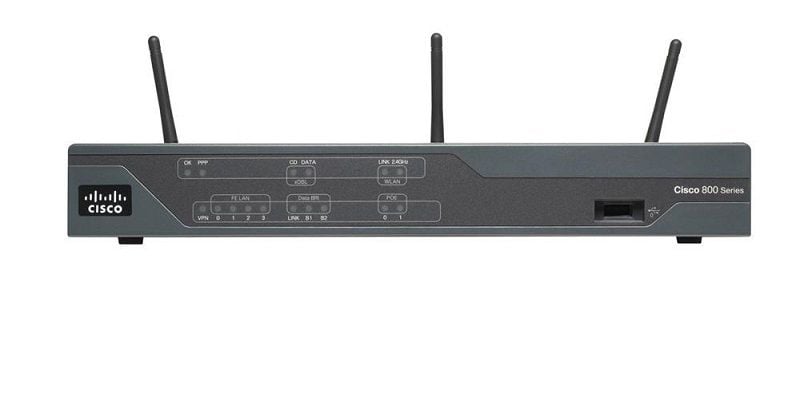
Description
Advanced Features of Security Router
The Cisco 897VA Gigabit Ethernet Security Router (C897VA-K9) is a high-performance router that offers a range of advanced features to support enterprise networks and secure remote connections. Some of the key advanced features of this router include:
- Integrated Gigabit Ethernet ports: The router has four Gigabit Ethernet ports that allow for high-speed data transfer and support for Power over Ethernet (PoE) for connecting IP phones, wireless access points and other devices.
- VPN support: The router supports VPN protocols such as IPsec and SSL, allowing for secure remote connections to the network. This feature enables employees to access the network remotely and securely.
- Advanced security features: The router has built-in firewall and intrusion prevention capabilities, as well as support for network security protocols like 802.1x and TACACS+. This provides a comprehensive security solution to protect the network from a wide range of threats.
- Quality of Service (QoS): The router supports QoS features that allow for prioritization of traffic, ensuring that critical applications receive the bandwidth they need. This ensures that the network is optimized for different types of traffic and prevents congestion.
- Voice and video support: The router supports voice and video applications through the integration of Cisco IOS software and hardware. This enables the deployment of voice and video applications over the network.
- IPv6 support: The router supports IPv6, the next generation of internet protocol addressing. This allows for a larger number of IP addresses and enables organizations to prepare for the eventual depletion of IPv4 addresses.
- VDSL2 and ADSL2+ support: The router supports VDSL2 and ADSL2+ technologies, allowing for faster internet speeds over copper telephone lines. This enables organizations to take advantage of high-speed internet access in areas where fiber is not yet available.
- 4G LTE support: The router supports 4G LTE cellular network, providing high-speed internet access in the event of a WAN failure. This ensures that the network remains connected even in the event of a failure of the primary WAN connection.
- Management and monitoring: The router includes a variety of management and monitoring tools, such as Cisco Configuration Professional and Cisco Network Assistant, that can be used to configure and troubleshoot the router. This makes it easy to manage and monitor the network and quickly resolve any issues that arise.
Network Management Systems
The Cisco 897VA Gigabit Ethernet Security Router (C897VA-K9) includes a range of network management systems that allow for easy configuration and monitoring of the router. Some of the key network management systems include:
- Cisco Configuration Professional (CCP): This is a graphical user interface (GUI) that allows for easy configuration and management of the router. It provides wizards and other tools to help with tasks such as configuring VPNs, setting up firewall rules, and monitoring the router’s performance.
- Cisco Network Assistant (CNA): This is a management tool that allows for centralized management of multiple Cisco devices. It provides a single point of control for managing routers, switches, and wireless access points, and allows for easy configuration of network-wide policies.
- Cisco IOS command-line interface (CLI): The router is also configurable through the Cisco IOS command-line interface (CLI). The CLI provides a powerful and flexible way to configure the router and allows for advanced troubleshooting and monitoring of the network.
- SNMP (Simple Network Management Protocol): The router supports SNMP, a widely used network management protocol that allows for monitoring and management of network devices through the use of SNMP management systems such as Cisco Prime.
- Remote Management : The router supports Telnet, SSH, and web-based management, allowing for secure remote management and monitoring of the router.
- Netflow: The router supports netflow, a Cisco proprietary protocol that allows for monitoring of network traffic and identifying the source and destination of the traffic.
- Cisco DNA Center: This is a centralized management system that allows for end-to-end visibility, automation, and assurance of the network. It provides features such as network topology, inventory, and configuration management, as well as analytics and troubleshooting.
- Embedded Event Manager (EEM) : The router supports EEM, a powerful tool that allows for automation of tasks based on events and conditions within the router. It can be used to automate tasks such as logging, SNMP traps, and syslog messages.
All these management systems provide a variety of options for configuring and monitoring the router, and make it easy to manage and troubleshoot the network.
Establishing Internet Connectivity
Establishing internet connectivity on the Cisco 897VA Gigabit Ethernet Security Router (C897VA-K9) involves configuring the router’s WAN interface and setting up the appropriate connection type. The specific steps to establish internet connectivity will vary depending on the connection type and the service provider, but generally, the process involves the following steps:
- Connecting the WAN interface: Connect the WAN interface of the router to the internet service provider’s (ISP) modem or network. This can be done through an Ethernet cable or a serial cable, depending on the connection type.
- Configuring the WAN interface: Depending on the connection type, configure the WAN interface with the appropriate settings such as IP address, subnet mask, and default gateway. This can be done through the router’s web interface, Cisco Configuration Professional (CCP), or the command-line interface (CLI).
- Configuring the connection type: Depending on the connection type, configure the appropriate settings such as PPPoE, DHCP, or static IP. This can be done through the router’s web interface, CCP, or CLI.
- Configuring the DNS servers: Configure the DNS servers to use the servers provided by the ISP. This can be done through the router’s web interface, CCP, or CLI.
- Configuring the firewall: Configure the firewall to allow internet traffic to pass through the router. This can be done through the router’s web interface, CCP, or CLI.
- Verifying the internet connectivity: Once the configuration is completed, verify the internet connectivity by pinging a known IP address or website. This can be done through the router’s CLI.
- Securing the router: Once internet connectivity is established, it is important to secure the router by setting a strong password, disabling unnecessary services, and configuring the firewall to prevent unauthorized access.
Key Feature about this Cisco C897VA-K9
- Manufacturer Cisco
- Part Number or SKU# C897VA-K9
- Product Series 890
- Product Model 897VA
- Product Name 897VA Gigabit Ethernet Security Router
- Product Type Router
Interfaces/Ports of Cisco 890 Series Router
- Total Number of Ports 9
- Powerline No
- Management Port Yes
- Number of Network (RJ-45) Ports 8
Media & Performance of Cisco 8 Ports Router
- Broadband Transmission Technology VDSL2
I/O Expansions of Cisco Router
- Number of Total Expansion Slots 1
- Expansion Slot Type SFP (mini-GBIC)
Network & Communication
- Ethernet Technology Gigabit Ethernet
- Network Technology 10/100/1000Base-T
Power Description
- PoE (RJ-45) Port Yes
Dimension and Weight
- Form Factor Desktop
- Height 1.8 Inch
- Width 12.7 Inch
- Depth 9.8 Inch
- Weight (Approximate) 5.50 lbs


