

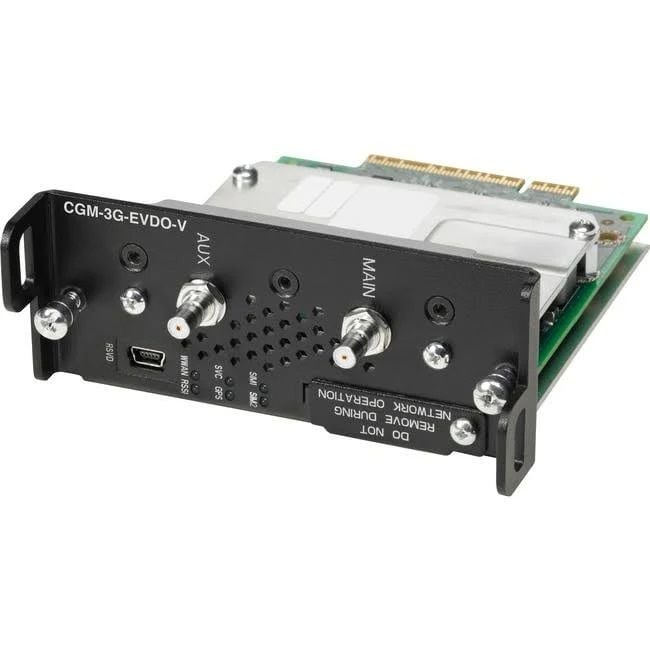
Description
Advantages of Wireless Access Points
Wireless access points, like the CGM-3G-EVDO-V Cisco Connected Grid Wireless Module, offer several advantages over wired network connections. These advantages include:
- Flexibility: Wireless access points allow for flexible connectivity, as devices can connect to the network without the need for physical cabling. This is particularly useful in situations where it may be difficult or impractical to run cables, such as in outdoor environments or in historical buildings where drilling holes for cables is not permitted.
- Scalability: Wireless networks are highly scalable, making it easy to add new devices or expand the network as needed. This can be particularly useful in environments where the number of devices can fluctuate, such as in a conference room or a public space.
- Mobility: Wireless access points allow for mobility, as devices can move around and stay connected to the network. This is particularly useful for mobile devices such as laptops, smartphones, and tablets, which can move around the office or building and stay connected to the network.
- Cost-Effective: Wireless networks can be more cost-effective than wired networks, as they eliminate the need for physical cabling, which can be expensive to install and maintain. Additionally, wireless networks can reduce the need for expensive switches, hubs, and other network infrastructure.
- Easy to Install and Manage: Wireless access points are relatively easy to install and manage, particularly when compared to wired network connections. This makes them an attractive option for organizations with limited IT resources or expertise.
Security Features of Wireless Access Points
The CGM-3G-EVDO-V Cisco Connected Grid Wireless Module is a wireless access point that is designed to be used in industrial applications, such as the utility industry. As such, security is a top priority for this device, as it is critical to protect against unauthorized access and potential cyber threats.
The access point supports a variety of security features to ensure the confidentiality, integrity, and availability of data transmitted over the wireless network. These features include:
- WPA2 and 802.11i security protocols – These are the most commonly used wireless security protocols and provide robust encryption and authentication for wireless networks.
- MAC address filtering – This feature allows administrators to create a whitelist of approved devices that are allowed to connect to the access point.
- Firewall – The access point has a built-in firewall that provides additional security by blocking unauthorized access attempts.
- VPN support – The access point supports Virtual Private Network (VPN) connections, which provide secure access to the network from remote locations.
- Access control lists – This feature allows administrators to control access to the network based on specific criteria, such as IP address or protocol.
- Radius authentication – This is a network authentication protocol that provides an additional layer of security by requiring users to authenticate themselves before accessing the network.
- Secure management interfaces – The access point provides secure management interfaces, such as SSH and HTTPS, to protect against unauthorized access to administrative settings.
Troubleshooting Wireless Access Points
The CGM-3G-EVDO-V Cisco Connected Grid Wireless Module is designed to provide reliable and secure wireless connectivity for a variety of applications, including smart grid and industrial IoT solutions. In the event of connectivity issues, troubleshooting the wireless access point can help to quickly identify and resolve the problem.
There are several steps that can be taken to troubleshoot the CGM-3G-EVDO-V wireless module. One of the first steps is to check the signal strength of the wireless connection. This can be done using a mobile device or a laptop with a wireless adapter. If the signal strength is weak or non-existent, it may be necessary to move the wireless access point to a different location or install a signal booster to improve coverage.
Another potential issue with the CGM-3G-EVDO-V wireless module is interference from other wireless devices. This can cause signal degradation or complete loss of connectivity. To troubleshoot this issue, it may be necessary to identify and remove the source of interference, such as a nearby wireless access point or other electronic device.
If the problem persists, it may be necessary to check the configuration settings of the wireless access point. This can be done using the web-based interface or command-line interface provided by the device. Checking the firmware version and upgrading to the latest version can also help to resolve connectivity issues.
In some cases, it may be necessary to perform a factory reset of the CGM-3G-EVDO-V wireless module. This can be done by pressing and holding the reset button on the device for 10 seconds. This will restore the device to its default configuration settings, which may help to resolve connectivity issues.
Detail Description
- Manufacturer Cisco Systems, Inc
- Type: Networking
- Sub-Type: Wireless Module
- Manufacturer Part Number CGM-3G-EVDO-V
- Brand Name Cisco
- Product Name Wireless Module
- Product Type Wireless Module
Miscellaneous:
- Device Supported Router
- Compatibility Cisco 1000 Series Connected Grid Routers


