Description
Performance and Scalability
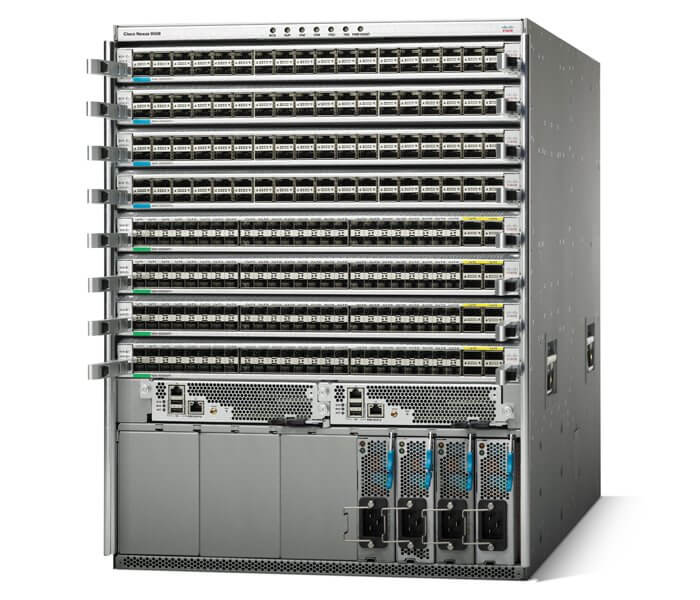
The Cisco Nexus 9508 is a high-performance, modular switch designed for data center and enterprise networks. It offers a number of features that contribute to its performance and scalability:
- Fabric Capacity: The N9K-C9508 has a switching capacity of up to 30 Tbps, which makes it suitable for high-density data center environments and large enterprise networks.
- Modular Design: The switch has a modular design that allows for easy expansion and upgrades as your network grows. It supports up to 8 line cards, each of which can support up to 576 ports of 10G or 144 ports of 40G.
- Low Latency: The Nexus 9508 has a low latency of less than 2 microseconds, which means that it can quickly forward data packets through the network, reducing delays and improving overall network performance.
- Advanced Features: The switch supports a range of advanced features such as Virtual Port Channels (vPC), FabricPath, and Overlay Transport Virtualization (OTV), which can help to improve network scalability, reliability, and flexibility.
- Redundancy: The N9K-C9508 supports redundant power supplies and fan modules, which help to ensure high availability and prevent downtime in case of component failure.
Installation and Setup
The installation and setup of a N9K-C9508 Cisco Nexus 9508 Chassis Fabric Switch involves the following steps:
- Unpack the switch and accessories – The Cisco Nexus 9508 switch comes with a chassis, supervisor engine(s), fabric modules, power supplies, fan trays, and other accessories. Unpack the components and ensure all the necessary items are present.
- Mount the chassis – The Cisco Nexus 9508 switch can be mounted in a rack or cabinet. Follow the manufacturer’s instructions for mounting the chassis and ensure proper grounding and cable management.
- Install the supervisor engine(s) – The Cisco Nexus 9508 switch can support up to six supervisor engines. Install the supervisor engines in the designated slots and ensure they are securely fastened.
- Install the fabric modules – The Cisco Nexus 9508 switch can support up to nine fabric modules. Install the fabric modules in the designated slots and ensure they are securely fastened.
- Install the power supplies – The Cisco Nexus 9508 switch can support up to six power supplies. Install the power supplies in the designated slots and ensure they are securely fastened.
- Install the fan trays – The Cisco Nexus 9508 switch can support up to six fan trays. Install the fan trays in the designated slots and ensure they are securely fastened.
- Connect the cables – Connect the power cables, management cables, and network cables to the switch as necessary. Follow the manufacturer’s instructions for proper cable management and labeling.
- Power on the switch – Power on the switch and follow the manufacturer’s instructions for initial setup and configuration.
- Configure the switch – Use the Cisco NX-OS software to configure the switch. This includes configuring interfaces, VLANs, routing protocols, and other network settings.
- Test the switch – Test the switch to ensure it is functioning properly and meeting performance requirements. This may involve running network tests, monitoring traffic, and verifying connectivity.
Configuration and Management
The N9K-C9508 Cisco Nexus 9508 Chassis Fabric Switch is a high-performance switch that is designed to provide a reliable and scalable network infrastructure for data centers and other high-density computing environments. The switch features a modular design that allows for flexible configuration and easy management, making it an ideal choice for businesses that require a high level of flexibility and scalability.
The configuration of the N9K-C9508 Cisco Nexus 9508 Chassis Fabric Switch is done through the Cisco NX-OS operating system, which provides a rich set of tools and features for configuring and managing the switch. The NX-OS operating system is designed to be easy to use, and it offers a range of graphical and command-line interfaces that allow administrators to manage the switch according to their specific needs.
The management of the N9K-C9508 Cisco Nexus 9508 Chassis Fabric Switch is also straightforward, with a range of monitoring and reporting tools available that provide real-time information on the performance of the switch and the network as a whole. These tools allow administrators to quickly identify and resolve issues, and to optimize the performance of the network to meet the needs of the business.
General Information:
- Manufacturer Cisco Systems, Inc
- Manufacturer Part Number N9K-C9508
- Brand Name Cisco
- Product Line Nexus
- Product Series 9000
- Product Model 9508
- Product Name Nexus 9508 Chassis with 8 Linecard Slots
- Product Type Layer 3 Switch
Interfaces/Ports
- Token Ring Port No
- LRE Port No
- Uplink Port No
- Bypass No
- Modular No
- Management Port Yes
- USB Yes
I/O Expansions
- Number of Total Expansion Slots 16
- Expansion Slot Type Switch Fabric
- Expansion Slot Type Supervisor Engine
- Expansion Slot Type Line Card
Network & Communication
- Layer Supported 3
- Management & Protocols
- Manageable Yes
- Management VLAN
- RMON
- SNMP v1, 2, 3
- Syslog
- Telnet
Power Description
- PoE (RJ-45) Port No
- Input Voltage 220 V AC
- Input Voltage 110 V AC
- Power Source Power Supply
- Redundant Power Supply Supported Yes
Miscellaneous
- Certifications & Standards Safety:
- UL 60950-1 Second Edition
- CAN/CSA-C22.2 No. 60950-1 Second Edition
- EN 60950-1 Second Edition
- IEC 60950-1 Second Edition
- AS/NZS 60950-1
- GB4943
- EMC: Emissions
- 47CFR Part 15 (CFR 47) Class A
- AS/NZS CISPR22 Class A
- CISPR22 Class A
- EN55022 Class A
- ICES003 Class A
- VCCI Class A
- EN61000-3-2
- EN61000-3-3
- KN22 Class A
- CNS13438 Class A
- EMC: Immunity
- EN55024
- CISPR24
- EN300386
- KN 61000-4 series
- Environmentally Friendly Yes
- Environmental Certification RoHS-6