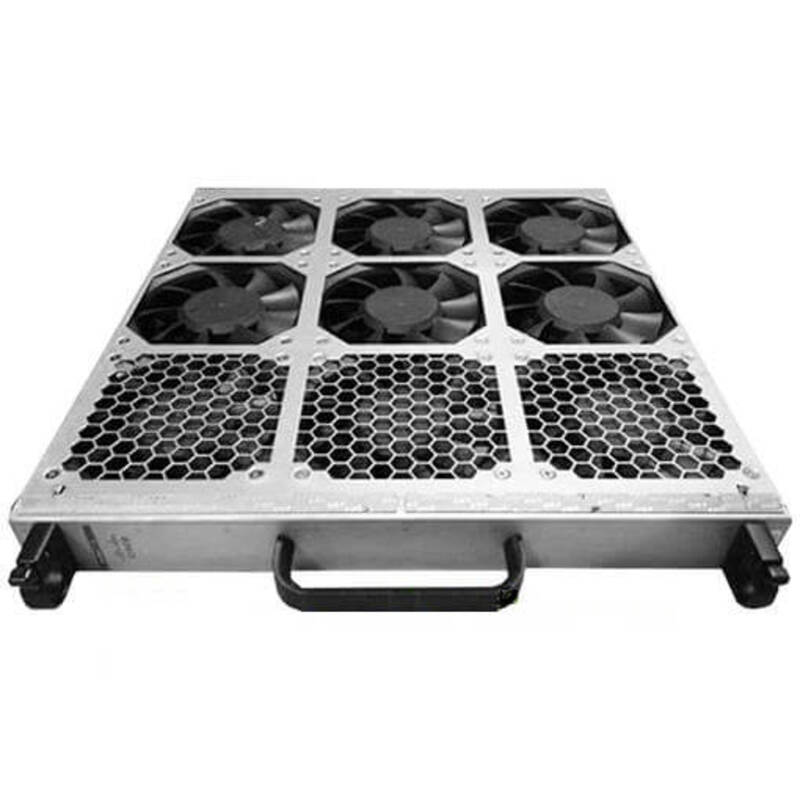
Description
Easy Installation and Maintenance
Installing the N9K-C9508-FAN Cisco Fan Tray for Nexus 9508 Chassis FD is a simple process that can be completed in a few steps:
- Preparation: Before installing the fan tray, ensure that the Nexus 9508 Chassis FD is powered off and disconnected from all power sources.
- Removing the old fan tray: Open the front panel of the Nexus 9508 Chassis FD and remove any existing fan trays by pressing the release buttons and pulling them out.
- Installing the new fan tray: Slide the N9K-C9508-FAN fan tray into the Nexus 9508 Chassis FD, aligning the connectors with the sockets, and press the locking buttons to secure it in place.
- Power on the chassis: Connect the power sources and turn on the Nexus 9508 Chassis FD. The new fan tray should be operational.
Maintenance of the N9K-C9508-FAN fan tray involves cleaning the filters and verifying that the fans are operating properly. The filters can be removed and cleaned with compressed air, while the fan operation can be monitored using the “show environment” command in the Nexus 9508 Chassis FD. If a fan fails, the fan tray can be replaced with a new one following the installation steps.
It is important to regularly maintain the N9K-C9508-FAN fan tray to ensure proper cooling of the Nexus 9508 Chassis FD and prevent downtime due to overheating. By following these steps, you can easily install and maintain the fan tray for optimal performance.
Features and Benefits
The N9K-C9508-FAN Cisco Fan Tray for Nexus 9508 Chassis FD offers several features and benefits, including:
- High-density cooling: The N9K-C9508-FAN provides high-density cooling for the Nexus 9508 Chassis FD, ensuring that the system operates at optimal temperatures, even under high loads.
- Easy maintenance: The N9K-C9508-FAN fan tray is designed for easy maintenance, with filters that can be easily removed and cleaned to maintain optimal performance.
- Redundant operation: The N9K-C9508-FAN fan tray has redundant fans, ensuring that the Nexus 9508 Chassis FD continues to operate even if one fan fails.
- Enhanced reliability: The N9K-C9508-FAN fan tray is designed for enhanced reliability, with hot-swappable fans that can be easily replaced if necessary, without affecting the operation of the Nexus 9508 Chassis FD.
- Improved airflow: The N9K-C9508-FAN fan tray is designed to improve airflow within the Nexus 9508 Chassis FD, helping to prevent overheating and improve overall system performance.
Superior Performance and Durability
The N9K-C9508-FAN is a fan tray manufactured by Cisco specifically for the Nexus 9508 chassis. It is designed to provide superior performance and durability in a data center environment, making it an ideal choice for those who need reliable cooling solutions for their networking equipment.
The fan tray features high-quality components and advanced engineering design, ensuring that it can meet the demanding requirements of a data center environment. This, in turn, ensures efficient and reliable cooling for the Nexus 9508 chassis. The N9K-C9508-FAN is built to withstand the challenges posed by high-density, high-performance data center environments, and it is designed to ensure maximum uptime and minimal downtime.
In addition to its performance and durability, the N9K-C9508-FAN is also designed to be easy to install and maintain. This makes it an ideal choice for those who need a cooling solution that is both reliable and user-friendly. The fan tray is equipped with an easy-to-use interface that makes it simple to monitor and control the cooling system, and it also features a compact design that makes it easy to integrate into existing data center environments.
Main Specifications
- Manufacturer: Cisco
- Manufacturer Part Number: N9K-C9508-FAN
- Product Name : Fan Tray for Nexus 9508 Chassis
- Product Type: Fan Tray
- Compatibility: Cisco Nexus 9508 Router Chassis
- Environmentally Friendly: Yes