Description
Key features and benefits of 48 Ports Managed Switch
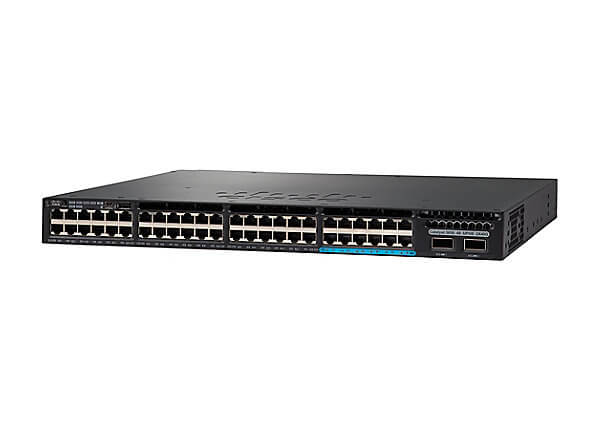
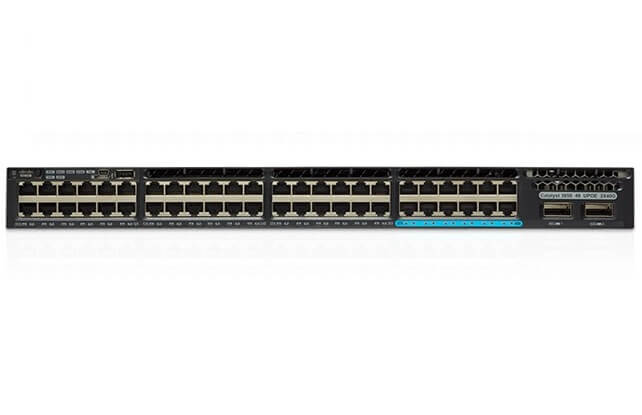
The WS-C3650-12X48UZ-E Cisco Catalyst 3650 is a Layer 3 manageable switch with 48 ports. It is designed for enterprise networks and is rack-mountable. Some of its key features and benefits include:
- StackWise-160 technology: This allows multiple switches to be stacked together and managed as a single entity, providing increased scalability and simplified management.
- Wireless controller capability: The switch can function as a wireless controller, allowing for centralized management of wireless access points and providing advanced wireless features such as location services and wireless intrusion prevention.
- Multigigabit Ethernet: The switch supports speeds of 2.5, 5, and 10 Gbps on some of its ports, providing increased bandwidth for high-speed network applications.
- Advanced security: The switch supports IEEE 802.1X for network access control and authentication, DHCP snooping and IP source guard for protecting against DHCP and IP spoofing attacks, and control plane protection (CoPP) for protecting the switch’s control plane from network-based attacks.
- Quality of Service (QoS): The switch supports advanced QoS features such as traffic shaping, congestion management, and hierarchical QoS, allowing for better control of network traffic.
- Energy efficient Ethernet (EEE): The switch supports EEE, which reduces power consumption during periods of low network activity.
- Easy deployment and management: The switch is easy to set up and manage, with a web interface and Cisco’s ProVision ASIC providing intelligent automation and application visibility.
Configuring and managing of Rack-mountable Switch
The WS-C3650-12X48UZ-E Cisco Catalyst 3650 switch is a 48-port managed rack-mountable switch that can be configured and managed using a web interface or the command-line interface (CLI).
To configure the switch, you will need to connect to it using a console or a Telnet/SSH client and log in with the appropriate credentials. Once logged in, you can use the CLI to configure various aspects of the switch, such as VLANs, ports, and security settings.
To manage the switch, you can use the web interface or the CLI to view and modify the switch’s configuration, monitor its performance, and troubleshoot any issues that may arise.
The following are the basic steps to configure the switch:
- Connect to the switch using a console or Telnet/SSH client.
- Log in with the appropriate credentials.
- Configure the switch’s basic settings, such as hostname, IP address, and password.
- Configure VLANs, ports, and other settings as needed.
- Save the configuration to non-volatile memory (NVRAM)
For security, the switch supports the following features:
- IEEE 802.1X authentication and access control
- DHCP snooping and IP source guard
- Dynamic ARP Inspection (DAI)
- Control plane protection
- Quality of service (QoS)
It also supports features such as Link Aggregation Control Protocol (LACP) and Spanning Tree Protocol (STP) for network resiliency and redundancy.
It is also recommended to enable SNMP and syslogging to monitor the switch’s activities and to keep the switch’s software and firmware up-to-date to ensure that any known security vulnerabilities are patched.
Energy Efficient of Ethernet Switch
The WS-C3650-12X48UZ-E Cisco 3650 switch is an energy-efficient switch that features a number of energy-saving technologies.
One of the key energy-saving features is Cisco EnergyWise, which is a technology that allows the switch to monitor and control energy consumption of connected devices. It can be used to schedule when devices are powered on or off, and to set power limits for devices.
The switch also supports Power over Ethernet Plus (PoE+), which allows it to power devices such as IP phones and wireless access points using the same Ethernet cables that carry data. This eliminates the need for separate power cables and can reduce energy consumption.
Additionally, the switch has a built-in feature called Energy Efficient Ethernet (EEE), which reduces power consumption during periods of low network utilization by placing the switch ports into a low-power idle state. This feature can help to conserve energy when the switch is not being heavily used.
The switch also supports Cisco StackPower technology, which allows multiple switches to share power supplies and to distribute power to other switches in the stack. This can help to reduce power consumption and improve energy efficiency.
Finally, the switch supports Cisco Universal Power over Ethernet (UPOE), which allows it to provide both data and power to devices over a single Ethernet cable, which can reduce the number of power cords and devices that need to be powered, ultimately reducing energy consumption.
General Information:
- Manufacturer Cisco Systems, Inc
- Manufacturer Part Number WS-C3650-12X48UZ-E
- Brand Name Cisco
- Product Line Catalyst
- Product Series 3650
- Product Model 3650-12X48UZ-E
- Product Name Catalyst 3650-12X48UZ-E Switch
- Product Type Ethernet Switch
Interfaces/Ports
- Total Number of Network Ports 48
- Uplink Port Yes
- Modular Yes
- Stack Port Yes
- Port/Expansion Slot Details 36 x Gigabit Ethernet Stack
- Port/Expansion Slot Details 12 x 10 Gigabit Ethernet Stack
- Port/Expansion Slot Details 2 x 10 Gigabit Ethernet Uplink
Performance:
- Media Type Supported Twisted Pair
- Media Type Supported Optical Fiber
- Ethernet Technology Gigabit Ethernet
- Ethernet Technology 10 Gigabit Ethernet
- Ethernet Technology 40 Gigabit Ethernet
- Network Technology 10GBase-T
- Network Technology 40GBase-X
- Network Technology 1000Base-T
I/O Expansions:
- Number of Total Expansion Slots 2
- Expansion Slot Type QSFP+
- Shared SFP Slot No
Network & Communication:
- Layer Supported 3
Management & Protocols
- Manageable Yes
Power Description:
- Power Source Power Supply
- Redundant Power Supply Supported Yes
Miscellaneous:
- Package Contents-
- Catalyst 3650-12X48UZ-E Switch
- 1100WAC Power Supply
- Environmentally Friendly Yes
- Environmental Certification RoHS