



Description
Product Overview
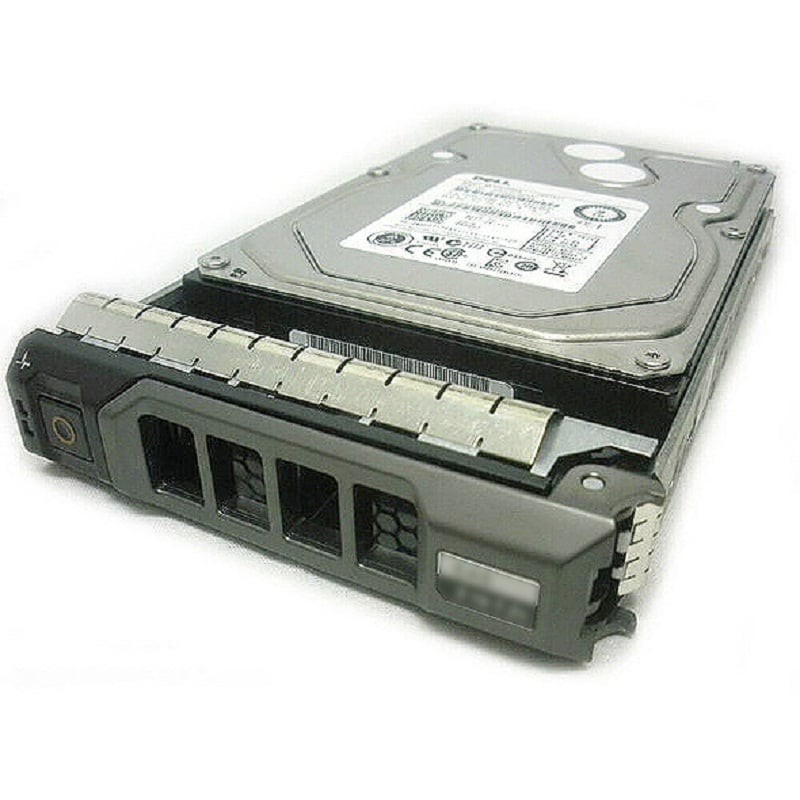
The 00RVDT Dell 300GB 15K RPM SAS-12GBPS 128MB 512n Hot Plug Hard Drive is a high-performance storage solution designed for use in enterprise-level servers and storage systems. It features a SAS interface and a 12 Gbps data transfer rate, as well as a 15K RPM rotation speed and a large 128MB cache for improved performance. The drive also has a hot-plug capability, allowing for easy installation and replacement without the need to shut down the system. It has a capacity of 300GB and 512n form factor. This drive is suitable for high-demand applications such as databases, virtualization, and business-critical workloads.
High Compatibility
The 00RVDT Dell 300GB 15K RPM SAS-12GBPS 128MB 512n Hot Plug Hard Drive is compatible with servers and storage systems that support SAS interfaces and have a 12 Gbps data transfer rate. It is also compatible with Dell PowerEdge servers and Dell PowerVault storage arrays. Additionally, it is compatible with the Dell PowerEdge R630, R730, R730xd, T630, and T430 servers.
It is important to note that the drive’s form factor and capacity must also be compatible with the system in which it is being installed. In this case, the drive has a 512n form factor and 300GB capacity, so the system should have the appropriate drive bays and space available to accommodate it.
It is recommended to check with the system’s documentation or with the manufacturer to confirm compatibility before purchasing or installing the drive.
Installation and setup
Installing and setting up the 00RVDT Dell 300GB 15K RPM SAS-12GBPS 128MB 512n Hot Plug Hard Drive is a straightforward process. Here are the general steps for installing the drive:
- Power off the server or storage system and unplug it from the power source.
- Open the system’s cover and locate the appropriate drive bay for the new hard drive.
- Carefully remove any existing hard drive from the bay and disconnect any cables or connectors.
- Carefully insert the new hard drive into the bay, making sure that it is properly seated and connected to the appropriate cables or connectors.
- Close the system’s cover and plug the system back into the power source.
- Power on the server or storage system and check that the new hard drive is properly recognized by the system’s BIOS or RAID controller.
- Configure the new hard drive as desired (e.g., initialize it and create partitions, add it to a RAID array, etc.)
It is important to handle the drive with care and to follow the manufacturer’s instructions. If you are not familiar with the process, it is recommended to seek assistance from a qualified technician or to contact the manufacturer for support.
General Information
- Manufacturer : Dell
- MPN : 00RVDT
- Capacity : 300GB
- SKU : 00RVDT
Key Features
- Device Type: Hard Drive – Hot Plug
- Interface : SAS- 12GBPS
- Buffer : 128 MB
- Spindle Speed: 15000 RPM
- Form Factor :2.5 Inch
- Feature : Advanced Format 512n
Expansion/connectivity
- Interfaces : 1 X Serial Attached SCSI (SAS-12GBPS)
- Compatible Bays : 1 X Hot Plug- 2.5inch
Compatibility
- Poweredge M520
- Poweredge M620
- Poweredge M820
- Poweredge M910
- Poweredge M915
- Poweredge R320
- Poweredge R420
- Poweredge R515
- Poweredge R520
- Poweredge R620
- Poweredge R630
- Poweredge R715
- Poweredge R720
- Poweredge R720xd
- Poweredge R730
- Poweredge R730xd
- Poweredge R815
- Poweredge R820
- Poweredge R910
- Poweredge R920
- Poweredge T420
- Poweredge T620
- Poweredge T630
- Poweredge T710
- Poweredge Vrtx
Contact us or ask for live chat/help if you have any questions about the compatibility of this item to ensure the model’s matching features with your current system.


