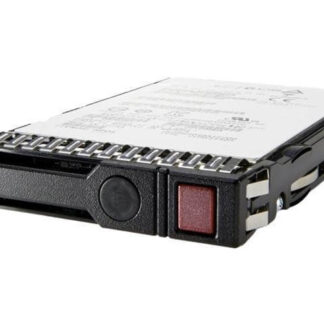
Description
Data Backup and Recovery Options
Dell 5CC1X 480GB SATA 6GBPS Mixed-Use Hot Swap SSD provides several options for data backup and recovery. Some of the most commonly used options include:
- Operating System Backup and Recovery: The operating system (OS) provides built-in backup and recovery options, such as Windows Backup and Restore, which can be used to backup important data and files.
- External Hard Drive Backup: This involves backing up data to an external hard drive, which can be connected to the system via USB. This method is simple and provides an offline backup of data, which can be restored in case of data loss.
- Cloud Backup: Cloud backup involves uploading data to a remote server or storage solution, such as Amazon S3, Microsoft OneDrive, or Google Drive. This method is convenient as it provides remote access to data and eliminates the need for manual backup.
- Tape Backup: This method involves using tapes to store data. Tape backup is useful for organizations with large amounts of data as tapes can store a large amount of data and are durable.
- Image Backup: Image backup involves creating a complete image of the system, including the operating system, applications, and data. This method can be useful in case of system failure or hard drive crashes, as the image can be restored to the system quickly.
It is important to regularly backup important data to ensure that it can be restored in case of data loss. A combination of these backup methods can provide a comprehensive data backup and recovery solution.
Endurance Management and Extended Life
The endurance of a Dell 5CC1X 480GB SATA 6GBPS Mixed-Use Hot Swap SSD is determined by the total amount of data that can be written to the drive over its lifespan. This is typically measured in terabytes written (TBW), which indicates the total amount of data that can be written to the drive before it may fail.
The TBW of the Dell 5CC1X 480GB SATA 6GBPS Mixed-Use Hot Swap SSD is likely to be high, since it is designed for mixed-use applications, which typically involve a combination of read and write operations.
To extend the life of the drive, it is important to follow best practices for SSD usage, such as:
- Avoiding frequent full-drive writes: Writing data to the entire drive on a regular basis can shorten the lifespan of the drive.
- Using TRIM command: The TRIM command helps the drive maintain its performance and extends its lifespan by allowing the drive to reclaim space that is no longer in use.
- Monitoring drive health: Regularly monitoring the health of the drive can help you identify potential issues and take steps to address them before they lead to a failure.
- Avoiding high temperatures: Excessive heat can shorten the lifespan of an SSD, so it is important to keep the drive cool, either by using a proper cooling solution or by avoiding exposure to high temperatures.
Troubleshooting and Maintenance
The Dell 5CC1X 480GB SATA 6GBPS Mixed-Use Hot Swap SSD is a high-performance solid-state drive that can be used in a variety of applications, including data centers, cloud computing environments, and other enterprise systems. Proper troubleshooting and maintenance of this drive is crucial to ensure its optimal performance and longevity.
Troubleshooting:
- Check the SATA cable and ensure that it is securely connected to the drive and the motherboard.
- Verify that the drive has been formatted and has a valid file system.
- Check the BIOS settings and make sure that the drive is recognized by the system.
- Try connecting the drive to a different SATA port on the motherboard.
- Check for any firmware updates for the drive and the system.
- If the drive is still not recognized, try connecting it to a different system to determine if it is a problem with the drive or the system.
Maintenance:
- Store the drive in a clean, dust-free environment.
- Handle the drive with care to avoid physical damage.
- Store the drive in a secure location when not in use.
- Avoid exposing the drive to extreme temperatures and humidity.
- Regularly back up the data on the drive to prevent data loss.
- Check the S.M.A.R.T. status of the drive regularly to ensure that it is functioning properly.
- Replace the drive if it begins to show signs of wear or if it fails any S.M.A.R.T. tests.
General Information
- Manufacturer: Dell
- Manufacturer Part Number: 5CC1X
- Type: Solid State Drive
- Sub-Type: SATA 6GBPS
Technical Information
- Storage Capacity : 480 Gb
- Interface Type : Sata-6gbps
- Features : Mixed-use Tlc
- Drive Transfer Rate : 600 Mbps (external)
- Form Factor : 2.5 Inch 7mm
- Lithography : 3d Nand Tlc
- Shock : 1000 G/0.5 Msec
- Mtbf : 2000000 Hours