Description
Product Introduction of the Dell JV6C8
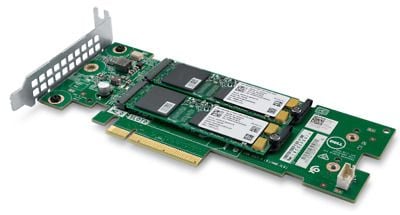
In the fast-paced world of computing, technological advancements are relentless, and one such innovation that has garnered attention is the JV6C8 Dell Ultra-Speed Drive Quad X16 PCIe to M.2 Adapter. This powerful component promises to revolutionize storage capabilities, providing users with enhanced speed, efficiency, and versatility. In this detailed guide, we will explore the ins and outs of the JV6C8 Dell Ultra-Speed Drive Quad X16 PCIe to M.2 Adapter, breaking down its features, applications, installation process, and potential benefits.
Understanding the Basics
The JV6C8 Dell Ultra-Speed Drive Quad X16 PCIe to M.2 Adapter is a hardware device designed to facilitate the connection between PCIe slots on a motherboard and M.2 storage devices. This adapter acts as a bridge, allowing users to harness the power of M.2 solid-state drives (SSDs) through the high-speed PCIe interface.
Key Features
- Quad X16 PCIe Slots: The adapter boasts four X16 PCIe slots, providing ample room for multiple M.2 storage devices. This feature enables users to maximize storage capacity and potentially enhance overall system performance.
- Compatibility: The JV6C8 Dell Ultra-Speed Drive Quad X16 PCIe to M.2 Adapter is engineered to be compatible with a wide range of M.2 SSDs, offering users flexibility in choosing the storage solution that best suits their needs.
- Ultra Speed Performance: Leveraging the PCIe interface, this adapter delivers ultra-fast data transfer speeds, reducing loading times and significantly improving system responsiveness.
- Dell Reliability: Manufactured by Dell, a renowned name in the technology industry, the JV6C8 adapter is built with reliability and durability in mind, ensuring a robust and stable storage solution.
Applications and Use CasesGaming Enthusiasts
For gaming enthusiasts, the JV6C8 Dell Ultra-Speed Drive Quad X16 PCIe to M.2 Adapter opens up a realm of possibilities. With the ability to connect multiple M.2 SSDs, gamers can experience faster load times, seamless gameplay, and reduced lag, providing a competitive edge in the gaming arena.
Content Creators
Content creators working with large files, such as high-resolution videos and complex graphics, will find the JV6C8 adapter invaluable. The increased storage capacity and rapid data transfer speeds allow for smoother editing workflows and quicker rendering times, ultimately boosting productivity.
Professional Users
Professionals dealing with data-intensive tasks, such as video editing, 3D rendering, and scientific simulations, can benefit from the JV6C8 Dell Ultra-Speed Drive Quad X16 PCIe to M.2 Adapter. The combination of PCIe speed and M.2 storage efficiency accelerates data processing, enabling professionals to meet tight deadlines and work more efficiently.
Installation GuideEnsure Compatibility
Before installation, verify that your motherboard supports the JV6C8 Dell Ultra-Speed Drive Quad X16 PCIe to the M.2 Adapter. Check the motherboard’s manual or the manufacturer’s website for information on compatible PCIe slots and any potential BIOS updates required for compatibility.
Power Off and Disconnect
Power off your computer and disconnect all cables. This step is crucial to ensure safety during the installation process. Open the computer case to access the PCIe slots on the motherboard.
Locate PCIe Slots
Identify the available X16 PCIe slots on your motherboard. The JV6C8 adapter typically requires a physical X16 slot to maximize its capabilities. If multiple X16 slots are available, choose the one that best suits your configuration.
Insert the Adapter
Carefully insert the JV6C8 Dell Ultra-Speed Drive Quad X16 PCIe into the M.2 Adapter into the chosen PCIe slot. Apply gentle, even pressure to secure the adapter in place. Ensure that the adapter is properly aligned with the slot.
Connect M.2 SSDs
Attach the M.2 SSDs to the adapter. The number of SSDs you can connect depends on the available slots on the adapter. Use the provided screws to secure the M.2 drives in place.
Secure the Adapter
Once the M.2 SSDs are attached, secure the JV6C8 adapter to the case using the appropriate screws. This step ensures that the adapter remains stable and does not shift during operation.
Reconnect Cables and Power On
Reconnect all cables to your computer and power it on. Ensure that the system recognizes the newly installed JV6C8 Dell Ultra-Speed Drive Quad X16 PCIe to the M.2 Adapter. If necessary, check the BIOS settings to confirm proper detection.
Potential BenefitsEnhanced Speed and Performance
The primary advantage of the JV6C8 adapter lies in its ability to unlock the full potential of M.2 SSDs through the PCIe interface. This results in significantly faster data transfer speeds, reduced latency, and improved overall system responsiveness.
Increased Storage Capacity
By accommodating multiple M.2 SSDs, the JV6C8 Dell Ultra-Speed Drive Quad X16 PCIe to M.2 Adapter provides users with expanded storage capacity. This is particularly beneficial for users dealing with large files, whether in the gaming, content creation, or professional computing realms.
Streamlined Workflows
Professionals and content creators will appreciate the streamlined workflows facilitated by the JV6C8 adapter. Tasks such as video editing, rendering, and data analysis become more efficient, allowing users to focus on their work rather than waiting for data to load or transfer.
Future-Proofing Your System
As technology continues to advance, the JV6C8 Dell Ultra-Speed Drive Quad X16 PCIe to M.2 Adapter represents a forward-looking investment. Its compatibility with a variety of M.2 SSDs and adherence to PCIe standards ensure that your system remains relevant and capable of handling future storage requirements.
General Information about the Dell JV6C8
- Manufacturer: Dell
- Model Number or SKU# JV6C8
- Product Type:
- Type: Controller
- Sub-Type: Storage Controller
In summary, the JV6C8 Dell Ultra-Speed Drive Quad X16 PCIe to M.2 Adapter emerges as a powerful solution for users seeking to optimize their storage capabilities. Whether you’re a gamer looking for faster load times, a content creator in need of increased storage and speed, or a professional handling data-intensive tasks, this adapter offers a versatile and reliable solution. With careful installation and a keen understanding of its features, users can unlock the full potential of their systems and stay ahead in the rapidly evolving landscape of technology.