


Description
Product Overview
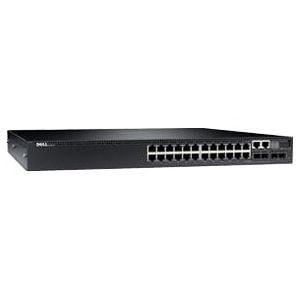
The KY73Y Dell N3024 is a managed L3 switch that comes with 24 Ethernet ports, two 10-gigabit SFP+ ports, and two combo 1000Base-T ports. It is designed to provide high-performance network connectivity and advanced features for small to medium-sized businesses and enterprise networks.
With the 24 Ethernet ports, the switch can support up to 24 devices on the network with reliable and fast connectivity. The two 10-gigabit SFP+ ports offer high-speed connectivity for data-intensive applications and can be used for uplink connections to other switches or servers.
The two combo 1000Base-T ports provide additional flexibility for connecting devices with either Ethernet or SFP interfaces, allowing for a wide range of devices to be easily integrated into the network.
The switch also features advanced Layer 3 routing capabilities, allowing for more efficient and effective routing of network traffic. It also supports VLANs, QoS, and other advanced features that can help optimize network performance and security.
Advantages
The KY73Y Dell N3024 Managed L3 Switch is a powerful networking device that offers a number of advantages, including:
- High Speed: The KY73Y Dell N3024 Managed L3 Switch features 24 Ethernet ports, two 10-gigabit SFP+ ports, and two combo 1000Base-T ports, allowing for fast data transfer speeds.
- Scalability: With its support for up to 4096 VLANs and 9000-byte jumbo frames, the KY73Y Dell N3024 Managed L3 Switch is highly scalable and can easily accommodate growing network demands.
- Security: The KY73Y Dell N3024 Managed L3 Switch provides advanced security features such as access control lists (ACLs), port security, and DHCP snooping, which help to protect against unauthorized access and potential network threats.
- Management: The KY73Y Dell N3024 Managed L3 Switch is designed for easy management with its web-based GUI, command line interface (CLI), and SNMP support.
- Reliability: The KY73Y Dell N3024 Managed L3 Switch is built to provide high levels of uptime and reliability, with features such as hot-swappable power supplies and fans, redundant power supply options, and advanced cable diagnostics.
- Flexibility: The KY73Y Dell N3024 Managed L3 Switch can be used in a variety of network environments, including data centers, server rooms, and small to medium-sized businesses.
Troubleshooting Common Issues
Here are some common issues you may encounter with the KY73Y Dell N3024 Managed L3 Switch and possible solutions:
- Switch does not power on: Check if the power cable is properly plugged in and the outlet is functioning. If the switch still does not power on, try using a different power cable or outlet. If the issue persists, contact Dell technical support.
- Switch does not recognize network devices: Check if the cables are properly connected to the switch and the devices. Also, ensure that the devices are configured with appropriate IP addresses and subnet masks. Verify if the switch ports are configured correctly and if the VLAN settings are correct.
- Slow network performance: Check if the switch is configured for the appropriate port speed and duplex settings. Ensure that the firmware is up to date, and the switch is not overloaded with traffic. If necessary, configure QoS to prioritize traffic.
- Switch is unreachable: Verify if the switch is properly connected to the network and if the network is functioning correctly. Check if the switch is accessible via the web interface or command-line interface. Also, check if the firewall is blocking access to the switch.
- SFP+ modules not working: Ensure that the SFP+ modules are inserted correctly and securely. Verify if the modules are compatible with the switch and if they are configured correctly. If necessary, update the firmware to support the SFP+ modules.
- Combo ports not working: Verify if the cable is properly connected to the switch and the device. Also, ensure that the device is configured correctly. If necessary, switch to the other type of port or try a different cable.
- VLAN configuration issues: Verify if the VLANs are properly configured on the switch and the devices. Check if the VLAN IDs are unique and if the ports are assigned to the correct VLANs. If necessary, use a network analyzer to troubleshoot VLAN issues.
General Information about the Dell KY73Y
- Manufacturer: Dell
- Part Number or SKU# KY73Y
- Device Type: Switch 24 Ports
Technical Information
- Enclosure Type : Rack-Mountable – 1u
- Ports : 24 X 10/100/1000 + 2 X 10 Gigabit Sfp+ + 2 X Combo 1000base-T
Performance
- Switching Fabric Bandwidth : 212 GBPS Forwarding Performance : 158 MBPS Stacking Bandwidth : 84 GBPS
- Capacity : Mac Addresses : 16384 Ipv4 Routes (Static) : 1024 Ipv6 Routes (Static) : 1024 Ipv4 Routes (Dynamic) : 8160 Ipv6 Routes (Dynamic) : 4096 Maximum Member Ports Per Lag : 8 Maximum Dynamic Ports Per Switch Stack : 144 Lag Groups : 128 Ospf Routes : 8160 Rip Routes : 512 Ecmp Next Hops Per Route : 4 Ecmp Groups : 64 Vlan Routing Interfaces : 128 Vlans Supported : 4094 Multicast Entries (Ipv4) : 512 Multicast Entries (Ipv6) : 256 Arp Entries : 6144 Ndp Entries : 400 Acl : 100 Maximum Rules Per Acl : 1023 Max Acl Rules System-Wide : 4096 Maximum Acl Rules Per Interface (Ipv4) Egress Rules : 1024 Maximum Acl Rules Per Interface (Ipv4) Ingress Rules : 3072 Maximum Acl Rules Per Interface (Ipv6) Egress Rules : 512 Maximum Acl Rules Per Interface (Ipv6) Ingress Rules : 1021 Maximum Vlan Interfaces With Acls Applied : 24
- Mac Address Table Size : 16k Entries
Management and Protocol
- Routing Protocol : Ospf, Rip-1, Rip-2, Igmpv2, Igmp, Vrrp, Pim-Sm, Pim-Dm, Igmpv3, Ospfv3, Mldv2, Mld
- Remote Management Protocol : Snmp 2, Snmp, Rmon, Http, Ssh
- Encryption Algorithm : Md5, Aes, Ssl, Tls
- Authentication Method : Secure Shell (Ssh), Radius, Tacacs+
Features
- Flow Control, Layer 3 Switching, Layer 2 Switching, Mdi/Mdi-X Switch, Auto-Negotiation, Port Mirroring, Stackable, Weighted Round Robin (Wrr) Queuing, Broadcast Storm Control, Rapid Spanning Tree Protocol (Rstp) Support, Multiple Spanning Tree Protocol (Mstp) Support, Quality Of Service (Qos), Port Forwarding, Lldp Support, Link Aggregation Control Protocol (Lacp), Per-Vlan Rapid Spanning Tree (Pvrst), Energy Efficient Ethernet, Dynamic Vlan Support (Gvrp), Dual Firmware Images, Network Access Control (Nac), Tagged Vlan, Generic Vlan Registration Protocol (Gvrp), Redundant Fans, Protocol-Based Vlans Support
- Compliant Standards : IEEE 802.2, IEEE 802.3, IEEE 802.3u, IEEE 802.3z, IEEE 802.1d, IEEE 802.1q, IEEE 802.3ab, IEEE 802.1p, IEEE 802.3x, IEEE 802.3ad (Lacp), IEEE 802.1w, IEEE 802.1x, IEEE 802.3ae, IEEE 802.3ac, IEEE 802.1s, IEEE 802.1v, IEEE 802.1ag, IEEE 802.1ab (Lldp), IEEE 802.3az
- Ram : 1 Gb
- Flash Memory : 256 Mb
Expansion / Connectivity
- Interfaces :
- 24 X Gigabit Lan – Rj-45
- 2 X 10gbit Lan – Sfp+
- 2 X Gigabit Lan – Rj-45
- 1 X Serial (Rs-232) – Rj-45 – Management
- 1 X Usb – Type A 2 X Network Stack Device
Expansion Slots
- 1 (Total) / 1 (Free) X Expansion Slot
Power
- Power Device : Internal Power Supply – Hot-Plug
- Installed Qty : 1 (Installed) / 2 (Max)
- Power Redundancy : Optional
- Power Provided : 200 Watt
- Power Consumption Operational : 52.8 Watt


