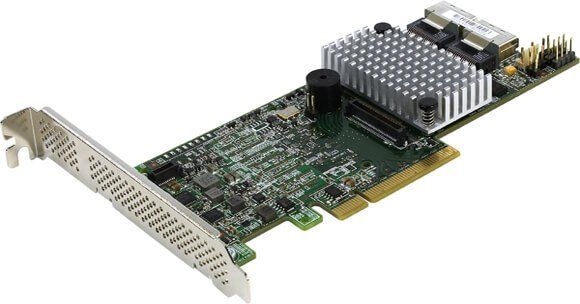
Description
Product overview of WPXP6 Dell Lsi Sas9202-16e 6GB
The WPXP6 Dell Lsi Sas9202-16e 6GB S PCI-E 2.0 X16 Host Bus Adapter is a hardware component used in computer systems. It is a type of peripheral device that connects to the PCI Express (PCI-E) slot on a motherboard to provide additional functionality to the system. In this article, we will explore the features and capabilities of the WPXP6 Dell Lsi Sas9202-16e Host Bus Adapter.
A Host Bus Adapter
A Host Bus Adapter (HBA) is a device that connects a computer system to a Storage Area Network (SAN). It is responsible for handling data transfer between the system and the SAN. An HBA acts as an intermediary between the system and the SAN, allowing the system to access data stored on the SAN.
Features of the WPXP6 Dell Lsi Sas9202-16e Host Bus Adapter
The WPXP6 Dell Lsi Sas9202-16e Host Bus Adapter is designed to provide high-speed connectivity between a computer system and a SAN. It comes with the following features:
PCI Express (PCI-E) 2.0 X16 Interface
The WPXP6 Dell Lsi Sas9202-16e Host Bus Adapter uses the PCI-E 2.0 X16 interface to connect to the computer system. The PCI-E 2.0 X16 interface provides a high-speed data transfer rate of up to 8 GB/s. This allows the host bus adapter to transfer data to and from the SAN quickly.
SAS 2.0 Interface
The WPXP6 Dell Lsi Sas9202-16e Host Bus Adapter supports the SAS 2.0 interface. SAS 2.0 is a high-speed serial interface used to connect storage devices to a computer system. It provides a data transfer rate of up to 6 GB/s, making it suitable for high-performance storage devices.
16 External Ports
The WPXP6 Dell Lsi Sas9202-16e Host Bus Adapter comes with 16 external ports, allowing it to connect to multiple storage devices simultaneously. This makes it ideal for use in large data center environments where multiple storage devices are used.
PCI-E Low Profile Form Factor
The WPXP6 Dell Lsi Sas9202-16e Host Bus Adapter comes in a low profile form factor, making it suitable for use in slimline desktop and server systems. The low profile form factor allows the host bus adapter to fit into systems with limited space.
Supports Multiple Operating Systems
The WPXP6 Dell Lsi Sas9202-16e Host Bus Adapter is compatible with multiple operating systems, including Windows, Linux, and VMware. This makes it suitable for use in a wide range of environments.
Benefits of the WPXP6 Dell Lsi Sas9202-16e Host Bus Adapter
The WPXP6 Dell Lsi Sas9202-16e Host Bus Adapter offers several benefits to computer systems, including:
Improved Performance
The WPXP6 Dell Lsi Sas9202-16e Host Bus Adapter provides high-speed connectivity between a computer system and a SAN. This allows the system to access data stored on the SAN quickly, improving overall system performance.
Scalability
The WPXP6 Dell Lsi Sas9202-16e Host Bus Adapter comes with 16 external ports, allowing it to connect to multiple storage devices simultaneously. This makes it easy to scale the storage capacity of a system by simply adding more storage devices.
Compatibility
The WPXP6 Dell Lsi Sas9202-16e Host Bus Adapter is compatible with multiple operating systems, making it suitable for use in a wide range of environments. This ensures that the host bus adapter can be used with existing systems without requiring any additional changes.
General Information about the Dell WPXP6
- Brand Name : Dell
- MPN : WPXP6
- Sub-Type : Host Bus Adapter
- Type : Controller
Technical Information
- Data Transfer Rates: 16 Ports, 6GB/S SAS 2.0 Compliant
- SAS Bandwidth : Half Duplex 600 MB/S Per Lane
- Port Configurations : 16 Ea X1 Ports (Individual Drives)
- 4 Ea X4 Wide Ports
- 2 Ea X8 Wide Ports
- Host Bus : X16 Lane PCI Express 2.0 Compliant
- Physical Dimensions : Low Profile (2.7 X 6.6)
- Connectors : Four Hd Mini-SAS External Connectors (Sff8644)
- PCI Card Type : 3.3 V Add-In Card
- Device Support : 1024 Non-Raid SAS/SATA Devices
- Os Support : Microsoft Windows Linux (Suse Red Hat) Solaris Vmware
Contact us or ask for live chat/help if you have any questions about the compatibility of this item to ensure the model’s matching features with your current system.