

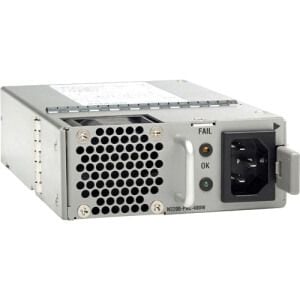
Description
Compatibility with Cisco Equipment
The EDPS-400BB B Cisco 350 Watt DC Port-Side Intake Airflow Power Supply is compatible with a variety of Cisco equipment, including the Cisco 4451-X, Cisco 4331, Cisco 4321, Cisco 4221, and Cisco 4221 ISR G2 routers. It is also compatible with the Cisco ASR 1000 Series Aggregation Services Routers and the Cisco Nexus 9372PX and 9372TX switches.
This power supply is designed to provide a reliable and consistent power source for your Cisco equipment, ensuring that your network runs smoothly and efficiently. It is also designed to be easy to install, with a simple plug-and-play setup that allows you to quickly and easily replace any existing power supply.
In terms of airflow, the EDPS-400BB B Cisco 350 Watt DC Port-Side Intake Airflow Power Supply is designed for port-side intake airflow, which helps to ensure that the power supply stays cool and operates at optimal temperatures. This helps to extend the life of the power supply and reduce the risk of failure or downtime.
Installation and Setup Instructions
The EDPS-400BB B Cisco 350 Watt DC Port-Side Intake Airflow Power Supply is a high-performance power supply designed for use in Cisco switches and routers. It is capable of providing up to 350 watts of power and features a port-side intake airflow design for improved cooling.
Installation and setup instructions for the EDPS-400BB B Cisco 350 Watt DC Port-Side Intake Airflow Power Supply are as follows:
- Unpack the power supply from its packaging and ensure that all components are included.
- Connect the power supply to the switch or router by aligning the connectors and pushing them together firmly.
- Connect the power cord to the power supply and plug it into an electrical outlet.
- Turn on the switch or router to ensure that the power supply is providing power to the device.
- Check the power supply status indicator to ensure that it is lit, indicating that the power supply is functioning properly.
- If the power supply status indicator is not lit, check the power cord and electrical outlet to ensure that they are functioning properly.
- If the power supply status indicator is still not lit, contact Cisco technical support for assistance.
It is important to note that the power supply should be installed in a location that is well-ventilated and free from dust and other debris to ensure proper cooling and operation. Additionally, it should be installed in a location that is free from vibration and shock to prevent damage to the power supply.
Available Accessories and Sdditional Components
- Power cord: A compatible power cord is required to connect the power supply to an electrical outlet.
- Rack mount kit: Allows for the installation of the power supply in a standard 19-inch rack.
- Redundant power supply kit: Allows for the installation of a second power supply for redundancy in case of failure.
- Air filter: A replacement air filter for the power supply’s intake fan.
- Cable management arm: Helps to organize and secure cables connected to the power supply.
- Battery backup module: Provides backup power to the system in case of a power outage.
- Temperature sensor: Monitors the temperature inside the power supply and alerts the user if it exceeds a certain threshold.
- Remote power management card: Allows for remote monitoring and control of the power supply through a network connection.
- Power distribution unit (PDU): Allows for the distribution of power to multiple devices in a rack.
- Power monitoring software: Allows for the monitoring of power usage and alerts the user if the power supply is approaching capacity.
General Information
- Manufacturer Cisco Systems, Inc
- Manufacturer Part Number : EDPS-400BB B
- Brand Name : Cisco
- Type : Networking
- Sub-Type: Switching Power Supply
Features
- Cisco 350 Watt DC Port-Side Intake Airflow Power Supply For Nexus 2200


