


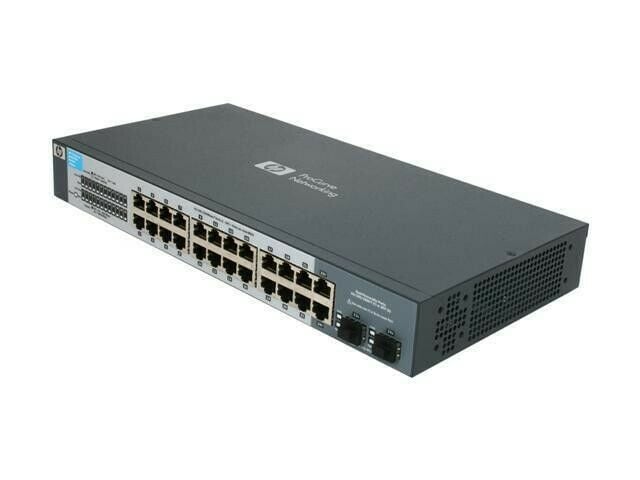


Description
Network Management Options
The HP ProCurve 1410-24G switch offers several options for network management:
- Command Line Interface (CLI): The switch can be managed through a command line interface using a console connection or a Telnet/SSH connection.
- Web Interface: The switch can be managed through a web browser using its IP address. This allows for a graphical interface for configuring and monitoring the switch.
- SNMP: The switch supports Simple Network Management Protocol (SNMP), which allows for remote monitoring and management of the switch.
- ProCurve Manager (PCM): The ProCurve Manager is a centralized management software that allows administrators to manage multiple switches from a single location.
- HP Intelligent Management Center (IMC): The HP IMC is a comprehensive network management software that provides end-to-end network visibility, performance analysis, and fault management.
It’s important to choose the network management option that best fits your organization’s needs and budget, taking into consideration the size of the network, the number of switches, and the level of management required.
Link Aggregation and Trunking
Link Aggregation (also known as Link Bonding) and Trunking are technologies used to combine multiple physical network connections into a single logical connection. This provides increased bandwidth and redundancy, and can improve network performance and reliability.
- Link Aggregation: Link Aggregation is a method of bundling multiple physical links into a single logical link, providing increased bandwidth and redundancy. The HP ProCurve 1410-24G switch supports Link Aggregation Control Protocol (LACP) which is used to bundle multiple physical links into a single logical link.
- Trunking: Trunking is a method of allowing multiple VLANs to share a single physical link. This can be useful in reducing the number of cables and switch ports needed, and in providing a single point of failure for multiple VLANs. The HP ProCurve 1410-24G switch supports 802.1Q VLAN trunking, allowing multiple VLANs to be transmitted over a single physical link.
By using Link Aggregation and Trunking, administrators can improve network performance, increase bandwidth, and enhance network reliability. These technologies are particularly useful in large and complex networks, where multiple links are needed to handle the network traffic.
Firmware Upgrade Process
The firmware upgrade process for the HP ProCurve 1410-24G switch involves the following steps:
- Obtain the latest firmware version from HP’s website or through the device’s network management interface.
- Save a backup copy of the current switch configuration.
- Connect to the switch using a console cable or through the network management interface.
- Initiate the firmware upgrade process through the command-line interface (CLI) or through the network management interface.
- Upload the firmware file to the switch.
- Wait for the firmware upgrade process to complete, which can take several minutes.
- Verify the new firmware version and check if all the features are working as expected.
- Restore the previous configuration if needed.
It’s important to note that interrupting the firmware upgrade process can cause the switch to become inoperable. Therefore, it’s recommended to perform the upgrade during a maintenance window or when there is no critical traffic flowing through the switch.
General Information
- Manufacturer: HP
- Model Number or SKU# J9561-61001
- Type: Networking
- Sub-Type: Switch 24 Ports
- Device Type : Switch
- Enclosure Type : External – 1u
Networking
- Ports Qty : 24 X Ethernet 10base-T, Ethernet 100base-Tx, Ethernet 1000base-T
- Data Transfer Rate : 1 Gbps
- Data Link Protocol : Ethernet, Fast Ethernet, Gigabit Ethernet
- Communication Mode : Half-Duplex, Full-Duplex
- Mac Address Table Size : 8k Entries
- Status Indicators : Link Activity, Port Transmission Speed, Port Duplex Mode, Status
- Features : Flow Control, Auto-Negotiation, Auto-Uplink (Auto Mdi/Mdi-X), Quality Of Service (Qos)
- Compliant Standards : Ieee 802.3, Ieee 802.3u, Ieee 802.3ab, Ieee 802.1p, Ieee 802.3x
Expansion / Connectivity
- Expansion Slots Total (Free) : 2 ( 0 ) X Sfp (Mini-Gbic)
- Interfaces : 24 X Network – Ethernet 10base-T/100base-Tx/1000base-T – Rj-45
Power
- Power Device : Power Adapter
- Voltage Required : Ac 120/230 V ( 50/60 Hz )
- Power Consumption Operational : 24 Watt


