


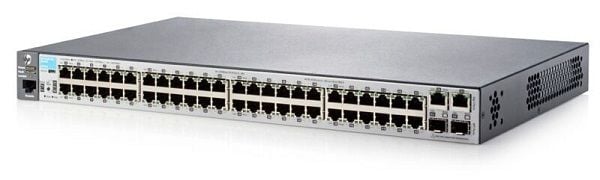
Description
Power and Cooling
J9781A HPE 2530-48 Ethernet Switch is a device that helps connect multiple devices on a network to facilitate communication between them. It provides power and cooling to the devices connected to it.
The power and cooling mechanism in the switch is designed to ensure the smooth functioning of the switch and the connected devices. It provides a stable power supply that is essential for the efficient functioning of the switch and connected devices. It also helps regulate the temperature inside the switch and prevent overheating, which can cause damage to the switch or connected devices.
In addition, the switch has a fan system that helps regulate the temperature inside the switch. This helps to prevent overheating and ensure that the switch continues to function optimally. The power and cooling mechanism in the switch is also designed to provide redundancy, ensuring that the switch continues to function even if one of the components fails.
In conclusion, the J9781A HPE 2530-48 Ethernet Switch provides essential power and cooling to the connected devices, ensuring their smooth and efficient functioning. The power and cooling mechanism is designed to provide redundancy and prevent overheating, ensuring the longevity and reliability of the switch.
Switch Configuration
The J9781A HPE – 2530-48 Ethernet Switch is a switch that provides high-performance connectivity, security, and reliability for enterprise networks. It has 48 Ethernet ports, two SFP ports for fiber connectivity, and supports Power over Ethernet (PoE) for powering IP devices.
The switch configuration process involves setting up the switch to match the network requirements and preferences. The following steps outline the basic steps for configuring the switch:
- Connect the switch to the network: Connect the switch to the network using a console cable and configure the switch with an IP address, subnet mask, and default gateway.
- Configure VLANs: Create VLANs to segment the network into separate broadcast domains, assign ports to VLANs, and configure VLAN tagging.
- Configure Spanning Tree Protocol (STP): Enable STP on the switch to prevent loops in the network and to ensure that there is only one active path between two devices.
- Configure Link Aggregation Control Protocol (LACP): Configure link aggregation to increase network bandwidth and to provide redundancy.
- Configure Quality of Service (QoS): Configure QoS to prioritize network traffic based on specific criteria such as IP address, port number, or DSCP values.
- Configure security: Enable access control lists (ACLs) to control traffic flow and restrict access to specific parts of the network.
- Save the configuration: Save the configuration changes to the switch’s flash memory to ensure that the changes persist after a reboot.
These are the basic steps for configuring the J9781A HPE – 2530-48 Ethernet Switch. More advanced configuration options, such as routing, may also be available depending on the network requirements.
Security Features
The J9781A HPE – 2530-48 Ethernet Switch is a high-performance network switch that provides a variety of security features to ensure the security and protection of your network. Some of the security features of this switch include:
- Access Control Lists (ACLs): This feature allows you to set rules for incoming and outgoing network traffic, based on source and destination IP addresses, ports, and protocols. This helps you to control who has access to your network and what they can do on it.
- VLANs: The switch supports Virtual Local Area Networks (VLANs), which allow you to segment your network into multiple virtual networks, each with its own security rules. This helps you to isolate sensitive data and control access to it.
- Port Security: This feature allows you to limit the number of MAC addresses that can be associated with a specific port on the switch. This helps to prevent unauthorized devices from accessing your network.
- RADIUS Authentication: This feature enables you to use a RADIUS server to authenticate users who want to access the switch. This ensures that only authorized users can access your network, and it helps you to manage user accounts and passwords more easily.
- SSL Encryption: This feature provides secure, encrypted communication between the switch and remote management tools. This helps to protect sensitive information from eavesdropping and tampering.
- 802.1X Port-Based Authentication: This feature allows you to authenticate users and devices before they are allowed to access the network. This helps to prevent unauthorized access and protects your network against security threats.
In conclusion, the J9781A HPE – 2530-48 Ethernet Switch provides a comprehensive set of security features that help you to protect your network and ensure that only authorized users and devices have access to it.
Detail Description
- Manufacturer: HP
- Part Number or SKU# J9781A
- Type : Networking
- Switch -Type : Switch 48 Ports
- Product Series : 2530
- Product Model : 2530-48
Interfaces/Ports
- Total Number of Network Ports : 48
- Uplink Port : Yes
- Management Port : Yes
- Number of Network (RJ-45) Ports : 48
- Port/Expansion Slot Details : 48 x Fast Ethernet Network
- Port/Expansion Slot Details : 2 x Gigabit Ethernet Uplink
- Port/Expansion Slot Details : 2 x Gigabit Ethernet Expansion Slot
Media & Performance
- Media Type Supported : Twisted Pair
- Ethernet Technology : Gigabit Ethernet
- Ethernet Technology : Fast Ethernet
- Network Technology : 10/100/1000Base-T
- Network Technology : 10/100Base-TX
I/O Expansions
- Number of Total Expansion Slots : 2
- Expansion Slot Type : SFP
- Number of SFP Slots : 2
- Network & Communication:
- Layer Supported : 2
Dimension and Weight
- Height: 1.75inch
- Width: 17.4inch
- Depth: 9.7inch
- Weight: 7 Lbs


