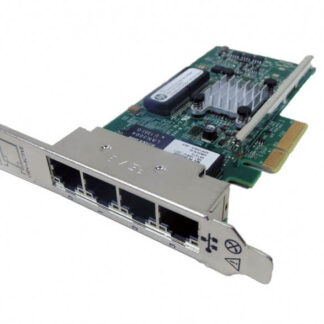
Description
Installation and Setup
Installation and setup refer to the process of physically installing the HPE Ethernet 1GB 4-Port 331t Adapter Network Adapter into a server or computer and configuring it to work properly with the operating system and network environment. Here are the steps involved in installation and setup:
- Verify system compatibility: Before installing the HPE Ethernet 1GB 4-Port 331t Adapter Network Adapter, ensure that your system meets the minimum requirements for compatibility. Refer to the adapter’s user guide or manufacturer’s website for system requirements.
- Shut down the system: Shut down the server or computer and unplug it from the power source.
- Install the adapter: Locate the expansion slot on the motherboard and remove the slot cover. Insert the adapter into the slot and secure it with screws if necessary.
- Connect the cables: Connect the Ethernet cables to the adapter’s ports and to the network switch or router.
- Power on the system: Plug in the system and turn it on.
- Install drivers: Install the drivers for the adapter. The drivers can be downloaded from the manufacturer’s website or provided on a CD that comes with the adapter.
- Configure network settings: After the drivers are installed, configure the network settings on the server or computer. This includes assigning IP addresses and configuring other network settings, such as DNS and gateway settings.
- Test the adapter: Test the adapter to ensure that it is working properly. This can be done by running network tests, such as pinging other devices on the network.
Proper installation and setup of the HPE Ethernet 1GB 4-Port 331t Adapter Network Adapter is critical to ensuring that it works as intended and provides reliable network connectivity. If you encounter any issues during the installation or setup process, consult the adapter’s user guide or contact the manufacturer’s technical support team for assistance.
Configuration and Management
Configuration and management refer to the process of setting up and adjusting the settings of the HPE Ethernet 1GB 4-Port 331t Adapter Network Adapter to optimize its performance and ensure its proper functioning. Here are some key aspects of configuration and management:
- Configuration of adapter settings: The adapter settings can be configured using the provided management tools, which allow you to adjust settings such as the speed and duplex mode, jumbo frame support, and VLAN settings.
- Advanced configuration settings: Advanced settings such as flow control, interrupt moderation, and TCP offload can be adjusted to optimize performance in specific network environments.
- Firmware updates: Firmware updates can be installed to improve adapter performance and address any issues or vulnerabilities.
- Network management tools: Network management tools such as SNMP (Simple Network Management Protocol) and CLI (Command Line Interface) can be used to monitor and manage the adapter’s performance and settings.
- Power management: Power management settings can be adjusted to optimize power usage, such as enabling power-saving modes when the adapter is not in use.
- Troubleshooting: The management tools can be used for troubleshooting purposes, such as diagnosing connection issues or identifying performance bottlenecks.
Proper configuration and management of the HPE Ethernet 1GB 4-Port 331t Adapter Network Adapter is critical to optimizing its performance and ensuring its reliability in your network environment. It is important to refer to the user guide or manufacturer’s website for guidance on specific settings and management tools to use with this adapter. If you encounter any issues with configuration or management, consult the manufacturer’s technical support team for assistance.
Performance and Reliability
Performance and reliability are critical aspects of any network adapter, including the HPE Ethernet 1GB 4-Port 331t Adapter Network Adapter. Here are some key factors that impact the performance and reliability of this adapter:
- Bandwidth: The adapter supports up to 4 Gb/s total bandwidth, which can be split between the four ports. This high bandwidth allows for high-speed data transfer and reduces network latency, improving overall network performance.
- Low latency: The adapter’s low latency design ensures that data can be transmitted quickly and efficiently, which is critical for real-time applications such as video streaming, online gaming, and VoIP.
- Jumbo frames support: The adapter supports jumbo frames up to 9 KB, which can improve network performance in certain situations where large amounts of data are being transferred.
- Reliability: The adapter is built with high-quality components that are designed to last and provide reliable network connectivity. It also includes advanced features such as teaming and failover capabilities, which ensure that the adapter remains functional even in the event of a hardware or software failure.
- Compatibility: The adapter is designed to work with a wide range of servers and operating systems, which ensures that it can be used in a variety of network environments. It is also interoperable with other networking hardware and software, which makes it easier to integrate into existing network infrastructures.
- Energy efficiency: The adapter is designed to be energy efficient, which helps reduce power consumption and operating costs. It supports power-saving features such as wake-on-LAN and adaptive power management, which help conserve energy when the adapter is not in use.
- Diagnostics and monitoring: The adapter includes advanced diagnostic and monitoring tools, which allow administrators to monitor the adapter’s performance and identify issues before they become serious problems. This helps ensure that the adapter remains reliable and functional over time.
Properly configuring and managing the HPE Ethernet 1GB 4-Port 331t Adapter Network Adapter is critical to ensuring its performance and reliability. If you encounter any issues with the adapter’s performance or reliability, consult the user guide or contact the manufacturer’s technical support team for assistance.
Detail Description
- Manufacturer Name: HPE
- MPN: 647592-001
- Type: Networking
- Sub-Type: Network Adapter 4 Ports
- SKU: 647592-001
- Form Factor : Plug-In Card – Low Profile
- Interface (Bus) Type : Pci Express 2.0 X4
- Pci Specification Revision : Pcie 2.0
- Processor : 1 X Bcm5719 – Broadcom
Networking
- Connectivity Technology : Wired
- Cabling Type : Ethernet 10Base-T, Ethernet 100Base-Tx, Ethernet 1000Base-T
- Data Link Protocol : Ethernet, Fast Ethernet, Gigabit Ethernet
- Data Transfer Rate : 1 GBPS
Processor / Memory
- Processor: 1 x BCM5719 – Broadcom
- RAM: 276 MB
Software / System Requirements
- OS Required: SuSE Linux Enterprise Server 11, Microsoft Windows Server 2008 R2, Microsoft Windows Storage Server 2008 Embedded, SuSE Linux Enterprise Server 10, Microsoft Windows Server 2008 Enterprise, Microsoft Windows Server 2008 Standard, Microsoft Windows Web Server 2008, Microsoft Windows Server 2008 Enterprise x64 Edition, Microsoft Windows Server 2008 Standard x64 Edition, Microsoft Windows HPC Server 2008, Microsoft Windows Server 2008 (32/64-bits), Microsoft Windows Small Business Server 2011 Essentials, Oracle Solaris 10, Microsoft Windows Small Business Server 2011, Red Hat Enterprise Linux 6.1, Red Hat Enterprise Linux 5.7
Miscellaneous
- Compliant Standards: FCC Class B certified, UL, EN 61000-3-2, EN 61000-3-3, EN55024, EN55022 Class B, FCC Part 15, RoHS, ICES, VCCI V-3 Class B ITE
Dimensions
- Depth: 4.6 inch
- Height: 3 inch
Environmental Parameters
- Min Operating Temperature: 32 °F
- Max Operating Temperature: 131 °F
- Humidity Range Operating: 10 – 90% (non-condensing)
Expansion / Connectivity
- Interfaces: 4 x 1000Base-T – RJ-45
Compatibility Information
- HPE ProLiant DL360p Gen8, DL360p Gen8 Base, DL360p Gen8 CMS, DL360p Gen8 Entry, DL360p Gen8 High Performance, DL360p Gen8 Performance