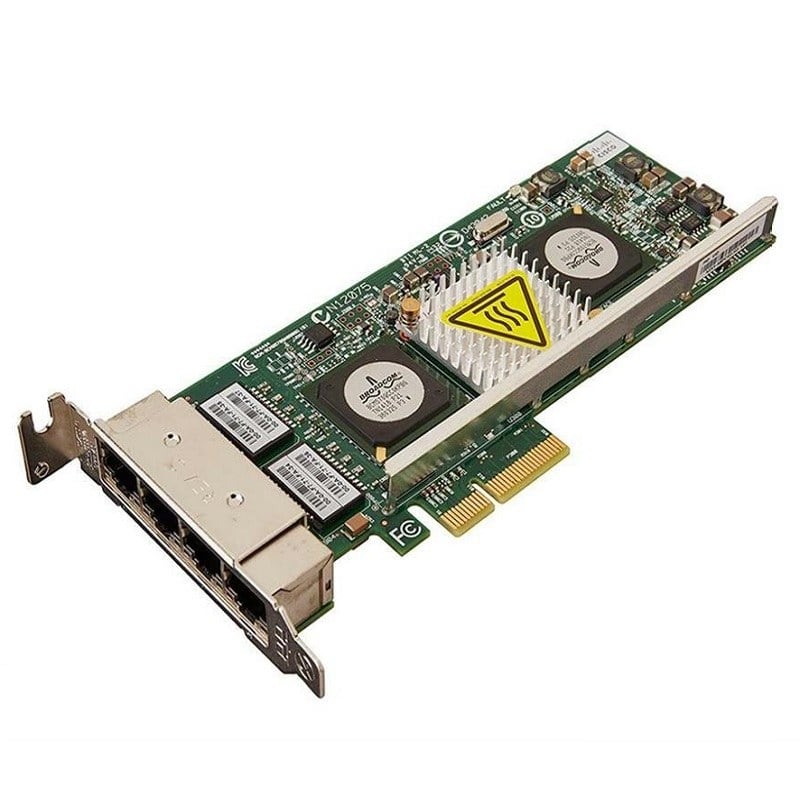
Description
Security Feature Considerations
Security is a critical consideration when selecting a network adapter for use in a business or enterprise environment. Network adapters can have various security features that help protect against cyber threats and ensure the privacy and integrity of network data.
Some important security features to consider when selecting a network adapter include:
- Firewall capabilities – Network adapters with built-in firewall capabilities can help prevent unauthorized access to the network by filtering incoming and outgoing traffic based on pre-defined rules.
- Intrusion prevention – Some network adapters have intrusion prevention capabilities that detect and block known and unknown threats, such as malware or denial-of-service attacks.
- Encryption – Encryption is a technique that encodes data to prevent unauthorized access. Some network adapters may support encryption protocols, such as Secure Sockets Layer (SSL) or Transport Layer Security (TLS), to help secure network communications.
- Access control – Access control features help to ensure that only authorized users have access to the network and its resources. Some network adapters support features like MAC address filtering, user authentication, or access control lists.
- Remote management – Network adapters with remote management capabilities allow network administrators to configure, monitor, and manage the adapter from a remote location. This can help streamline network management and improve security by enabling quick response to security events.
It’s important to note that security features may vary depending on the specific network adapter model and manufacturer. It’s important to carefully evaluate the security features of a network adapter to ensure that it provides the necessary level of security for the intended use case. Additionally, other security measures, such as firewalls and antivirus software, should be in place to provide comprehensive security for the network.
Network Architecture Design
Network architecture design refers to the process of planning and designing the layout, components, and features of a computer network to meet specific performance, security, and reliability requirements. This involves creating a network diagram, selecting appropriate hardware and software components, and defining network protocols and configurations to establish a functional and efficient network.
The design of a network architecture can vary depending on the specific needs and goals of the organization. Some key considerations that may impact the design include the size of the network, the number of users and devices, the types of applications and services that will be used, and the level of security required.
Some key components of a network architecture design may include:
- Physical topology – The physical topology describes the layout of the physical components of the network, including the cabling, switches, routers, and other hardware.
- Logical topology – The logical topology refers to the flow of data through the network and the communication protocols used to manage this flow.
- Network protocols – Network protocols define the rules for how data is transmitted, received, and processed within the network.
- Network security – The design should include appropriate security measures to protect the network from unauthorized access, data breaches, and other security threats.
- Scalability – The design should be flexible and scalable to accommodate growth and changing needs over time.
- Redundancy and failover – The design should include redundancy and failover mechanisms to ensure high availability and minimize downtime.
- Quality of Service (QoS) – The design should include QoS mechanisms to prioritize certain types of traffic and ensure a consistent level of performance for critical applications.
Performance and Testing Results
The performance and testing results of a network adapter can provide important information about its capabilities and suitability for a particular use case. Performance testing typically involves measuring the data transfer rates and latency of the adapter under different conditions, such as different network traffic loads or different types of network traffic.
When evaluating the performance and testing results of a network adapter, some important factors to consider include:
- Bandwidth and throughput – The maximum bandwidth and throughput of the adapter determine the maximum amount of data that can be transferred over the network. Higher bandwidth and throughput are generally better, especially for high-performance applications that require large data transfers.
- Latency – Latency is the amount of time it takes for a packet of data to be sent from one device to another. Low latency is important for applications that require real-time communication, such as video conferencing or online gaming.
- Jitter – Jitter is the variation in packet delay times. High jitter can cause packet loss and impact the quality of network transmissions, particularly for real-time applications.
- Compatibility – The network adapter should be compatible with the network equipment and software used in the environment. Compatibility issues can cause performance issues or prevent the adapter from working correctly.
- Reliability – The reliability of the network adapter is critical to ensure that the network is available when needed. The adapter should be able to handle high loads without failure or errors.
Performance testing results are typically published by the manufacturer or independent third-party testing organizations. When evaluating performance testing results, it’s important to look for results that reflect real-world conditions that are similar to the intended use case. For example, testing results for a network adapter used in a high-traffic data center may not be relevant for a network adapter used in a small business environment.
Specifications
- Manufacturer: HPE
- MPN: 700076-B21
- Type: Networking
- Adapter Type: Network Adapter 2 Ports
- Interface (Bus) Type: PCI Express 2.0 x8
- PCI Specification Revision: PCIe 2.0
Networking:
- Ports: 20 Gigabit Ethernet x 2
- Connectivity Technology: Wired
- Data Link Protocol: FCoE, 20 Gigabit LAN
- Data Transfer Rate: 20 Gbps
- Network/Transport Protocol: TCP/IP, UDP/IP
- Remote Management Protocol: SNMP
- Features: Full duplex capability, TCP/IP offloading, Quality of Service (QoS), Jumbo Frames support, teaming support, PXE support, Large Send Offload (LSO), Receive Side Scaling (RSS), Single Root I/O Virtualization (SR-IOV), TCP Segmentation Offload (TSO), checksum offload support, Extended Message-Signaled Interrupts (MSI-X), UDP/IP offloading
- Compliant Standards: IEEE 802.3, IEEE 802.3u, IEEE 802.1Q, IEEE 802.3ab, IEEE 802.1p, IEEE 802.3x, IEEE 802.3ad (LACP), IEEE 802.3ae, IEEE 802.3p, IEEE 802.3ap
Processor/Memory:
- Processor: 1 x BCM57840S – Qlogic
Miscellaneous
Compliant Standards: FCC Class A certified, UL, CISPR 22 Class A, BSMI CNS 13438 Class A, EN 60950, ICES-003, EN55024, FCC Part 15, WEEE, RoHS, VCCI V-3 Class A ITE, KN24, KN22 Class A, EN55022:2006 Class A
Power:
- Power Consumption Operational: 12 Watt
System Requirements:
- OS Required: Microsoft Windows Server 2008 (32/64-bits) SP2, SuSE Linux Enterprise Server 11 SP2, Microsoft Windows Server 2012, Microsoft Windows Server 2008 R2 (32/64-bits), Red Hat Enterprise Linux 5.9, Citrix XenServer 6.1, Microsoft Windows Server 2012 R2, Red Hat Enterprise Linux 6.4, VMware vSphere 5.5, Oracle Solaris x64 11, SuSE Linux Enterprise Server 11 SP3, Red Hat Enterprise Linux 6.5, Oracle Solaris 10 update 10, Red Hat Enterprise Linux 5.10, VMware ESXi 5.0 update 3, VMware ESXi 5.1 update 2
Environmental Parameters
- Min Operating Temperature: 32 °F
- Max Operating Temperature: 131 °F
- Humidity Range Operating: 10 – 90% (non-condensing)
Compatibility:
- Designed For: HPE ProLiant BL460c Gen8, BL465c Gen8, BL660c Gen8, BL660c Gen8 Entry, BL660c Gen8 Performance, WS460c Gen9 Graphics, WS460c Gen9 Graphics Expansion