Description
Performance and Throughput
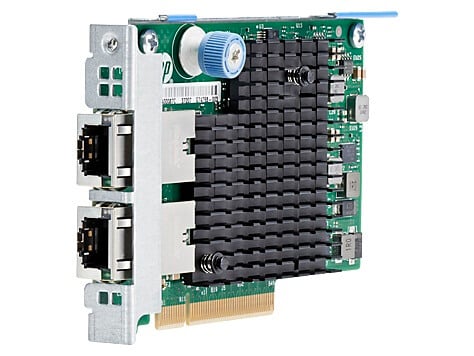
Performance and throughput refer to the speed and efficiency at which data can be transmitted and received by the HPE Ethernet 10GB 2-Port 561FLR-T Adapter.
Performance refers to the speed and processing power of the adapter itself, such as the speed at which it can process and transmit data packets. Higher performance can translate into faster data transfer rates and lower latency, which can improve the responsiveness and overall performance of the network.
Throughput refers to the actual amount of data that can be transmitted or received by the adapter over a period of time, typically measured in bits or bytes per second. Throughput can be affected by various factors, such as the network topology, the quality of the cables and other hardware components, and the configuration of the adapter and other network devices.
The HPE Ethernet 10GB 2-Port 561FLR-T Adapter is designed to provide high-performance and high-throughput network connectivity, with support for advanced features such as jumbo frames and hardware acceleration. The adapter can deliver up to 20 Gbps of bidirectional throughput, making it ideal for high-bandwidth applications such as video streaming, large file transfers, and high-performance computing.
To optimize performance and throughput, it is important to ensure that the network infrastructure is designed and configured to support the capabilities of the adapter, such as using high-quality cables and switches, enabling advanced features like flow control, and tuning the adapter’s settings for optimal performance.
Firmware Updates
Firmware updates refer to software updates that are designed to improve the performance, stability, and security of the HPE Ethernet 10GB 2-Port 561FLR-T Adapter by updating its embedded software or firmware.
The manufacturer may release firmware updates periodically to address known issues, fix bugs, or add new features to the adapter. Firmware updates can also help to improve the adapter’s compatibility with new operating systems or software applications.
To update the firmware of the HPE Ethernet 10GB 2-Port 561FLR-T Adapter, you typically need to download the latest firmware file from the manufacturer’s website and follow the installation instructions provided in the firmware release notes.
It is important to follow the instructions carefully when installing a firmware update, as an incorrect installation can cause the adapter to malfunction or become unusable. It is also recommended to back up any important data or configurations before updating the firmware to avoid data loss.
Keeping the firmware of the adapter up-to-date is important to ensure that the adapter is running at peak performance and that any known issues or vulnerabilities are addressed. It is therefore recommended to periodically check for firmware updates and install them as necessary.
Configuration Options
Configuration options refer to the settings and parameters that can be adjusted on the HPE Ethernet 10GB 2-Port 561FLR-T Adapter to optimize its performance and functionality for a specific network environment.
Some common configuration options that may be available for the adapter include:
- Network settings: This may include options for configuring the adapter’s IP address, subnet mask, default gateway, and other network-related settings.
- VLAN settings: This may include options for enabling or disabling VLAN tagging, setting the VLAN ID, and configuring VLAN trunking.
- Quality of Service (QoS) settings: This may include options for configuring the adapter’s QoS settings, such as prioritizing certain types of network traffic or assigning bandwidth limits to different types of traffic.
- Link Aggregation Control Protocol (LACP) settings: This may include options for configuring the adapter to use LACP to aggregate multiple network connections for improved performance and redundancy.
- Packet Filtering settings: This may include options for configuring the adapter’s packet filtering rules, such as allowing or blocking specific types of network traffic.
Configuration options may be accessed through the adapter’s management software or through the operating system’s network configuration settings. It is important to review the documentation and instructions for the adapter to understand which configuration options are available and how to adjust them to meet the specific requirements of your network environment.
General Information
- Product Type: 10gigabit Ethernet Card
- Host Interface: Pci Express X8
- Number Of Total Expansion Slots: 2
- Expansion Slot Type: Sfp+
- Number Of Sfp+ Slots: 2
- Media Type Supported: Twisted Pair
- Network Technology: 10gbase-T
- Form Factor: Flexiblelom
- Device Supported: Server