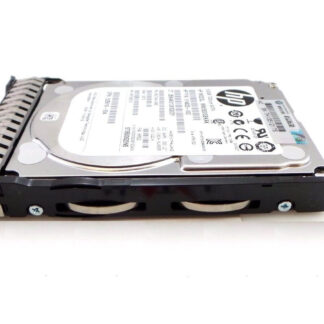
Description
Compatibility and Interoperability
The 714425-001 HPE Hard Disk is designed to be compatible with a wide range of servers and storage systems. Here is an overview of its compatibility and interoperability:
- Server compatibility: The 714425-001 HPE Hard Disk is compatible with a wide range of HPE servers, including HPE ProLiant DL, ML, and SL servers, as well as HPE BladeSystem c-Class enclosures.
- Storage system compatibility: The 714425-001 HPE Hard Disk is compatible with a wide range of HPE storage systems, including HPE StoreEasy, HPE StoreVirtual, HPE 3PAR StoreServ, and HPE MSA Storage systems.
- Operating system compatibility: The 714425-001 HPE Hard Disk is compatible with a wide range of operating systems, including Microsoft Windows, Linux, VMware, and Citrix.
- Interoperability: The 714425-001 HPE Hard Disk is designed to be interoperable with other storage systems and devices, allowing it to be integrated into existing storage infrastructure.
- Firmware compatibility: The 714425-001 HPE Hard Disk requires firmware that is compatible with the server or storage system it is installed in. HPE provides firmware updates and compatibility information on their website to ensure smooth operation.
Installation and Configuration
Installing and configuring the 714425-001 HPE Hard Disk is a straightforward process. Here are the basic steps:
- Power off the server or storage system that the hard disk will be installed in.
- Open the server or storage system chassis and locate an available drive bay that is compatible with the 714425-001 HPE Hard Disk.
- Carefully insert the hard disk into the drive bay, making sure that it is securely connected to the interface connector and that the screws are tightened to hold the drive in place.
- Close the server or storage system chassis.
- Power on the server or storage system and check to ensure that the hard disk is recognized by the system.
- If the hard disk is not recognized, check the server or storage system documentation and ensure that the hard disk is compatible with the system.
- Once the hard disk is recognized by the system, it can be configured for use. This typically involves creating a partition and formatting the hard disk with a file system.
- Depending on the specific server or storage system, there may be additional steps required to fully configure the hard disk, such as creating a RAID array or configuring disk settings through a management interface.
- It is important to follow best practices for hard disk configuration, such as ensuring that the hard disk is properly aligned and that RAID levels are configured correctly for the intended use case.
Maintenance and Support
Proper maintenance and support of the 714425-001 HPE Hard Disk can help ensure its longevity and optimal performance. Here are some maintenance and support considerations for this hard disk:
- Regularly monitor the hard disk’s performance using diagnostic tools. HPE provides diagnostic software that can help identify and resolve issues before they become critical.
- Regularly update the firmware of the hard disk to ensure it is up-to-date with the latest bug fixes and features.
- Keep the server or storage system environment clean and free of dust and debris, which can clog up the hard disk’s cooling system and cause it to overheat.
- Replace the hard disk if it begins to fail or shows signs of wear and tear. Common signs of a failing hard disk include slow performance, error messages, and unusual sounds such as clicking or whirring.
- Contact HPE technical support for assistance with troubleshooting and resolving issues related to the hard disk. HPE provides a range of support services, including online resources, phone support, and onsite support.
- Consider purchasing an HPE support contract, which can provide access to additional resources and services, such as software updates and hardware replacement.
Detail Description:
- Brand Name : HPE
- Part Number : 714425-001
- Sub-Type : 600GB 10K RPM SAS 6GBPS
- Type : Hard Drive (HDD)
Technical Information:
- Capacity : 600GB
- Maximum External Data Transfer Rate : 768 Mbps (6 Gbps)
- Spindle Speed : 10K RPM
- Generation : SAS
- Speed : 6GB/S
Physical Characteristics:
- Drive Bay Width : 2.5″
- Drive Type : Internal