


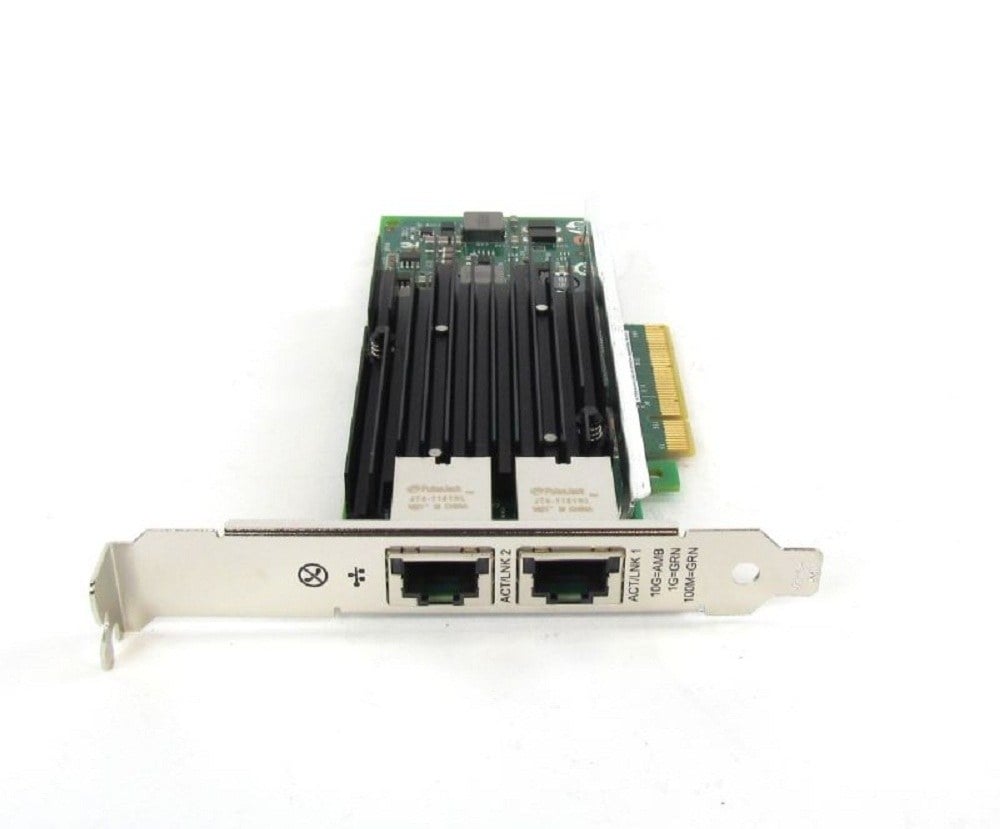
Description
Benefits of using
The HPE Ethernet Dual Port 561T PCI 10GB Network Adapter offers several benefits for organizations that require high-speed network connectivity for their data-intensive workloads. Some of the main benefits include:
- High-speed performance: With data transfer speeds of up to 10 Gbps, the adapter can handle high-bandwidth applications and large data transfers with ease.
- Dual-port design: The adapter has two 10 GbE ports, allowing for connection to multiple network devices or for link aggregation to increase bandwidth.
- Compatibility: The adapter is compatible with a wide range of operating systems, including Windows, Linux, and VMware, and it supports a variety of network protocols, including TCP/IP, iSCSI, and Fibre Channel over Ethernet (FCoE).
- Advanced Configuration: The adapter supports various advanced configuration options, such as VLAN tagging, Quality of Service (QoS), Link Aggregation, Teaming, Jumbo Frame, and Energy Efficient Ethernet (EEE)
- Flow control: The adapter supports flow control, which can help prevent network congestion.
- Wake on LAN (WOL): The adapter supports Wake on LAN (WOL), allowing you to remotely wake up a computer using the adapter.
- Energy Efficient Ethernet (EEE): The adapter supports Energy Efficient Ethernet (EEE), which reduces power consumption when the adapter is not in use.
- Advanced Security: The adapter support advanced security features like TPM, Secure Boot, and Secure Erase.
- Cost-effective: Using 10 GbE adapter can be a cost-effective solution compared to upgrading an entire network infrastructure to faster speeds.
Best practices
There are several best practices that can help ensure optimal performance and reliability when using the HPE Ethernet Dual Port 561T PCI 10GB Network Adapter. Some of the most important include:
- Use high-quality cables: Use high-quality, shielded Ethernet cables to ensure reliable data transfer and reduce the risk of interference.
- Follow the manufacturer’s instructions: Follow the manufacturer’s instructions for installing and configuring the adapter, including updating the driver and firmware as needed.
- Test the adapter: Run a speed test or ping other devices on the network to ensure that the adapter is working properly.
- Monitor the adapter: Use network monitoring tools to keep track of the adapter’s performance and troubleshoot any issues that may arise.
- Use link aggregation when necessary: Link aggregation can increase bandwidth and provide redundancy, use it when necessary.
- Use Quality of Service (QoS) when necessary: Use Quality of Service (QoS) to prioritize network traffic based on different types of data, such as video or voice.
- Use Teaming when necessary: Use Teaming to group multiple network adapters together to improve performance and provide redundancy.
- Use Jumbo Frame when necessary: Use Jumbo Frame to increase the maximum frame size, allowing for more data to be sent in a single packet, potentially increasing performance.
- Use Energy Efficient Ethernet (EEE) when necessary: Use Energy Efficient Ethernet (EEE) to reduce power consumption when the adapter is not in use.
- Secure the adapter: Use advanced security features like TPM, Secure Boot, and Secure Erase to secure the adapter.
It is important to note that these best practices are general recommendations, and the specific needs of your network may vary. It is recommended to consult the HPE’s documentation or with a network administrator for more detailed instructions and troubleshooting if necessary.
Advanced configuration
The HPE Ethernet Dual Port 561T PCI 10GB Network Adapter offers several advanced configuration options to help optimize performance and increase flexibility. Some of the most notable include:
- VLAN Tagging: Allows you to assign virtual LANs (VLANs) to the adapter, which can help improve network segmentation and security. This allows for the creation of multiple virtual networks on a single physical network.
- Quality of Service (QoS): Allows you to prioritize network traffic based on different types of data, such as video or voice. This can help ensure that critical applications receive the bandwidth they need.
- Teaming: Allows you to group multiple network adapters together to improve performance and provide redundancy. This can help increase the overall bandwidth and provide failover protection.
- Jumbo Frame: Allows you to increase the maximum frame size, allowing for more data to be sent in a single packet, potentially increasing performance.
- Advanced features like DSCP, VLAN, TCP/UDP checksum offload, TCP segmentation offload, and other features are also available for advanced configuration
- Advanced Security: The adapter support advanced security features like TPM, Secure Boot, and Secure Erase.
It is important to note that these advanced configuration options may require a certain level of network knowledge and experience to implement. It is recommended to consult the HPE’s documentation or with a network administrator for more detailed instructions and troubleshooting if necessary.
General Information
- Manufacturer: HPE
- Part Number or SKU# 717708-002
- Option Part Number: 716591-B21
- Adapter Type: Network Adapter
- Form Factor: Plug-in Card
- Interface (Bus) Type: PCI Express 2.1 x8
Networking
Compliant Standards: IEEE 802.3, IEEE 802.3x, IEEE 802.3ad (LACP), IEEE 802.1AX, IEEE 802.1Qbb, IEEE 802.1Qaz, IEEE 802.1Qau
Connectivity Technology: Wired
Data Link Protocol: 10 GigE
Data Transfer Rate: 10 Gbps
Features: Jumbo Frames support, teaming support, PXE support, Large Send Offload (LSO), Receive Side Scaling (RSS), TCP Segmentation Offload (TSO)
Ports: 10Gb Ethernet x 2
Remote Management Protocol: SNMP
Status Indicators: Port status, link/activity
Processor / Memory
- Processor: 1 x x540 – Intel
Expansion / Connectivity
- Interfaces: 2 x 10Gb Ethernet – RJ-45
Software / System Requirements
SunSoft Solaris 10, Microsoft Windows Server 2008 Foundation, SuSE Linux Enterprise Server 11, SuSE Linux Enterprise Server 10, Red Hat Enterprise Linux 5, Microsoft Windows Server 2008 Enterprise, Microsoft Windows Server 2008 Standard, Microsoft Windows Web Server 2008, Microsoft Windows Server 2008 Datacenter, Red Hat Enterprise Linux 6, Microsoft Windows Small Business Server 2011 Standard, Microsoft Windows Small Business Server 2011 Essentials, Microsoft Windows MultiPoint Server 2011, Citrix XenServer 6.0, Microsoft Windows Server 2012, SunSoft Solaris 11, Citrix XenServer 6.1, VMware vSphere 5.0, VMware vSphere 4.1
Miscellaneous
Compliant Standards: UL, BSMI, BSMI CNS 13438 Class A, EN 61000-3-2, ICES-003, EN 61000-3-3, EN55024, EN55022 Class A, WEEE, FCC Part 15 A, VCCI V-3 Class A ITE
Environmental Parameters
Humidity Range Operating: 5 – 95% (non-condensing)
Max Operating Temperature: 55 °C
Min Operating Temperature: 0 °C
Dimensions & Weight
- Width: 9.50 inch
- Height: 2.25 inch
- Depth: 7.50 inch
- Weight: 1.00 lbs
Compatibility Information 717708-002 HPE Ethernet 10GB
- HPE Apollo pc40, sx40
- HPE ProLiant DL Series DL160 Gen8, DL160 Gen8 Base, DL160 Gen8 Entry, DL160 Gen8 Performance, DL180 Gen9, DL180 Gen9 Base, DL180 Gen9 Entry, DL180 Gen9 Storage, DL20 Gen9, DL20 Gen9 Entry, DL20 Gen9 Performance, DL360p Gen8, DL360p Gen8 Base, DL360p Gen8 CMS, DL360p Gen8 High Performance, DL360p Gen8 Performance, DL360p Gen8 Special Server, DL380 Gen9 High Performance, DL380p Gen8 Base, DL380p Gen8 High Performance, DL380p Gen8 Performance, DL380p Gen8 Special, DL385p Gen8, DL385p Gen8 Dedicated Workload, DL385p Gen8 Entry, DL385p Gen8 Maximized Consolidation, DL385p Gen8 Storage, DL385p Gen8 Storage Centric, DL560 Gen8, DL560 Gen8 Base, DL560 Gen8 Entry, DL560 Gen8 Performance, DL560 Gen9, DL560 Gen9 Base, DL560 Gen9 Entry, DL560 Gen9 Performance, DL80 Gen9 Entry
- HPE ProLiant ML Series ML110 Gen9, ML110 Gen9 Base, ML110 Gen9 Entry, ML30 Gen9, ML30 Gen9 Base, ML30 Gen9 Performance, ML350 Gen9, ML350 Gen9 Base, ML350 Gen9 Entry, ML350 Gen9 Performance, ML350e Gen8, ML350e Gen8 Base, ML350e Gen8 Entry, ML350e Gen8 Performance, ML350e Gen8 v2, ML350p Gen8, ML350p Gen8 Base, ML350p Gen8 Special Server
- HPE ProLiant SL Series SL230s Gen8 1U Left Half Width Tray, SL230s Gen8 1U Right Half Width Tray, SL230s Gen8 Base 1U Left Tray Server, SL230s Gen8 Base 1U Right Tray Server, SL250s Gen8 2U Left Half Width Tray, SL250s Gen8 2U PCIe Gen3 Left Tray, SL250s Gen8 2U PCIe Gen3 Right Tray, SL250s Gen8 2U Right Half Width Tray, SL250s Gen8 Base 2U Left Half Width Tray, SL250s Gen8 Base 2U Left Tray Server, SL250s Gen8 Base 2U Right Half Width Tray, SL250s Gen8 Base 2U Right Tray Server, SL270s Gen8 1U Left Half Width Tray, SL270s Gen8 1U Right Half Width Tray, SL270s Gen8 Base 4U Left Half Width Tray, SL270s Gen8 Base 4U Right Half Width Tray, SL270s Gen8 SE 4U Left Tray, SL270s Gen8 SE 4U Right Tray, SL4540 Gen8, SL4540 Gen8 Tray 2x Node Server, SL4545 G7
- HPE ProLiant XL Series XL170r Gen9, XL190r Gen9
- HPE SimpliVity 380 Gen9 Node
- HPE StoreEasy 3850 Gateway Single Node


