

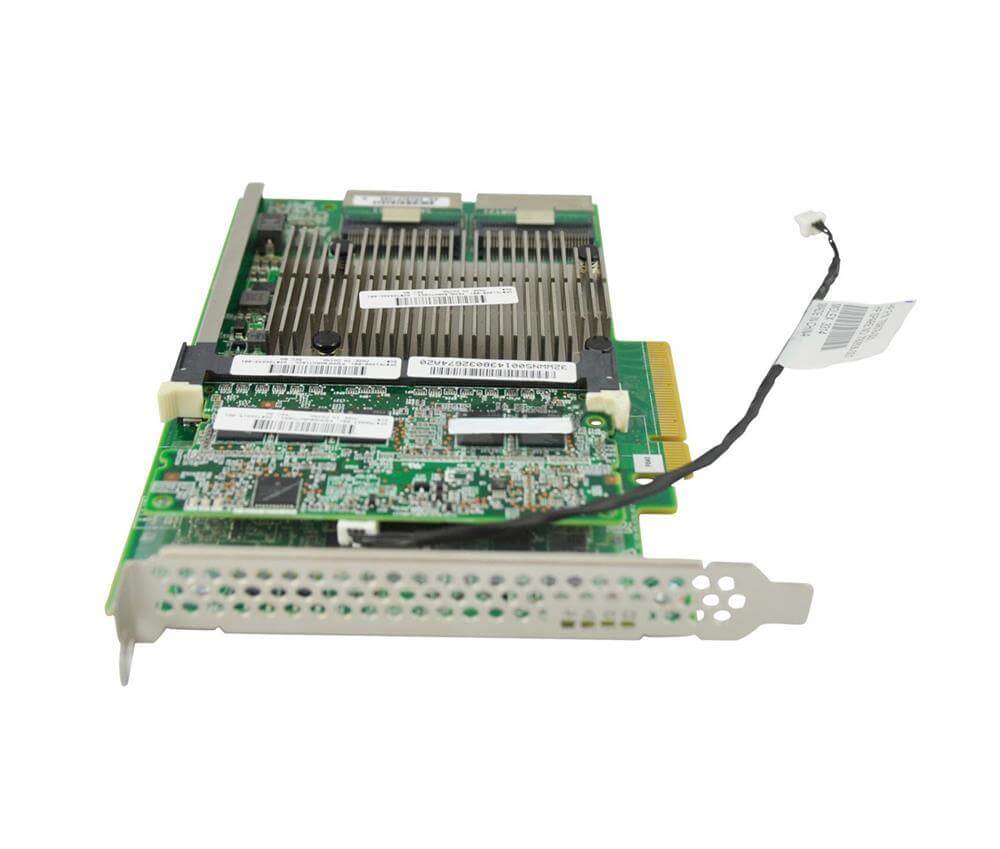
Description
Performance Comparison of the HPE Smart Array P840
The HPE Smart Array P840 (761874-B21) is a high-performance SAS controller card that offers several benefits over other SAS controllers. The following is a comparison of the HPE Smart Array P840 to similar SAS controllers:
- Speed: The HPE Smart Array P840 offers a 12GB/s data transfer rate, which is faster than many other SAS controllers. This speed provides improved application performance and reduced latency.
- Storage Scalability: The HPE Smart Array P840 supports the connection of multiple external storage devices, providing the ability to scale storage as needed.
- Reliability: The HPE Smart Array P840 provides hardware-based RAID, which offers improved data protection and provides better fault tolerance compared to software-based RAID solutions.
- FBWC: The HPE Smart Array P840 includes 4GB of FBWC, which provides fast and reliable write caching, improving the overall performance of the controller.
- Compatibility: The HPE Smart Array P840 is compatible with a wide range of operating systems, including Windows Server, Red Hat Enterprise Linux, SUSE Linux Enterprise Server, and VMware vSphere.
In comparison to similar SAS controllers, the HPE Smart Array P840 offers improved performance, scalability, reliability, and compatibility. These features make the HPE Smart Array P840 an excellent choice for customers looking for a high-performance SAS controller card.
HPE Smart Array P840 Maintenance and Support
The HPE Smart Array P840 12GB 2-Ports SAS Controller Card (761874-B21) requires proper maintenance and support to ensure its optimal performance and longevity. The following are some recommended steps for HPE Smart Array P840 maintenance and support:
- Firmware updates: Regularly check for firmware updates and install them as needed to ensure that the controller card is functioning optimally.
- Driver updates: Keep the drivers up-to-date to ensure compatibility with the operating system and other hardware components.
- RAID management: Regularly check the RAID configuration and make changes as needed to ensure optimal performance and data protection.
- Disk replacement: Replace failed or failing disks in a timely manner to ensure data protection and avoid potential data loss.
- Maintenance: Regularly clean the controller card and the server to prevent dust buildup, which can cause overheating and other problems.
- Support: If you encounter any issues with the HPE Smart Array P840, you can contact HPE support for assistance.
By following these steps, you can help ensure that the HPE Smart Array P840 12GB 2-Ports SAS Controller Card operates reliably and performs optimally for years to come.
Updating the Firmware on the HPE Smart Array P840
Updating the firmware on the HPE Smart Array P840 (761874-B21) is an important step in maintaining the stability and performance of the controller card. The following are the steps for updating the firmware:
- Download the latest firmware from the HPE website.
- Install the firmware update tool, such as HPE Service Pack for ProLiant (SPP), on a server connected to the network.
- Connect the HPE Smart Array P840 to the server running the firmware update tool.
- Launch the firmware update tool and select the HPE Smart Array P840 as the target device.
- Follow the instructions provided by the firmware update tool to complete the firmware update process.
- Verify that the firmware update was successful by checking the version number in the HPE Smart Array Configuration Utility.
It is recommended to follow the instructions provided by the firmware update tool carefully, as a failed firmware update can result in a loss of data and may cause the HPE Smart Array P840 to become inoperable. If you encounter any issues during the firmware update, it is recommended to seek assistance from HPE technical support.
General Information
- Manufacturer Name: HPE
- MPN : 761874-B21
- Type : Controller
- Sub-Type : SAS-SATA
Technical Information
- Controller Type:Storage Controller (RAID) – Plug-In Card
- Bus Type : PCIE 3.0 X8
- Interface :SATA 6GB/S / SAS 12GB/S
- Data Transfer Rate:1.2 GBPS
- Buffer Size : 4 GB
- Supported Devices: Disk Array (RAID)
- Channel QTY : 16
- Max Storage Devices Qty : 16
- RAID Level : RAID 0, RAID 1, RAID 5, RAID 6, RAID 10, RAID 50, RAID 60, RAID 1 ADM, RAID 10 ADM
Expansion / Connectivity
- Interfaces: 2 x SATA-6Gbps / SAS-12Gbps (internal)
Software / System Requirements:
- OS Required: Microsoft Windows Server 2008 R2, Ubuntu 12.04, Microsoft Windows Server 2012, Oracle Solaris 11.1, Microsoft Windows Server 2012 R2, VMware ESXi 5.0 update 2, VMware ESXi 5.1 update 1, VMware vSphere 5.5, SuSE Linux Enterprise Server 11 SP3, Ubuntu 14.04, Red Hat Enterprise Linux 7, Red Hat Enterprise Linux 6 update 5
Miscellaneous
- Compliant Standards: WEEE
- Features: HPE Smart Cache
Dimensions & Weight
- Depth: 6.6 inch
- Height: 4.4 inch
- Width: 0.6 inch
Compatibility Information
- HPE ProLiant DL Series: DL180 Gen9, DL560 Gen9 Entry, DL80 Gen9 Entry
- HPE ProLiant ML Series:ML110 Gen9, ML110 Gen9 Base, ML110 Gen9 Entry, ML350 Gen9, ML350 Gen9 Base, ML350 Gen9 Entry, ML350 Gen9 Performance


