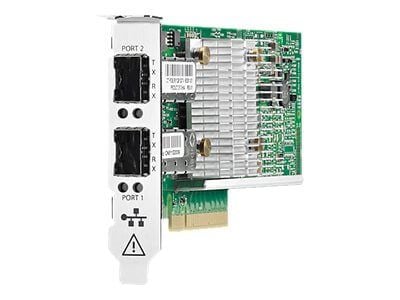
Description
Configuration and Management
The 763341-001 HPE Synergy 3820C is a converged network adapter (CNA) that allows for both Ethernet and Fibre Channel (FC) connectivity over a single interface. This adapter is designed specifically for the HPE Synergy platform and can provide up to 20GB of bandwidth for high-performance networking.
Configuration and management of the 763341-001 HPE Synergy 3820C can be done through several methods, including:
- HPE Synergy Composer: This is a web-based management tool that allows you to configure and manage various components of the HPE Synergy platform, including the 763341-001 HPE Synergy 3820C. Using the Composer, you can view and modify the adapter’s settings, such as network and FC settings, and monitor the adapter’s performance.
- HPE OneView: HPE OneView is another management tool that can be used to manage the 763341-001 HPE Synergy 3820C. It provides a centralized dashboard for managing your infrastructure and can be used to monitor and configure the adapter.
- Command-line interface (CLI): The 763341-001 HPE Synergy 3820C can also be managed through a CLI using commands that allow you to configure and monitor the adapter’s settings. The CLI provides a powerful way to manage the adapter, but it requires some technical knowledge and experience.
Some of the key settings that can be configured on the 763341-001 HPE Synergy 3820C include:
- Network settings: The adapter can be configured with various network settings, such as IP address, subnet mask, gateway, and DNS servers. These settings allow the adapter to communicate with other devices on the network.
- FC settings: The adapter can be configured with various FC settings, such as World Wide Node Name (WWNN), World Wide Port Name (WWPN), and FC speed. These settings allow the adapter to communicate with FC devices, such as storage arrays.
- Virtual LAN (VLAN) settings: The adapter can be configured to support VLANs, which allow you to segment your network into multiple virtual networks.
Performance and Reliability
The HPE Synergy 3820C 10/20GB Converged Network Adapter is a high-performance network adapter designed to provide reliable network connectivity to HPE Synergy servers.
The adapter supports both 10 Gigabit Ethernet (GbE) and 20 GbE speeds and is capable of handling high-bandwidth workloads, such as virtualization, cloud computing, and big data analytics. It is also designed to support converged network traffic, which means it can handle both storage and data traffic over a single network connection, reducing the need for separate network adapters.
In terms of performance, the HPE Synergy 3820C 10/20GB Converged Network Adapter is designed to deliver low-latency, high-bandwidth network connectivity, which is essential for high-performance computing environments. It supports Remote Direct Memory Access (RDMA) technology, which can reduce network latency and improve application performance.
The adapter also supports advanced network features, such as jumbo frames, which can improve network throughput by allowing larger data packets to be transmitted, and quality of service (QoS) controls, which can prioritize network traffic based on application requirements.
In terms of reliability, the HPE Synergy 3820C 10/20GB Converged Network Adapter is designed with a number of features to ensure network uptime and data integrity. These include support for link aggregation (or bonding) for increased network redundancy, advanced error detection and correction, and support for network virtualization technologies like Virtual Ethernet Bridging (VEB) and Virtual Extensible LAN (VXLAN).
Troubleshooting and Maintenance
The HPE Synergy 3820C 10/20GB Converged Network Adapter is a hardware component designed to provide high-speed connectivity to servers and storage systems in a data center environment. Like any other hardware component, it may encounter issues that require troubleshooting and maintenance.
Here are some troubleshooting and maintenance steps that you can follow to address issues with the HPE Synergy 3820C 10/20GB Converged Network Adapter:
- Check the physical connections: Make sure that the adapter is properly installed and connected to the server and storage systems. Check the cables for any damage or loose connections.
- Check for driver updates: Visit the HPE website and check for any available driver updates for the adapter. Download and install any updates that are available.
- Check for firmware updates: Check for any available firmware updates for the adapter. Download and install any updates that are available.
- Check the adapter settings: Check the adapter settings to make sure that they are configured correctly. Verify that the adapter is using the correct IP address, subnet mask, gateway, and DNS server settings.
- Check the server and storage system settings: Make sure that the server and storage system settings are configured correctly. Verify that the correct IP addresses, subnet masks, gateways, and DNS servers are configured.
- Test the adapter: Run a diagnostic test on the adapter to determine if it is functioning properly. Check the event log for any error messages that may provide clues as to what is causing the issue.
- Contact HPE support: If the above steps do not resolve the issue, contact HPE support for assistance. They may be able to provide additional troubleshooting steps or may need to replace the adapter if it is determined to be faulty.
To ensure the long-term reliability and optimal performance of the HPE Synergy 3820C 10/20GB Converged Network Adapter, it is important to perform regular maintenance tasks such as updating drivers and firmware, checking settings, and running diagnostic tests.
General Information
- Device Type : Network Adapter
- Form Factor : Plug-In Card
- Interface (Bus) Type : Pci Express 3.0 X8 Mezzanine
- Pci Specification Revision : Pcie 3.0
Networking
- Ports : 20 Gigabit Cee X 2
- Connectivity Technology : Wired
- Data Link Protocol : 20 Gigabit Cee
- Data Transfer Rate : 20 GBPS
- Capacity : Jumbo Frame Size: Up To 9 KB
- Features : Vlan Support, Quality Of Service (Qos), Virtual Machine Device Queues (Vmdq), Pxe Support, Large Send Offload (Lso), Single Root I/O Virtualization (Sr-Iov), Nic Partitioning (Npar), Tcp Segmentation Offload (Tso), Checksum Offload Support, Extended Message-Signaled Interrupts (Msi-X), Tcp Offload Engine (Toe), Fcoe Support
- Compliant Standards : IEEE 802.3, IEEE 802.3u, IEEE 802.1q, IEEE 802.3ab, IEEE 802.1p, IEEE 802.3x, IEEE 802.3ad (Lacp), IEEE 802.3ae, IEEE 802.3p, IEEE 802.3ap
Processor / Memory
- Processor : 1 X 57840s – Qlogic
- Ram : 900 MB
Expansion / Connectivity
- Interfaces : 2 X 20gb Ethernet