Description
Introduction to HPE 480GB PCI-E X4(Nvme)
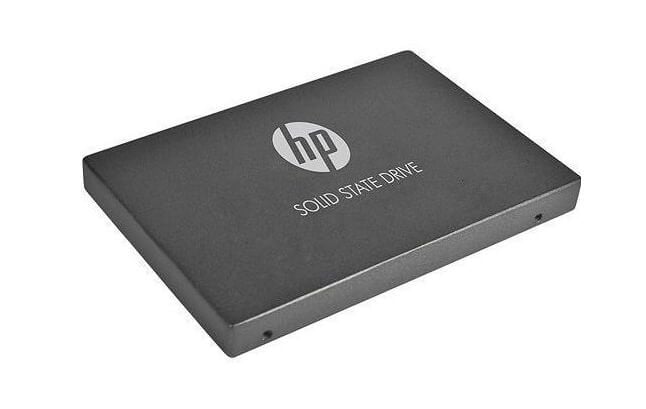
The HPE 480GB PCI-E X4 (Nvme) 2.5inch Sff SCN SSD is a high-performance solid-state drive designed for use in enterprise-level data centers. It uses the NVMe (Non-Volatile Memory express) protocol, which is optimized for flash-based storage, providing faster and more efficient access to data than traditional hard drives.
This solid-state drive is designed to be installed in a standard 2.5-inch drive bay, but it utilizes a PCI Express (PCI-E) interface rather than the traditional SATA interface used by many other SSDs. The PCI-E interface provides faster data transfer speeds, with the ability to take full advantage of the high bandwidth offered by modern PCIe lanes.
The HPE 480GB PCI-E X4 (Nvme) 2.5inch Sff SCN SSD is a small form factor (SFF) drive, making it an ideal choice for systems that require high-density storage without taking up too much physical space. It is also optimized for use in servers and storage arrays that require high-speed, low-latency storage devices to handle large amounts of data.
This SSD is designed and manufactured by Hewlett Packard Enterprise (HPE), a well-known and trusted name in the enterprise storage industry. It is built using high-quality, enterprise-grade components and is rigorously tested to ensure maximum reliability and performance.
Technical Specifications of HPE 480GB PCI-E X4(Nvme)
Sure, here are some additional technical specifications for the HPE 480GB PCI-E X4 (Nvme) 2.5inch Sff SCN SSD:
- Interface: The SSD uses a PCI Express 3.0 x4 interface, providing high-speed data transfer rates of up to 3.94 GB/s.
- Form Factor: The SSD is designed to fit into a standard 2.5-inch drive bay and has a small form factor (SFF) of 7mm.
- Capacity: The HPE 480GB PCI-E X4 (Nvme) 2.5inch Sff SCN SSD has a capacity of 480GB.
- NAND Flash Memory Type: The SSD uses 3D NAND TLC (Triple-Level Cell) flash memory, which provides high-density storage with low power consumption.
- Read/Write Speeds: The HPE 480GB PCI-E X4 (Nvme) 2.5inch Sff SCN SSD offers fast read and write speeds of up to 2.1 GB/s and 1.4 GB/s, respectively.
- Random Read/Write IOPS: The SSD can handle up to 290,000 random read IOPS and 100,000 random write IOPS, making it suitable for demanding workloads.
- Endurance: The SSD is rated for a total bytes written (TBW) of up to 665 terabytes, which is significantly higher than many other SSDs on the market.
- Power Consumption: The HPE 480GB PCI-E X4 (Nvme) 2.5inch Sff SCN SSD has a low power consumption of 6.3W during active operation and 0.82W during idle.
- MTBF (Mean Time Between Failures): The SSD has a mean time between failures of 2 million hours, ensuring high reliability and uptime for mission-critical applications.
Installation and Configuration
The installation and configuration of the HPE 480GB PCI-E X4(Nvme) 2.5inch Sff SCN SSD is a relatively straightforward process. Here are the general steps to follow:
- Prepare the system: Before installing the SSD, ensure that the system is powered off and unplugged from the electrical outlet. You will also need to have the necessary tools, such as a screwdriver, to open the server or storage array chassis and install the SSD.
- Locate the drive bay: Identify the 2.5-inch drive bay where you want to install the SSD. Check the system documentation to find the exact location and mounting requirements for the drive bay.
- Install the SSD: Align the SSD with the drive bay and insert it until it clicks into place. Secure the SSD to the drive bay with the screws provided.
- Connect the power and data cables: Connect the power and data cables to the SSD. The power cable will typically be a 15-pin SATA power connector, while the data cable will be a PCIe x4 connector.
- Power on the system: Power on the system and ensure that it recognizes the SSD. You may need to access the system BIOS to configure the SSD as a boot device or assign it a drive letter.
- Configure the SSD: If necessary, configure the SSD using the system software or the HPE Smart Storage Administrator tool. You can use these tools to configure the drive for RAID, update the firmware, and monitor its health and performance.
- Test the SSD: Test the SSD to ensure that it is working correctly. You can use various benchmarking tools to measure its read and write speeds, IOPS, and latency.
Specifications:
- Device Type : Solid State Drive – Hot – Swap
- MPN : 870343-001
- Capacity : 480 GB
- Form Factor : 2.5 Sff
- Interface : Pci Express X4 (nvme)
- Features : Digitally Signed Firmware
- Bundled With : Hpe Smart Carrier Nvme
- SKU : 870343-001
- Product Dimensions
& Weight - Height: 0.63 inch
- Width: 3.10 inch
- Depth: 5.45 inch
- Weight: 1.50 lbs