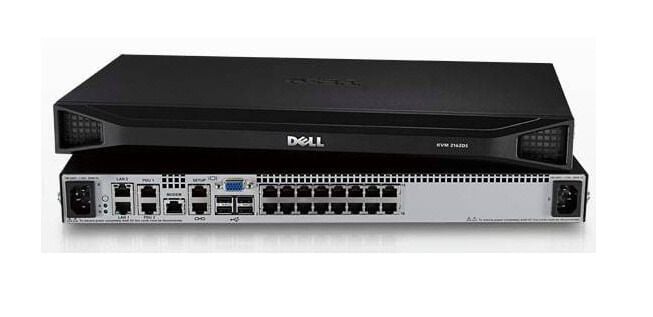
Description
Supported Devices and Operating Systems
The AF652A HPE KVM Console G3 Switch 0x2x16 KVM Switch 16 Ports is designed to provide remote access and management of servers in a data center. It supports a wide range of devices and operating systems, making it a versatile solution for IT administrators.
Here are the devices and operating systems that are supported by the AF652A KVM switch:
Devices:
- Servers with VGA, DisplayPort, and HDMI video outputs
- Notebooks and desktop computers with VGA, DisplayPort, and HDMI video outputs
- HPE IP Console Switches
- HPE Server Console Switches
- USB mice and keyboards
- USB devices such as external hard drives, printers, and scanners
The AF652A KVM switch supports multiple video resolutions up to 1920×1200 at 60Hz, allowing for high-quality video output to connected devices. It also supports multiple authentication methods, including LDAP and Active Directory, to ensure secure remote access.
Operating Systems:
- Microsoft Windows Server 2019, 2016, 2012, 2008, and 2003
- Microsoft Windows 10, 8.1, 8, 7, Vista, and XP
- Linux distributions, including Red Hat Enterprise Linux, SUSE Linux Enterprise Server, and Ubuntu
- VMware ESXi
The KVM switch is compatible with both PC and Mac platforms, providing cross-platform support. The switch also supports multi-language keyboard mapping, enabling IT administrators to work with servers in their native language.
Power Management Capabilities
The AF652A HPE KVM Console G3 Switch 0x2x16 KVM Switch 16 Ports provides several power management capabilities to help manage power consumption and reduce energy costs.
One of the key features is the ability to remotely power on and off servers connected to the switch. This allows administrators to turn servers off when they are not in use, which can help reduce power consumption and save energy costs. The switch also supports Wake-on-LAN (WOL) technology, which allows servers to be powered on remotely using a network signal.
In addition to remote power management, the AF652A KVM switch also includes advanced power management features such as power capping and power limiting. Power capping allows administrators to set a maximum power limit for each server, while power limiting allows them to set a maximum power consumption for the entire data center. This can help prevent power overloads and ensure that energy usage stays within acceptable levels.
Features and Benefits
The AF652A HPE KVM Console G3 Switch 0x2x16 KVM Switch 16 Ports is a high-performance KVM switch that provides a range of features and benefits for data center administrators. Some of the key features and benefits of the AF652A KVM switch include:
- Multi-platform support: The switch supports a wide range of operating systems and platforms, including Windows, Linux, and Unix.
- High-performance video support: The switch supports high-resolution video up to 2048×1536 at 75Hz, ensuring high-quality video output for servers.
- Secure remote management: The switch provides advanced security features such as two-factor authentication, remote authentication, and authorization, and 256-bit SSL encryption to ensure secure remote management.
- Easy server management: The switch allows administrators to manage up to 16 servers from a single console, reducing clutter and simplifying server management.
- Flexible connectivity options: The switch supports USB and PS/2 connectivity for input devices, and it includes a variety of cable options to ensure compatibility with a wide range of servers.
- Redundant power supplies: The switch includes redundant power supplies to ensure maximum uptime and reliability.
- Energy management capabilities: The switch provides a range of power management capabilities, including remote power on/off, power capping, and energy monitoring, to help reduce energy consumption and costs.
Product Information
- Manufacturer: HPE
- Part Number : AF652A
- Product Type : Console Switch
Key Features
- Device Type : KVM Switch – 16 Ports – Cascadable
- Enclosure Type : Rack Mountable
- Kvm Local Users Qty : 2 Local Users
- Keyboard / Mouse Interface : USB