

Description
Security Features
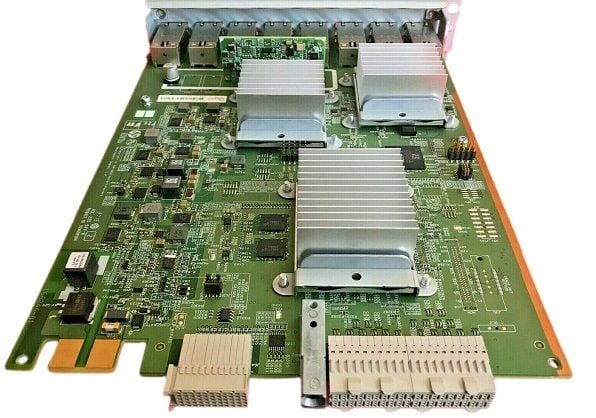
The J9995-61001 HPE 5400R Zl2 8 Port 10Base T PoE With Macsec V3 Zl2 Expansion Module is a network switch expansion module that provides eight 10Base-T Ethernet ports with Power over Ethernet (PoE) support and MACsec (Media Access Control Security) encryption capabilities. Here are some of the security features of this module:
- MACsec Encryption: The J9995-61001 expansion module supports MACsec encryption, which provides secure communication between devices on the network by encrypting Ethernet frames at the MAC layer. MACsec can protect against a range of security threats, including eavesdropping, tampering, and replay attacks.
- PoE Security: The module supports PoE, which allows it to provide power to connected devices such as IP phones, cameras, and access points. However, the module also includes security features that help prevent unauthorized access to the network via these devices, such as the ability to restrict power delivery to only authorized devices.
- VLAN Security: The J9995-61001 expansion module supports Virtual Local Area Networks (VLANs), which allow network administrators to create logical networks that are isolated from each other. This can help prevent unauthorized access to sensitive information and devices on the network.
- Access Control: The module supports various access control features, including port-based access control and 802.1X authentication. These features allow network administrators to control access to the network based on user identity or device type, helping to prevent unauthorized access.
- Secure Management: The module supports secure management protocols, such as Secure Shell (SSH) and Secure Sockets Layer (SSL), which encrypt management traffic and help prevent unauthorized access to the network configuration and management interfaces.
Deployment Scenarios
The J9995-61001 HPE 5400R Zl2 8 Port 10Base T PoE With Macsec V3 Zl2 Expansion Module is a versatile network switch expansion module that can be deployed in various scenarios, including:
- Enterprise Networks: The module is suitable for deployment in large enterprise networks that require a high-performance and secure network infrastructure. The module’s MACsec encryption, VLAN support, access control, and secure management features make it a good fit for such networks.
- Data Centers: The module can also be deployed in data center environments where high-speed connectivity, Power over Ethernet, and security are critical. The module’s eight 10Base-T Ethernet ports with PoE support can power a range of devices such as servers, storage devices, and network appliances, while its MACsec encryption capabilities can secure data in transit.
- IP Telephony: The module can be used in IP telephony deployments, where it can provide Power over Ethernet to connected IP phones while also providing secure communication between devices using MACsec encryption.
- Video Surveillance: The module can be deployed in video surveillance networks to provide power and connectivity to IP cameras while also securing the video streams using MACsec encryption.
- Wireless Networks: The module can be used in wireless networks to provide connectivity to access points while also securing the wireless traffic using MACsec encryption.
Troubleshooting Common Issues
Some common issues that may be encountered with the J9995-61001 HPE 5400R Zl2 8 Port 10Base T PoE With Macsec V3 Zl2 Expansion Module include:
- Power over Ethernet (PoE) not working: If PoE is not working, check that the connected device is PoE-compliant and that the PoE feature is enabled on the module. You can also try a different cable or port to see if the issue is with the cable or the port.
- MACsec not working: If MACsec is not working, check that the connected device supports MACsec and that the feature is enabled on both the module and the device. You can also try a different cable or port to see if the issue is with the cable or the port.
- VLAN configuration issues: If there are issues with VLAN configuration, check that the VLANs are configured correctly on both the module and the connected devices. Ensure that the correct VLAN IDs are assigned to the correct ports and that the devices are members of the correct VLANs.
- Access control issues: If there are issues with access control, check that the access control policies are configured correctly and that the devices are properly authenticated. Ensure that the correct authentication method is being used and that the device’s credentials are correctly entered.
- Firmware issues: If there are issues with the module’s firmware, check that the latest firmware is installed on the module. If necessary, upgrade the firmware to the latest version to resolve any known issues.
- Network connectivity issues: If there are network connectivity issues, check that the cables are properly connected and that the correct network settings are configured on the module and connected devices. You can also try restarting the module and connected devices to see if the issue is resolved.
If the above troubleshooting steps do not resolve the issue, consult the product documentation or contact HPE technical support for further assistance.
General Information about the HPE
- Manufacturer: HPE
- Part Number or SKU# : J9995-61001
- Device Type : Expansion Module 8 Ports
- Spare Part Number: J9995A
Networking
- Cabling Type: Ethernet 1000Base-T, Ethernet 10GBase-T, Ethernet 2.5GBase-T, Ethernet 5GBase-T
- Connectivity Technology: Wired
- Data Link Protocol: Gigabit Ethernet, 10 Gigabit Ethernet, 5 Gigabit Ethernet, 2.5 Gigabit Ethernet
- Data Transfer Rate: 10 GBPS
- Features: PoE+, MACsec support
- Ports: 1/2.5/5/10GBase-T (PoE+) x 8
- Form Factor: Plug-in Module
Expansions And Connectivity
- Interfaces: 8 x 1/2.5/5/10GBase-T (PoE+)
Dimensions & Weight
- Depth: 8.1 inch
- Height: 1.8 inch
- Width: 10.3 inch
- Weight: 3 lbs
Compatibility Information
- HPE 5400R zl2 series switches