

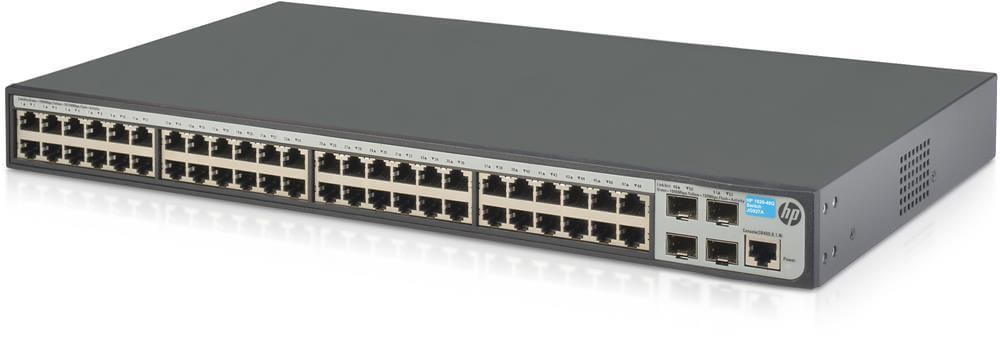
Description
Troubleshooting Capabilities
Troubleshooting capabilities refer to the tools and processes that are used to identify and resolve problems within a network. These capabilities can include a variety of different tools, such as diagnostic software, log analysis tools, and network monitoring tools, as well as a set of procedures and best practices for resolving issues.
Diagnostic software and tools are designed to help network administrators identify and diagnose problems within a network. These tools can include ping utilities, trace route tools, and other network utilities that can be used to test connectivity and identify potential issues. Log analysis tools, on the other hand, allow network administrators to review log files from network devices and servers in order to identify issues and troubleshoot problems.
Network monitoring tools are also an important part of troubleshooting capabilities. These tools allow network administrators to monitor network traffic, resource utilization, and other key performance indicators in real-time. This allows them to identify and diagnose problems as they occur, rather than waiting for users to report issues.
In addition to the tools, troubleshooting capabilities also include a set of procedures and best practices for resolving issues. This may include a step-by-step process for troubleshooting, such as isolating the problem to a specific device or component and then taking action to resolve the issue. It may also include a knowledge base of common problems and solutions that can be used to quickly and effectively resolve issues.
Software Compatibility
Software compatibility refers to the ability of software programs and applications to work together seamlessly on a particular operating system or platform. This means that the software can be installed, run, and used together without any errors or issues. Software compatibility is an important consideration when choosing or updating software for a network, as incompatible software can cause issues such as crashes, data loss, and poor performance.
When it comes to network switches, software compatibility can refer to the ability of the switch’s firmware and management software to work with other software programs and applications on the network. For example, the switch’s management software may need to be compatible with the network management tools or software that are already in use. Similarly, the switch’s firmware may need to be compatible with other network devices, such as servers or routers, in order to ensure that they can communicate and work together effectively.
Additionally, HPE provides a software compatibility matrix, which lists all the compatible versions of software that can be run on the switch. This includes the firmware, management software and other software that can be run on the switch, and this list is typically available on the HPE website.
Features and Benefits
Features and benefits refer to the specific features and capabilities of a product and how they can provide value and benefits to the user. In the case of the HPE A5120-48G SI Switch, some of the features and benefits may include:
- Advanced Layer 4 switching capabilities: This switch offers advanced routing and switching capabilities, allowing for efficient and effective management of network traffic. This can improve network performance, increase security, and reduce downtime.
- High-speed connectivity: The switch supports 48 Gigabit Ethernet ports and 4 SFP ports for fast and reliable connectivity. This can help to improve the speed and performance of the network, allowing for faster data transfer and more efficient use of resources.
- Easy Installation and Management: The switch is rack-mountable and easy to install, with a user-friendly interface for simple management and configuration. This can save time and resources, and make it easier for IT staff to manage the network.
- Future-proofing your switch infrastructure: The switch is designed for scalability and flexibility, allowing it to adapt to changing network requirements and support new technologies as they become available. This can help to ensure that the network remains efficient and effective over time.
- Integrated Management and Automation: The switch comes with a set of management and automation tools that can be used to monitor and manage the network. This can help to improve network visibility and control, and make it easier to troubleshoot and resolve issues.
- Maximizing Bandwidth Utilization: The switch offers Quality of Service (QoS) capabilities that allow for efficient use of bandwidth. This can help to improve the performance of critical applications and ensure that all users have access to the resources they need.
These are just a few examples, HPE provides a detailed feature and benefit list for the product on their website.
General Information
- Manufacturer Hewlett-Packard Enterprise(HPE)
- Manufacturer Part Number JE072A
- Type: Networking
- Sub-Type: Switch 48 Ports
- Product Series A5120G SI
- Product Model A5120-48G SI
- Product Name A5120-48G SI
- Product Type Layer 3 Switch
- UPC 885631202296
Network & Communication
- Layer Supported 3
Management & Protocols
- Manageable Yes


