

Description
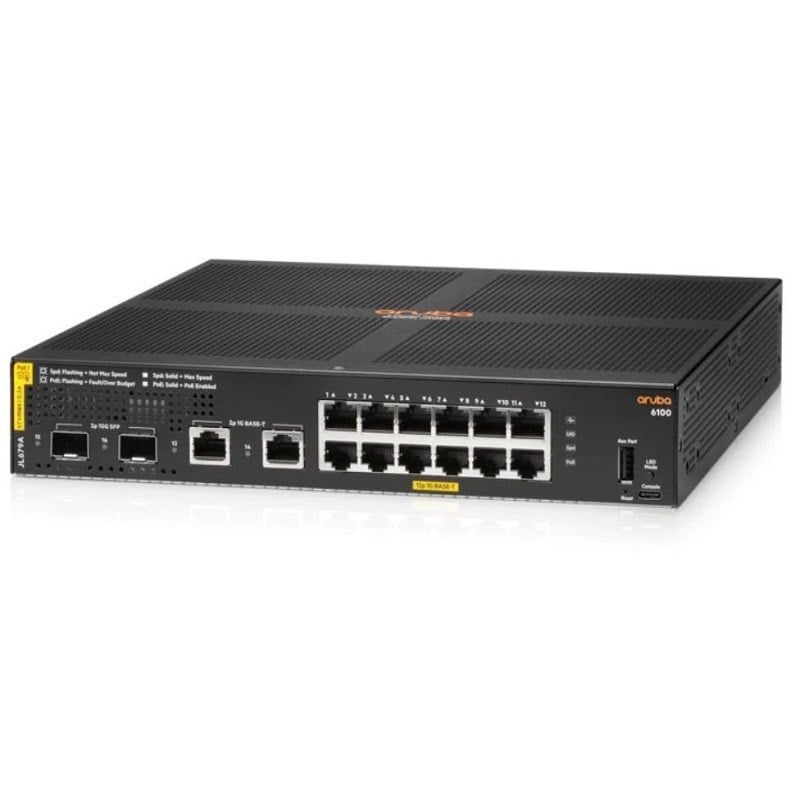
Overview of the HPE JL693-61101 Aruba 2930F Switch
The HPE JL693-61101 Aruba 2930F is a network switch that provides a variety of functions for managing and expanding your network. In this detailed explanation, we will break down the key features and capabilities of this switch to help you better understand its use and benefits.
Understanding the Basics of 12 Ports L3 Managed Switch
Before we delve into the specifics, let’s break down the product’s name to get a clearer picture of what it is and what it does.
- HPE JL693-61101: This is the product model or part number, which helps you identify this particular switch among HPE’s product offerings.
- Aruba 2930F: This is the product series and model name. Aruba is a subsidiary of Hewlett Packard Enterprise (HPE), known for its networking solutions. The 2930F is a specific model within this series.
- 12 Gigabits Ethernet: This indicates the number of 12 Ethernet ports on the switch, and each of these ports supports Gigabit Ethernet, which is a fast and reliable network connection.
- Power Over Ethernet Plus (PoE+): PoE+ is a feature that allows the switch to provide power to connected devices, such as IP cameras, phones, and access points, through the same Ethernet cable that transmits data.
- 139 Watts: This figure represents the maximum power the switch can provide to connected PoE+ devices. It’s an important consideration to ensure that the switch can support your power requirements.
- 2g/2sfp+: This part specifies the types of uplink or connection ports available on the switch. In this case, there are two Gigabit Ethernet (2g) ports and two SFP+ (Small Form-Factor Pluggable Plus) ports. These uplink ports are used for connecting the switch to other network devices or the internet.
- 12 Ports: This tells us that the switch has 12 Gigabit Ethernet ports for connecting various devices to the network.
- Managed: The switch is manageable, which means it can be configured and controlled to meet specific network requirements.
- Rack-mountable: This feature allows you to install the switch in a standard equipment rack, which is common in data centers and network closets.
- Layer 3: This indicates that the switch supports Layer 3 routing capabilities. In simpler terms, it can make decisions about how to route data between different networks, enhancing network efficiency and organization.
- Stackable: Stackable switches can be physically connected and operated as a single unit, making network management more streamlined and efficient.
Now that we’ve dissected the product name, let’s explore each of these features and capabilities in more detail.
Gigabit Ethernet Ports for High-Speed Connections
The Aruba 2930F switch comes with 12 Gigabit Ethernet ports. These ports provide high-speed network connections that are essential for modern data-intensive applications and high-bandwidth tasks. Whether you’re connecting computers, servers, printers, or other networked devices, Gigabit Ethernet ensures that data is transferred quickly and efficiently.
Each Gigabit Ethernet port on the switch is capable of handling data at a rate of 1 gigabit per second (Gbps). This is significantly faster than standard Ethernet, which operates at 100 megabits per second (Mbps). With Gigabit Ethernet, you can enjoy smooth and lag-free data transfer, making it ideal for multimedia streaming, online gaming, and large file transfers.
Power Over Ethernet Plus (PoE+): Enabling Device Power and Data over Ethernet
One of the standout features of the HPE JL693-61101 Aruba 2930F switch is its support for Power Over Ethernet Plus (PoE+). PoE+ is a technology that allows both power and data to be transmitted over the same Ethernet cable. This feature is incredibly useful in scenarios where powering network devices would be challenging or inconvenient.
How PoE+ Works
With PoE+, the switch can deliver electrical power to connected devices, such as:
- IP Cameras: PoE+ simplifies the installation of security cameras by eliminating the need for separate power cables.
- VoIP Phones: Voice over Internet Protocol (VoIP) phones can receive power and data over a single cable, reducing clutter and complexity.
- Wireless Access Points: PoE+ enables wireless access points to be installed in optimal locations without the need for nearby power outlets.
- Networked Lighting: Some modern lighting systems can be powered and controlled via PoE+, offering energy efficiency and remote management.
In essence, PoE+ streamlines the deployment and maintenance of network devices by reducing the reliance on electrical outlets and the tangle of power cords.
PoE+ Power Capacity
The Aruba 2930F switch is capable of delivering up to 139 watts of power through its PoE+ ports. This wattage is shared among the connected devices, so it’s important to consider the power requirements of each device to ensure they can be adequately powered by the switch. This 139-watt capacity is suitable for a range of PoE+ devices, but it’s essential to check the power consumption of your specific devices to ensure compatibility.
Connecting to the Wider Network
In addition to the 12 Gigabit Ethernet ports for connecting end devices, the HPE JL693-61101 Aruba 2930F switch features uplink ports to connect to the wider network, including the internet and other network switches. These uplink ports play a critical role in ensuring network connectivity and expansion.
Gigabit Ethernet Uplink Ports
The switch is equipped with two Gigabit Ethernet uplink ports. These ports are typically used to connect the switch to routers, firewalls, or internet service providers. They allow the switch to access external networks and the internet, making it an integral part of your network infrastructure.
Gigabit Ethernet uplink ports provide high-speed connectivity for data to flow in and out of your local network. This is essential for businesses and organizations that rely on a fast and stable internet connection to support their daily operations and online services.
SFP+ Uplink Ports
In addition to the Gigabit Ethernet uplink ports, the switch includes two SFP+ (Small Form-Factor Pluggable Plus) uplink ports. SFP+ ports are designed for fiber-optic connections, which are commonly used in scenarios where long-distance and high-speed data transmission is required.
SFP+ uplink ports provide the flexibility to connect the switch to other network devices over fiber-optic cables. This is particularly advantageous when dealing with network links that span extended distances, such as connecting switches between different floors of a building or even across multiple buildings in a campus environment.
Managed Switch: Tailoring Your Network to Your Needs
The Aruba 2930F switch is a managed switch, which means it offers a high level of control and customization for your network. Let’s explore what this means and how it can benefit your network infrastructure.
Network Management Capabilities
As a managed switch, the Aruba 2930F provides a wide range of network management capabilities, including:
- VLAN Support: You can segment your network into virtual LANs (VLANs), each with its own set of rules and permissions. This enhances network security and management.
- Quality of Service (QoS): The switch allows you to prioritize certain types of traffic, ensuring that critical data, such as voice or video calls, gets the highest level of service.
- Remote Monitoring and Control: Managed switches typically come with a web-based interface or command-line interface (CLI) that enables remote monitoring and configuration. This is especially useful for network administrators who need to manage networks across multiple locations.
- Security Features: Managed switches often include security features like MAC address filtering, port security, and SNMP (Simple Network Management Protocol) for monitoring and alerting.
- Firmware Updates: You can keep the switch up to date with the latest firmware to ensure optimal performance and security.
The ability to configure and manage a network through a managed switch is invaluable for businesses and organizations that require specific network setups to meet their unique needs.
Network Expansion and Scalability
Managed switches are essential when it comes to network expansion. They offer the flexibility to add more devices and configure the network to accommodate the growth of your organization. This scalability ensures that your network infrastructure can adapt to changing requirements.
Rack-Mountable Design: Efficient Space Utilization
The Aruba 2930F switch is rack-mountable, which means it is designed to be installed in a standard equipment rack. This feature is particularly important in data centers, server rooms, and network closets where space optimization is crucial.
Benefits of Rack-Mountable Switches
Rack-mounted switches offer several advantages:
- Space Savings: They occupy minimal floor or wall space, leaving more room for other equipment or operations.
- Organization: Rack-mounted switches make it easy to keep network equipment tidy and accessible, simplifying maintenance and troubleshooting.
- Cooling Efficiency: In a rack, switches benefit from the rack’s ventilation and cooling systems, which help prevent overheating.
- Easy Installation: The standardized design of rack-mounted equipment allows for quick and hassle-free installation.
- Cable Management: Racks often include cable management features to keep cables organized and prevent tangling.
By being rack-mountable, the Aruba 2930F switch enhances the overall efficiency and organization of your network infrastructure.
Layer 3 Routing: Enhancing Network Efficiency
The Aruba 2930F switch supports Layer 3 routing, which is a significant feature for enhancing network efficiency and organization. Let’s break down what Layer 3 routing means and how it benefits your network.
Understanding Layer 3 Routing
In networking, data is transmitted between devices and networks in packets. Layer 3, often referred to as the network layer in the OSI model is responsible for routing these packets between different networks.
A Layer 3 switch has the capability to make routing decisions based on the destination IP address of packets. This allows it to determine the most efficient path for data to travel between networks. In other words, it acts as an intelligent traffic cop, directing data where it needs to go.
Benefits of Layer 3 Routing
Here are some key benefits of Layer 3 routing:
- Network Segmentation: Layer 3 routing enables the creation of separate network segments, which can enhance security and efficiency. For example, you can have a guest network and an internal network with different access rules and permissions.
- Improved Network Performance: By making intelligent routing decisions, a Layer 3 switch can optimize the flow of data, reducing network congestion and latency.
- Inter-VLAN Routing: Layer 3 switches can route traffic between different VLANs, allowing for more efficient communication between network segments.
- Scalability: Layer 3 routing is essential for large networks with multiple subnets and segments. It ensures that data can flow smoothly across complex network architectures.
Having Layer 3 routing capabilities in the Aruba 2930F switch is especially beneficial for organizations that require a versatile and efficient network infrastructure.
Stackable Switch: Simplifying Network Management
The Aruba 2930F is a stackable switch, which means it can be physically connected and operated as a single unit with other compatible switches. This feature simplifies network management and offers various advantages.
Meaning of Stacking
Stacking involves connecting multiple network switches in a way that they operate as a unified system. In a stack, all switches are managed as one entity, even though they may be physically distributed across different locations in a network.
Advantages of Stackable Switches
Here are some of the advantages of using stackable switches like the Aruba 2930F:
- Scalability: Stacking allows you to easily expand your network by adding more switches to the stack as needed. This simplifies network growth and reduces the complexity of network management.
- Redundancy: In a stack, switches can provide redundancy for each other. If one switch fails, the others in the stack can continue to operate, minimizing network downtime.
- Single Management Interface: With stackable switches, you can manage the entire stack using a single management interface. This streamlines network configuration, monitoring, and troubleshooting.
- Efficient Uplinks: Stackable switches often include high-speed uplink ports that provide ample bandwidth for connecting the stack to the wider network or the internet.
- Consistency: Stacking ensures that all switches in the stack have the same configurations and settings, which reduces the chances of misconfigurations and simplifies maintenance.
Stackable switches are particularly useful for businesses and organizations that require a reliable and scalable network infrastructure. They offer a solution for growing networks without adding complexity to network management.
General Information for 12 Ethernet Switch
- Manufacturer: HPE
- Part Number or SKU# JL693-61101
- Device Type: L3 Managed Stackable Switch
Technical Information of Layer 3 Managed Stackable Switch
- Enclosure Type: Rack-mountable 1U
- Ports Type: Gigabit Ethernet
- Ports: 12 x 10/100/1000 (PoE+) + 2 x 1 Gigabit / 10 Gigabit SFP+ (uplink) + 2 x 10/100/1000
- Power Over Ethernet (PoE): PoE+
- PoE Budget: 139 W
Performance
- Throughput: 41.7 Mpps
- Switching Capacity: 68 Gbps
- Latency (1 Gbps): 3.8 µs
- Latency (10 Gbps): 1.6 µs
- Capacity:
- Jumbo Frame Size: 9220
- IPv4 Routing Table Entries: 2000
- IPv6 Routing Table Entries: 1000
- MAC Address Table Size: 32k Entries
Management and Protocol
- Routing Protocol: OSPF, RIP, RIP-1, RIP-2, IGMPv2, IGMP, OSPFv2, Static IP Routing, IGMPv3, OSPFv3, Static IPv4 Routing, Static IPv6 Routing, RIPng, MLD, CIDR
- Remote Management Protocol: SNMP 1, SNMP 2, RMON 1, SNMP, Telnet, SNMP 3, SSH, SSH-2, CLI, XRMON
- Encryption Algorithm: MD5, SSL
- Authentication Method: RADIUS, PAP, CHAP, TACACS, TACACS+
Features
- Flow Control
- Full Duplex Capability
- DHCP Support
- BOOTP Support
- ARP Support
- VLAN Support
- IGMP Snooping
- Syslog Support
- Diffserv Support
- IPv6 Support
- SNTP Support
- sFlow
- Spanning Tree Protocol (STP) Support
- Multiple Spanning Tree Protocol (MSTP) Support
- Trivial File Transfer Protocol (TFTP) Support
- Access Control List (ACL) Support
- Quality of Service (QoS)
- Jumbo Frames Support
- DHCP Server
- MLD Snooping
- STP Root Guard
- Uni-directional Link Detection (UDLD)
- LLDP Support
- DHCP Relay
- Link Aggregation Control Protocol (LACP)
- Management Information Base (MIB)
- MAC Address Lockout
- Dynamic ARP Protection
- DHCP Protection
- Dynamic VLAN Support (GVRP)
- Multiple VLAN Registration Protocol (MVRP)
- Neighbor Discovery Protocol (NDP)
- Class of Service (CoS)
- SNMP Support
- Type of Service (ToS)
- Openflow Support
- CPU Protection
- Internet Control Message Protocol (ICMP)
- ICMP Router Discovery Protocol (IRDP)
- Virtual Extensible LAN (VXLAN)
- Management Information Base (MIB) II
Compliant Standards
- IEEE 802.3
- IEEE 802.3u
- IEEE 802.1D
- IEEE 802.1Q
- IEEE 802.3ab
- IEEE 802.1p
- IEEE 802.3af
- IEEE 802.3x
- IEEE 802.3ad (LACP)
- IEEE 802.1w
- IEEE 802.1x
- IEEE 802.1s
- IEEE 802.1v
- IEEE 802.1AB (LLDP)
- IEEE 802.3at
- IEEE 802.3az
- IEEE 802.1AX
Memory
- Processor: 1 x ARM Cortex-A9, 1.016 GHz
- RAM: 1 GB DDR3 SDRAM
- Flash Memory: 4 GB
Expansion/Connectivity
- Interfaces:
- 12 x 1000BASE-T RJ-45 PoE+
- 2 x Gigabit / 10Gbit LAN SFP+
- 1 x Serial (console)
- 2 x 1000BASE-T RJ-45
- Expansion Slots: 1 (total) / 1 (free) x Expansion Slot
- Installed Modules Qty (max): 0 (installed) / 2 (max)
Power
- Power Device: Internal Power Supply
- Installed Qty: 1
- Voltage Required: AC 120/230 V (50/60 Hz)
In summary, the HPE JL693-61101 Aruba 2930F 12 Gigabits Ethernet Power Over Ethernet Plus (PoE+) 139 Watts 2g/2sfp+ 12 Ports Managed Rack-mountable Layer 3 Stackable Switch is a versatile networking device designed to meet the demands of modern networks. Its key features include high-speed Gigabit Ethernet ports, PoE+ support for powering devices, uplink ports for connecting to external networks, manageability for customization, rack-mountable design for efficient space utilization, Layer 3 routing for network efficiency, and stackable capabilities for streamlined network management.
Understanding the features and capabilities of this switch is essential for network administrators, IT professionals, and businesses looking to enhance their network infrastructure. By harnessing the power of the Aruba 2930F switch, you can build a robust and scalable network that meets your organization’s specific needs and ensures reliable and efficient data transfer and communication.


