

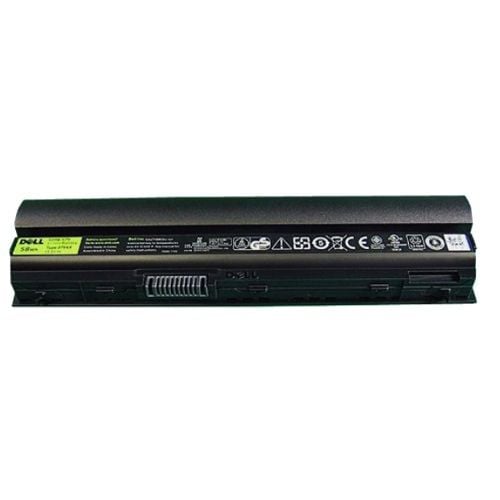

Description
Installing the 312-1446 Dell Battery
To install the 312-1446 Dell 58wh 6 Cell 1 X Long Life Li-Ion Battery for Latitude E6220, E6230, E6320, E6330, E6430s, follow these steps:
- Turn off your laptop and unplug it from any power source.
- Locate the battery latch or release mechanism on the bottom of your laptop. This may be a switch or button that needs to be moved or pressed to release the battery.
- Slide the battery out of the battery compartment and set it aside.
- Take the new 312-1446 Dell battery and insert it into the battery compartment. Make sure that the battery is properly aligned and securely inserted.
- Push the battery into the compartment until it clicks into place. You should hear a satisfying “click” when the battery is properly installed.
- Power on your laptop and check the battery status indicator to confirm that the new battery is recognized and charging. You may need to charge the battery fully before using it for the first time.
Troubleshooting Common Issues
Here are some common issues that you may encounter with the 312-1446 Dell 58wh 6 Cell 1 X Long Life Li-Ion Battery for Latitude E6220, E6230, E6320, E6330, E6430s, and some troubleshooting steps you can take:
- Battery not recognized: If your laptop doesn’t recognize the new battery, try removing and reinserting it to make sure it’s properly connected. If the problem persists, you may need to update your BIOS or check your laptop’s power management settings to make sure they’re configured correctly.
- Battery not charging: If your battery is not charging, check that the charger is properly connected to the laptop and the wall outlet. If there is no issue with the charger, you may need to check the battery contacts for any signs of dirt or corrosion. If the battery contacts are dirty, clean them using a soft, dry cloth. If the battery is still not charging, it may be faulty and require replacement.
- Short battery life: If your battery is not lasting as long as it should, you can try calibrating it by fully discharging and then fully charging it. You can also try adjusting the power settings on your laptop to reduce energy consumption. If the battery life remains short, it may be reaching the end of its useful life and require replacement.
- Overheating: If your laptop and battery are overheating, you may need to check for any obstructions that may be blocking the air vents on your laptop. You can also try adjusting the power settings on your laptop to reduce the workload and heat generation. If the problem persists, it may be due to a malfunctioning cooling system or a faulty battery, and you should seek professional assistance.
- Error messages: If you encounter any error messages related to your battery, make sure you have the latest drivers and software updates installed for your laptop. You can also check the user manual or contact Dell support for further assistance.
Tips for Maintaining and Extending
Here are some tips for maintaining and extending the life of your 312-1446 Dell 58wh 6 Cell 1 X Long Life Li-Ion Battery for Latitude E6220, E6230, E6320, E6330, E6430s:
- Calibrate the battery: Calibrating the battery once every few months can help optimize its performance and extend its lifespan. To do this, fully discharge the battery and then fully charge it before using it again.
- Use the correct charger: Using a charger that is not compatible with your laptop or battery can damage it and shorten its lifespan. Always use the correct charger that is recommended by the manufacturer.
- Store the battery correctly: If you’re not using the battery for an extended period of time, store it in a cool and dry place. Avoid exposing the battery to extreme temperatures, moisture, or direct sunlight.
- Reduce power consumption: Reducing the power consumption of your laptop can help extend the life of your battery. You can do this by adjusting the screen brightness, turning off Wi-Fi and Bluetooth when not in use, and closing any unnecessary programs and apps.
- Clean the battery contacts: Dirt and debris can accumulate on the battery contacts over time and interfere with its performance. Clean the contacts using a soft, dry cloth to maintain optimal connectivity.
- Replace the battery when necessary: Lithium-ion batteries have a limited lifespan and will eventually lose their ability to hold a charge. If you notice that your battery is no longer holding a charge or is not lasting as long as it used to, it may be time to replace it.
By following these tips, you can help maintain and extend the life of your 312-1446 Dell battery, allowing you to enjoy optimal performance and longer run times.
312-1446 Dell 58wh 6 Cell 1 X Long Life Li-Ion Battery For Latitude E6220 E6230 E6320 E6330 E6430s
Technical Specifications
- Battery technology: Lithium-ion
- Battery capacity: 58Wh
- Number of cells: 6
- Voltage: 11.1V
- Watt-hours: 5200 mAh
- Battery color: Black
- Battery weight: 12.3 oz (348 g)
- Operating temperature: 0°C to 60°C (32°F to 140°F)
- Storage temperature: -20°C to 60°C (-4°F to 140°F)
- Dimensions (L x W x H): 8.07 x 2.13 x 0.79 inches (205 x 54 x 20 mm)


