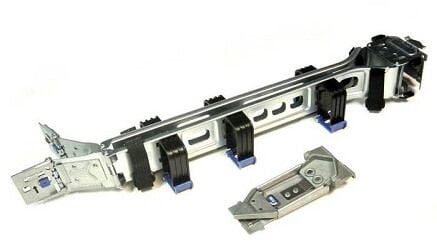
Description
Benefits of Using HP 2U CMA
- High performance: The HP 2U CMA for Management Gen8 Dl380P Server is designed to provide high performance with its Intel Xeon processors and large memory capacity.
- Scalability: The server has the capability to expand with the growing needs of the business, with support for up to 12 LFF or 24 SFF drives and 8 PCI-E slots.
- High availability: The server is equipped with features like redundant power supplies and hot-plug fans to ensure high availability and minimal downtime.
- Easy management: The HP iLO Management Engine allows for remote management and monitoring of the server, making it easy to troubleshoot and maintain.
- Virtualization support: The server is optimized for virtualization with support for VMware vSphere and other virtualization platforms.
- Energy efficiency: The server is designed to be energy efficient, with features like power capping and power supply efficiency to reduce energy costs.
- Security: The server has several security features like secure boot, TPM, and HP BIOSphere to protect against unauthorized access and data breaches.
- Compatibility: The HP 2U CMA is compatible with other HP servers and software, making it easy to integrate into existing IT environments.
- Warranty: The standard 3-year warranty provides peace of mind and protection against hardware failure.
- Reliability: HP is known for its high-quality and reliable products, and the HP 2U CMA for Management Gen8 Dl380P Server is no exception.
Energy Efficiency
The HP 2U CMA for Management Gen8 DL380P Server is designed to be energy efficient, which can help to reduce costs associated with power consumption and cooling. Here are some ways that the HP 2U CMA can help to improve energy efficiency:
- Power Management: The HP 2U CMA includes power management features that can help to reduce power consumption. This can be done by setting power policies that limit the amount of power that the server uses, or by automatically shutting down the server when it is not in use.
- Temperature Monitoring: The HP 2U CMA can monitor the temperature of the server and take actions to prevent overheating. This can help to reduce the amount of power needed for cooling and can help to prolong the lifespan of the server.
- Remote Management: The HP 2U CMA’s remote management capabilities allow administrators to monitor and manage the server from a remote location. This can help to reduce the need for on-site visits and can help to lower power consumption.
- Energy Star: The HP 2U CMA is Energy Star certified, which means that it meets the energy efficiency requirements set by the Environmental Protection Agency (EPA).
- HPE ProActive Insight Architecture: This feature uses sensors and software to monitor the server and predict potential issues, allowing administrators to take proactive steps to prevent failures and downtime, reducing energy consumption.
By using these energy-efficient features, the HP 2U CMA can help to reduce power consumption and lower the overall cost of running the server.
Installation and Setup
Installing and setting up the HP 2U CMA for Management Gen8 DL380P Server is a straightforward process that can be completed in a few steps. Here is a general overview of the installation and setup process:
- Prepare the server: Before installing the HP 2U CMA, ensure that the DL380P Gen8 Server is properly configured and that all necessary components are in place.
- Mount the HP 2U CMA: The HP 2U CMA is designed to be mounted in a 2U rack-mountable form factor, so it will need to be inserted into the server rack.
- Connect the HP 2U CMA: Connect the HP 2U CMA to the DL380P Gen8 Server using the appropriate cables. This may include data cables, power cables, and other necessary connections.
- Configure the HP 2U CMA: Once the HP 2U CMA is connected, it will need to be configured to work with the DL380P Gen8 Server. This may involve setting up the IP address, configuring the management software, and setting up any necessary access controls.
- Install the HP CMA Software: The HP CMA Software can be installed from the HP website.
- Update the firmware: To ensure that the HP 2U CMA is running the latest version of the firmware, check for updates and install them if necessary.
- Verify the Installation: Verify that the HP 2U CMA is working properly by checking for any errors, ensuring that all connections are secure, and checking that the management software is functioning correctly.
It’s important to follow the HP’s instructions and guidelines for the installation and setup process, as well as to check the compatibility of the HP 2U CMA with the specific version of the DL380P Gen8 Server.
General Information 675606-001 HP 2U Cable Management Arm
- Manufacturer : HP
- MPN : 675606-001
- Type : Cable Management Arm
- Compatibility : HP Proliant Dl380p G8 Server
Technical specifications
- Form factor: 2U rack-mountable
- Processor: Intel Xeon E5-2600 v2 or v3 series
- Memory: Up to 768 GB of DDR3 or DDR4 RAM
- Storage: Up to 12 LFF or 24 SFF SAS/SATA/SSD drives
- RAID support: HP Smart Array controllers with RAID 0, 1, 1+0, 5, and 6
- Networking: 4x Gigabit Ethernet ports, optional 10 Gigabit Ethernet or Fibre Channel
- Expansion slots: Up to 8x PCI-E slots
- Power supply: Dual hot-plug power supplies with redundancy options
- Cooling: Redundant hot-plug fans
- Management: HP iLO Management Engine for remote management
- Dimensions: 3.44 x 17.5 x 29.8 inches (8.74 x 44.45 x 75.74 cm)
- Weight: 42.2 lbs (19.15 kg)
- Operating systems supported: Microsoft Windows Server, Red Hat Enterprise Linux, SUSE Linux Enterprise Server, VMware vSphere