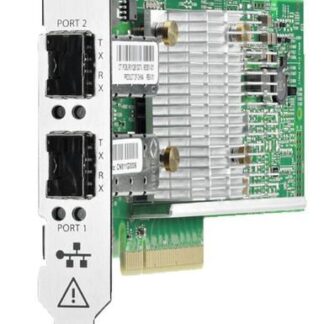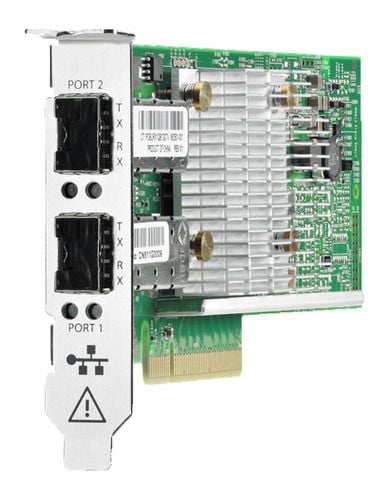
Description
Supported Security Features
The 869572-001 HPE Ethernet 10/25GB 2-Port 622FLR-SFP28 Converged Network Adapter (CNA) supports several security features to help protect data and ensure network security. Some of these features include:
- Advanced Encryption Standard (AES): This is a widely-used encryption standard that can be used to secure network traffic. The CNA supports AES with key lengths of 128, 192, and 256 bits.
- Internet Protocol Security (IPsec): IPsec is a protocol suite that provides secure communication over IP networks. The CNA supports IPsec for securing network traffic between devices.
- Secure Boot: Secure Boot is a feature that ensures that only authorized firmware and software are loaded on the CNA. This helps prevent unauthorized access to the device and ensures that the device is running the correct firmware and software.
- Secure Firmware Updates: The CNA supports secure firmware updates, which helps ensure that the device’s firmware is updated only with authorized firmware images. This helps prevent unauthorized access to the device and ensures that the device’s firmware is up-to-date with the latest security patches.
- Trusted Platform Module (TPM): The CNA includes a TPM, which is a hardware-based security feature that can be used to store encryption keys, digital certificates, and other sensitive information. This helps protect the CNA against unauthorized access and ensures that sensitive information is kept secure.
Management Options
The 869572-001 HPE Ethernet 10/25GB 2-Port 622FLR-SFP28 Converged Network Adapter offers a variety of management options to allow users to monitor and control the adapter’s performance and settings. Some of the management options include:
- HPE OneView: HPE OneView is an infrastructure management software that allows users to automate and simplify the management of their IT infrastructure. HPE OneView can be used to manage and monitor HPE servers, storage, and networking devices, including the 869572-001 HPE Ethernet 10/25GB 2-Port 622FLR-SFP28 Converged Network Adapter.
- HPE Intelligent Provisioning: HPE Intelligent Provisioning is a utility that simplifies server setup, providing a quick and easy way to deploy an operating system and other software on a server. It can also be used to configure and manage the 869572-001 HPE Ethernet 10/25GB 2-Port 622FLR-SFP28 Converged Network Adapter.
- HPE System Management Homepage: The HPE System Management Homepage is a web-based interface that provides users with an overview of the server hardware and system health, including the 869572-001 HPE Ethernet 10/25GB 2-Port 622FLR-SFP28 Converged Network Adapter. It allows users to view performance metrics, manage firmware updates, and configure adapter settings.
- HPE Smart Update Manager: HPE Smart Update Manager is a utility that simplifies firmware and driver updates for HPE servers and network devices. It can be used to update the firmware of the 869572-001 HPE Ethernet 10/25GB 2-Port 622FLR-SFP28 Converged Network Adapter.
- Command-line interface (CLI): The 869572-001 HPE Ethernet 10/25GB 2-Port 622FLR-SFP28 Converged Network Adapter supports a command-line interface (CLI) that allows users to configure and manage the adapter using command-line commands.
Configuration Ethernet
Configuring the HPE 10/25GB 2-Port 622FLR-SFP28 Converged Network Adapter involves several steps, including installing the adapter, configuring the network settings, and testing the network connection. Here are the general steps to configure this adapter:
- Install the adapter: First, install the adapter into an available PCIe slot on the server. Follow the manufacturer’s instructions to ensure the adapter is installed correctly.
- Configure the network settings: Next, configure the network settings for the adapter. This typically involves assigning an IP address to the adapter, setting the subnet mask, and configuring the default gateway. You may also need to configure DNS settings and other network settings as needed.
- Configure advanced settings: The adapter may also support advanced settings that can be configured to optimize performance and reliability. These settings may include link aggregation, VLAN tagging, and Quality of Service (QoS) settings.
- Test the network connection: Once the adapter is configured, test the network connection to ensure that it is working correctly. You can use network diagnostic tools to test the connection and identify any issues that need to be addressed.
It’s important to note that the specific steps to configure the HPE 10/25GB 2-Port 622FLR-SFP28 Converged Network Adapter may vary depending on the specific server and operating system being used. Always refer to the manufacturer’s documentation and follow best practices for configuring network adapters to ensure optimal performance and reliability.
General Information about the HPE 869572-001
- Manufacturer: HPE
- Part Number or SKU# 869572-001
- Product Type : Network Adapter
Technical Information
- Ports : 25 Gigabit SFP28 X 2
- Form Factor : Plug-in Card
- PCI Specification Revision :PCIE 3.0
- Connectivity Technology : Wired
- Data Link Protocol : 10 GIGE, 25 Gigabit LAN
- Data Transfer Rate : 25 GBPS