Description
Product Overview of the Cisco AIR-AP1832I-B-K9C Aironet Access Point
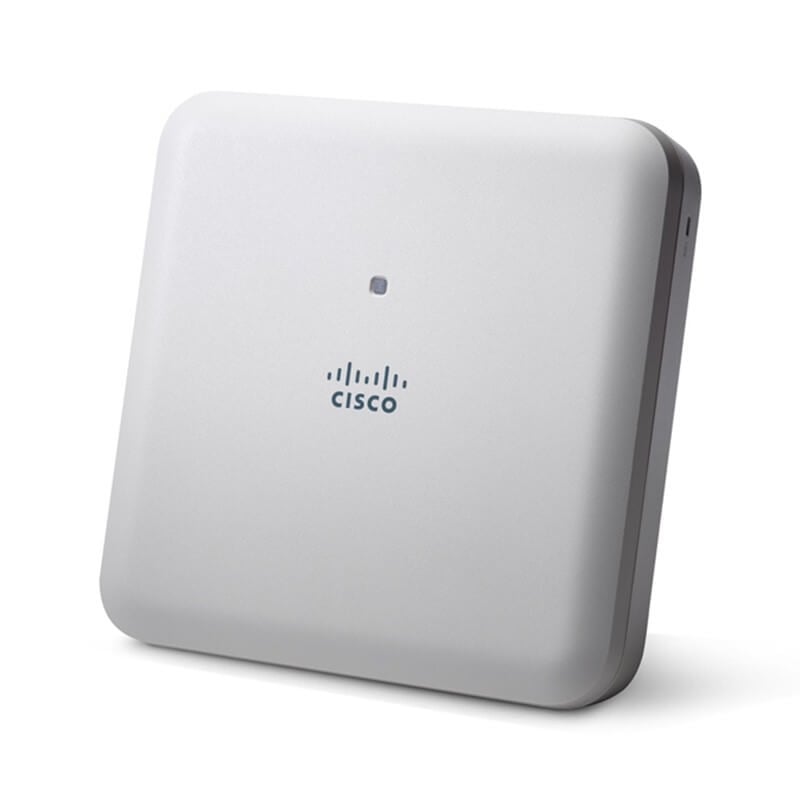
The Cisco AIR-AP1832I-B-K9C is an access point designed to provide wireless connectivity in networks. It belongs to the Aironet 1830 Series and operates under a controller-based system. This access point supports Power over Ethernet Plus (PoE+), delivering power and data through a single Ethernet cable. It offers wireless access at speeds of up to 1 Gigabit per second and utilizes Fast Ethernet for wired connectivity.
Understanding Wireless Access Points
Wireless access points are devices that enable wireless devices, like laptops or smartphones, to connect to a wired network. They transmit and receive wireless signals, allowing devices to access the network without requiring physical connections.
Features of Cisco AIR-AP1832I-B-K9C Aironet Access PointController-Based System
This access point operates within a controller-based system, where a central controller manages multiple access points, providing centralized control and configuration.
Power over Ethernet Plus (PoE+)
Supporting PoE+, this access point can receive power and transmit data over a single Ethernet cable, simplifying installation and reducing cable clutter.
Gigabit Wireless Speeds
It offers wireless access speeds of up to 1 Gigabit per second, providing fast and reliable connections for wireless devices.
Fast Ethernet Connectivity
The wired connections on this access point utilize Fast Ethernet, offering a reliable and efficient wired network connection.
Importance of Access Points in Networks
Access points are crucial in creating wireless networks. They extend network coverage, provide connectivity to wireless devices, and ensure seamless communication within the network.
Benefits of Using Cisco AIR-AP1832I-B-K9C Aironet Access Point
High-Speed Wireless Connectivity
The access point provides high-speed wireless access, catering to the demands of modern applications and devices.
Simplified Deployment
With PoE+ support, installation becomes more straightforward and cost-effective as it requires only one cable for both power and data.
Centralized Management
The controller-based system allows for centralized management, making it easier to configure and monitor multiple access points from a single location.
Reliable Wired Connectivity
The Fast Ethernet ports ensure reliable and stable wired connections for devices that require a wired network connection.
Use Cases for Cisco AIR-AP1832I-B-K9C Aironet Access Point
Enterprise Networks
In large organizations and businesses, these access points are deployed to create extensive wireless networks that provide connectivity to a large number of devices.
Public Spaces
Airports, hotels, and other public spaces utilize these access points to offer Wi-Fi access to visitors and guests, ensuring reliable and high-speed internet connectivity.
Educational Institutions
Schools and universities use access points like these to facilitate wireless connectivity for students and faculty across campuses.
Maximizing the Performance of 1830 Series Aironet Access Point
The Cisco 1830 Series Aironet 1 GBPS Wireless Access Point (AIR-AP1832I-B-K9C) is a high-performance wireless access point that is designed to provide reliable and fast wireless connectivity to a large number of users. Maximizing the performance of this device requires careful consideration of several factors, including its physical placement, configuration settings, and management.
Here are some specific steps you can take to maximize the performance of the AIR-AP1832I-B-K9C:
- Choose the Right Location: The physical placement of your access point can have a big impact on its performance. Place the AIR-AP1832I-B-K9C in a central location that is free from obstructions, such as walls or large pieces of furniture, which can interfere with the signal. Ideally, it should be installed in a location that is high up and free from sources of interference, such as microwave ovens or other wireless devices.
- Optimize the Configuration Settings: The performance of the AIR-AP1832I-B-K9C can also be optimized by configuring it correctly. For example, you can adjust the transmit power and channel width settings to improve the range and throughput of the device. You can also configure the device to use 802.11ac Wave 2, which offers faster speeds and better performance than earlier versions of the 802.11 standard.
- Enable Quality of Service (QoS): QoS settings allow you to prioritize certain types of traffic, such as voice or video, over others. This can help to ensure that critical applications have the bandwidth they need to perform effectively. Enabling QoS can also help to reduce latency and packet loss, which can improve overall performance.
- Monitor and Manage the Device: Regular monitoring and management of the AIR-AP1832I-B-K9C can help to identify and resolve issues that may be impacting performance. You can use tools such as Cisco Prime Infrastructure or the Cisco Wireless Control System to monitor the device and perform regular maintenance tasks such as firmware upgrades or configuration backups.
- Consider Adding Antennas: The AIR-AP1832I-B-K9C comes with two internal antennas, but you may want to consider adding additional antennas to improve the device’s range and coverage. Cisco offers a variety of external antennas that can be used with the AIR-AP1832I-B-K9C to optimize its performance in different environments and applications.
Basic Components
The AIR-AP1832I-B-K9C Cisco 1 Ports WAP is a high-performance, dual-band access point designed for small to medium-sized businesses, as well as enterprise environments. It is part of the Cisco 1830 Series of WAPs, which also includes the AIR-AP1832P-B-K9C model that includes Power over Ethernet (PoE) support.
Here are the basic components of the AIR-AP1832I-B-K9C WAP:
- Ethernet ports: The WAP has two Gigabit Ethernet ports – one for the connection to the LAN, and another for Power over Ethernet (PoE) support. The PoE port can also be used as a second LAN port.
- Antennas: The WAP has four internal omnidirectional antennas – two for 2.4 GHz and two for 5 GHz – that provide wireless coverage throughout the area.
- LEDs: The WAP has several LEDs on the front panel that provide information about the device’s status, including power, LAN activity, and wireless activity.
- Reset button: The WAP has a reset button on the back panel that can be used to reset the device to its factory default settings.
- Console port: The WAP has a console port that can be used for local management and configuration.
- Wireless capabilities: The WAP supports IEEE 802.11a/b/g/n/ac Wave 2 wireless standards and can provide up to 1 Gbps of throughput.
- Power supply: The WAP can be powered using an external power supply or through PoE.
- Management and configuration: The WAP can be managed and configured using Cisco’s Wireless LAN Controller (WLC) or Cisco Mobility Express, which is a simplified option for smaller networks.
Integrating Wireless Access Points into a Network Infrastructure
Integrating wireless access points (APs) into a network infrastructure requires careful planning and configuration to ensure optimal performance, security, and scalability. The Cisco 1830 Series Aironet 1 GBPS Wireless Access Point, specifically the AIR-AP1832I-B-K9C model, is a popular AP that can be integrated into a network infrastructure.
Here are some details to consider when integrating this wireless access point:
- Network architecture: Before integrating the AP, it’s important to understand the existing network architecture. This includes the type of switches, routers, and firewalls used, as well as the network topology. This will help determine how the AP should be connected to the network.
- Power source: The AIR-AP1832I-B-K9C can be powered using a Power over Ethernet (PoE) or an AC adapter. If PoE is used, ensure that the switch supports PoE and that it provides enough power for the AP.
- Placement: The location of the AP is critical for optimal performance. Consider factors such as coverage area, signal strength, and interference from other devices when deciding where to place the AP. For example, the AP should be placed in an area with minimal interference from other wireless devices or appliances.
- Configuration: The AP needs to be configured properly to integrate into the network infrastructure. This includes setting up wireless security protocols such as WPA2 or 802.1X, configuring VLANs and QoS settings, and enabling features such as mesh networking or beamforming.
- Management: Once the AP is integrated into the network infrastructure, it needs to be managed and monitored. This includes monitoring performance, troubleshooting connectivity issues, and updating firmware or software as needed.
Key Information about this Cisco AIR-AP1832I-B-K9C
- Manufacturer: Cisco
- Model Number or SKU# AIR-AP1832I-B-K9C
- Product Line: Aironet
- Product Series: 1830
- Product Model: AP1832I
- Product Type: Wireless Access Point
Technical Information of Wireless Access Point
- Wireless Transmission Speed: 1 GBPS
- Wireless LAN Standard: IEEE 802.11ac
- Frequency Band: 2.40 GHz
- Frequency Band: 5 GHz
- MIMO Technology: Yes
- Beamforming Technology: Yes
Interfaces / Ports for Wireless 1830 Series Access Point
- Ethernet Technology: Ethernet
- Ethernet Technology: Gigabit Ethernet
- Ethernet Technology: Fast Ethernet
- Number of Networks: (RJ-45) Ports 1
- PoE (RJ-45) Port: Yes
- VGA: No
- HDMI: No
- USB: Yes
- Powerline: No
- Management Port: Yes
Power Description
- Power Source PoE
- Power Source Power Supply
- 802.3af
- 802.3at
- Enhanced PoE
- Cisco local power supply
- Cisco power injector
Antenna
- Integrated antenna 2.4 GHz, gain 3 dBi
- Internal omni, horizontal beamwidth 360 5 GHz,
- Gain 5 dBi, internal omni, horizontal beamwidth 360
Extensible Authentication Protocol (EAP) types
- EAP-Transport Layer Security (TLS)
- EAP-Tunneled TLS (TTLS) or Microsoft Challenge Handshake Authentication Protocol Version 2 (MSCHAPv2)
- Protected EAP (PEAP) v0 or EAP-MSCHAPv2
- EAP-Flexible Authentication via Secure Tunneling (FAST)
- PEAP v1 or EAP-Generic Token Card (GTC)
- EAP-Subscriber Identity Module (SIM)
Miscellaneous
- Supported Wireless LAN Controllers-
- The Aironet 1831i supports the following Cisco wireless LAN controllers: 2500 Series Wireless Controllers, the Cisco Wireless Controller Module for ISR G2, Cisco Wireless Services Module 2 (WiSM2) for Cisco Catalyst 6500 Series Switches, Cisco 5500 Series Wireless Controllers, Cisco 5520 Series Wireless Controllers, Cisco Flex 7500 Series Wireless Controllers, Cisco 8500 Series Wireless Controllers, Cisco 8540 Series Wireless Controllers, Cisco 5760 Wireless LAN Controller, Cisco Catalyst 3650 and 3850 Series Switches with integrated controller.
In summary, the Cisco AIR-AP1832I-B-K9C Aironet 1830 Series Controller-Based Access Point is a powerful tool for establishing wireless connectivity. With its controller-based system, support for PoE+, high-speed wireless capabilities, and reliable wired connectivity through Fast Ethernet, it caters to the demands of various network environments. From large enterprises to public spaces and educational institutions, this access point ensures seamless wireless communication and efficient network management.