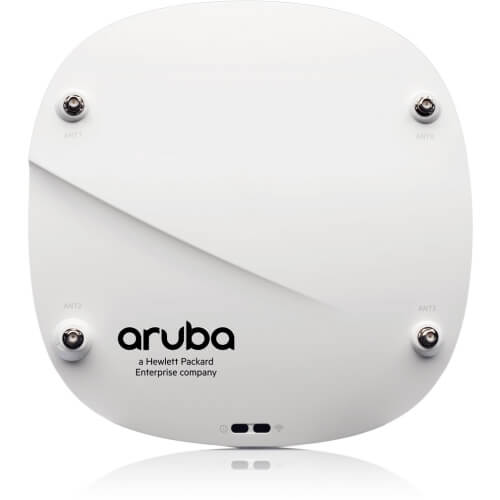
Description
Wireless Access Point Performance Optimization
The AIR-AP1852E-H-K9 Cisco IEEE 802.11ac Wireless Access Point is designed to provide high-performance wireless connectivity in challenging environments. To optimize the performance of this access point, there are several strategies that can be employed.
- Optimize Placement: The placement of the access point is critical to ensure optimal signal coverage and performance. The access point should be placed in a central location that provides maximum coverage, and away from sources of interference such as microwaves, cordless phones, or other electronic devices.
- Channel Optimization: In a crowded wireless environment, it’s essential to select the right channels to avoid interference and improve performance. The access point should be set to automatically select the best channel or manually set the optimal channels.
- Bandwidth Optimization: The AIR-AP1852E-H-K9 supports both 2.4GHz and 5GHz frequencies. For maximum performance, it’s recommended to use the 5GHz frequency, which offers faster data transfer rates and is less susceptible to interference.
- Quality of Service (QoS): The QoS settings of the access point should be configured to prioritize traffic and ensure that critical applications receive the necessary bandwidth and performance.
- Security Settings: Security settings such as WPA2 and AES encryption should be enabled to protect the wireless network from unauthorized access.
- Firmware Updates: The latest firmware updates should be installed to ensure optimal performance and to address any security vulnerabilities.
- Load Balancing: Load balancing should be enabled to distribute traffic across multiple access points to avoid network congestion and improve performance.
Troubleshooting Wireless Access Points
The AIR-AP1852E-H-K9 is a high-performance wireless access point from Cisco, designed to support the latest IEEE 802.11ac standard for faster, more reliable wireless networking. While this access point is designed to be highly reliable and easy to use, issues may arise that require troubleshooting. Here are some steps that can be taken to troubleshoot the AIR-AP1852E-H-K9:
- Check the physical connections: Make sure that the access point is properly connected to the network and power source. Ensure that the Ethernet cable is properly plugged in and that the power supply is properly connected.
- Verify network configuration: Check the configuration of the network to ensure that the access point is properly configured with the correct SSID, channel, and security settings.
- Verify firmware version: Check the firmware version of the access point and compare it with the latest available version. If the firmware is outdated, update it to the latest version.
- Monitor the logs: The access point has a log feature that can provide detailed information on any issues. Review the log files to see if there are any errors or warnings.
- Analyze the wireless environment: Use a wireless analyzer tool to check the signal strength, noise levels, and interference in the wireless environment. This can help identify issues that are impacting the performance of the access point.
- Perform a factory reset: If none of the above steps work, perform a factory reset to restore the access point to its default settings.
- Contact technical support: If the issue persists, contact the technical support team for further assistance. They can provide more advanced troubleshooting steps or replace the access point if necessary.
Power over Ethernet (PoE)
The AIR-AP1852E-H-K9 Cisco IEEE 802.11ac Wireless Access Point is a high-performance wireless access point designed for enterprise-class networks. It supports the IEEE 802.11ac Wave 2 standard and provides wireless data transfer rates of up to 1.7 Gbps.
One of the key features of this access point is Power over Ethernet (PoE) support. PoE technology allows the access point to be powered using the Ethernet cable that connects it to the network switch. This eliminates the need for a separate power supply, making installation easier and more flexible.
The AIR-AP1852E-H-K9 supports PoE+ (also known as PoE Plus), which provides up to 30 watts of power over Ethernet to the access point. This is important because the access point requires a significant amount of power to operate at full capacity, and PoE+ ensures that it receives the necessary power without the need for a separate power source.
Another advantage of PoE support is that it enables the access point to be installed in locations where there is no electrical outlet nearby. This can be particularly useful in outdoor environments or in large indoor spaces where running power cables can be difficult or expensive.
General Information
- Manufacturer Cisco Systems, Inc
- Manufacturer Part Number AIR-AP1852E-H-K9
- Category Name: Networking
- Sub Category Name:Wireless 1.7GBPS
- Brand Name Cisco
- Product Type Wireless Access Point
Technical Information
- Wireless LAN Standard IEEE 802.11ac
- Frequency Band 2.40 GHz
- 5 GHz
- Wireless Transmission Speed 1.70 Gbit/s
- MIMO Technology Yes
- Beamforming Technology Yes
Interfaces/Ports
- Ethernet Technology Gigabit Ethernet
- Number of Network (RJ-45) Ports 2
- PoE (RJ-45) Port No
- PoE PD Port Yes
- VGA No
- HDMI No
- USB Yes
- Powerline No
- Management Port Yes