

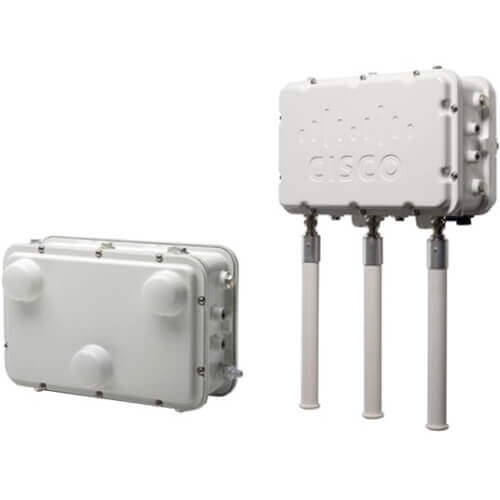
Description
Security Features of Wireless Access Points
The AIR-CAP1552EU-E-K9 Cisco Aironet 1552EU Wireless Access Point is equipped with a range of security features to ensure the confidentiality, integrity, and availability of wireless communications. Some of the key security features of this device include:
- Encryption: The AIR-CAP1552EU-E-K9 supports the use of the Advanced Encryption Standard (AES) to secure wireless communications between the access point and client devices. AES is a widely used encryption standard that provides strong, effective encryption to protect data from unauthorized access.
- Authentication: The AIR-CAP1552EU-E-K9 supports a variety of authentication methods, including 802.1X, which provides a secure way to authenticate and authorize wireless clients before allowing them to connect to the network. The access point can also use other authentication methods, such as MAC address filtering, to ensure only authorized devices can connect to the network.
- Intrusion detection and prevention: The AIR-CAP1552EU-E-K9 includes an integrated intrusion detection and prevention system (IDPS) that monitors the wireless network for security threats and attacks. The IDPS can detect and block unauthorized access attempts, rogue access points, and other security threats.
- Access controls: The AIR-CAP1552EU-E-K9 can be configured with access controls to limit who can connect to the network and what resources they can access. Access controls can be based on a variety of factors, such as device type, user role, and location.
- VLAN support: The AIR-CAP1552EU-E-K9 supports the use of VLANs to segment the network and isolate traffic. This can help prevent unauthorized access to sensitive network resources and limit the impact of security breaches.
- Management security: The AIR-CAP1552EU-E-K9 includes a range of management security features, such as Secure Shell (SSH) and Simple Network Management Protocol (SNMP) v3, to protect against unauthorized access to the device’s management interfaces.
Troubleshooting Wireless Access Points
The AIR-CAP1552EU-E-K9 Cisco Aironet 1552EU Wireless Access Point may experience a number of issues that can impact its performance and ability to provide wireless connectivity. Troubleshooting these issues can help identify the root cause of the problem and take appropriate corrective actions. Here are some common issues that may require troubleshooting:
- Connectivity issues: This is a common issue and could be due to incorrect network settings or interference from other devices. Verify that the correct network settings are configured on the access point and that the wireless clients are able to connect to the network. Also, check for any sources of interference, such as other wireless devices or equipment, and move the access point away from these sources.
- Poor signal strength: This issue could be due to the location of the access point or interference from other devices. Move the access point to a different location or adjust the antenna to improve signal strength. You can also use a wireless analyzer tool to identify the source of the interference and take appropriate actions.
- Firmware issues: If the access point is not functioning properly, it could be due to a firmware issue. Check for any available firmware updates from Cisco’s website and upgrade the firmware as necessary.
- Authentication and security issues: If users are unable to connect to the network or are experiencing connectivity issues, it could be due to authentication or security issues. Verify that the correct security settings are configured on the access point and that the user credentials are correct.
- DHCP issues: If clients are unable to obtain IP addresses from the network, it could be due to DHCP issues. Verify that the correct DHCP settings are configured on the access point and that the DHCP server is functioning properly.
- Power issues: If the access point is not powering on or is intermittently powering off, it could be due to a power issue. Verify that the correct power supply is being used and that the power source is functioning properly.
Quality of Service and Traffic Management
The AIR-CAP1552EU-E-K9 Cisco Aironet 1552EU Wireless Access Point comes with a range of features that allow for Quality of Service (QoS) and traffic management. These features are designed to ensure that the wireless network operates smoothly and efficiently, even under heavy loads.
One important feature of the AIR-CAP1552EU-E-K9 access point is its ability to prioritize traffic. This means that the access point can be configured to give priority to certain types of traffic over others, such as voice or video traffic. This can help to ensure that these types of traffic receive the necessary bandwidth and are not affected by congestion on the network.
Another feature that can help with traffic management is the ability to create different virtual LANs (VLANs). VLANs allow network administrators to group devices together and control how they communicate with each other. This can help to reduce congestion and improve overall network performance.
The AIR-CAP1552EU-E-K9 access point also supports Quality of Service (QoS) protocols such as 802.11e, which allows for the prioritization of certain types of traffic. In addition, the access point can be configured to use various QoS policies, such as Weighted Fair Queuing (WFQ) or Class-Based Queuing (CBQ), which can help to ensure that traffic is managed effectively and efficiently.
Finally, the AIR-CAP1552EU-E-K9 access point comes with a range of monitoring and reporting tools that allow network administrators to monitor network performance in real-time. This includes the ability to view network traffic statistics and identify any bottlenecks or areas of congestion that need to be addressed.
General Information
- Manufacturer: Cisco Systems, Inc
- Manufacturer Part Number: AIR-CAP1552EU-E-K9
- Brand Name: Cisco
- Product Line: Aironet
- Product Series: 1550
- Product Model: 1552EU
- Product Name: Aironet 1552EU Wireless Access Point
- Product Type: Wireless Access Point
Technical Information
- Wireless LAN Standard: IEEE 802.11n
- ISM Band: Yes
- UNII Band: Yes
- ISM Minimum Frequency: 2.40 GHz
- ISM Maximum Frequency: 2.48 GHz
- UNII Minimum Frequency: 5.47 GHz
- UNII Maximum Frequency: 5.73 GHz
- Antenna Type: Omnidirectional Antenna
- Antenna Type: Directional Antenna
- Wireless Transmission Speed: 300 Mbit/s
- Wireless Security-
- AES
- TKIP
- IEEE 802.11i
- IEEE 802.1X
- WPA2
- WPA
- EAP-PEAP
- EAP-TLS
- EAP-TTLS
- EAP-SIM
- LEAP
- Features: MIMO Technology
- Features: Quality of Service (QoS)
Interfaces / Ports
- Ethernet Port: Yes
- Fast Ethernet Port: Yes
- Gigabit Ethernet Port: Yes
- 10Gigabit Ethernet Port: No
- Network (RJ-11): No
- PoE (RJ-45) Port: Yes
- VGA: No
- HDMI: No
- Audio Line Out: No
- Serial Port: No
- USB: No
- Powerline: No
- Management Port: No
I/O Expansions
- Expansion Slots: SFP (mini-GBIC)
Power Description
- Input Voltage: 12 V DC
- Power Source: AC Adapter
- Power Source: Battery


