

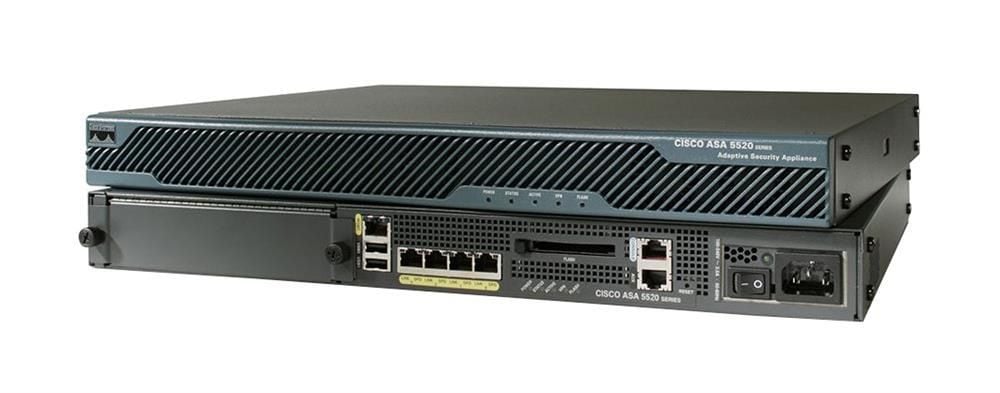
Description
Features and specifications
The ASA5520-AIP20-K9 is a Cisco ASA 5520 Security Appliance with an AIP-SSC-5 Module. Here are its key features and specifications:
Features:
- Firewall and VPN capabilities
- Intrusion Prevention System (IPS)
- Advanced application-layer security services
- URL filtering and anti-spam protection
- Failover and redundant interfaces
- Support for up to 750 IPSec VPN peers
- Support for up to 5,000 concurrent connections
- Support for up to 300,000 maximum concurrent sessions
Specifications:
- Firewall throughput: Up to 450 Mbps
- VPN throughput: Up to 225 Mbps
- IPS throughput: Up to 225 Mbps
- Concurrent sessions: 280,000
- VLANs: Up to 200
- Interfaces: 4 Gigabit Ethernet (10/100/1000) ports, 1 Fast Ethernet (10/100) port, 1 management port
Configuration and Management
The Cisco ASA 5520 Security Appliance is a firewall and security device that provides comprehensive protection for network resources. The ASA 5520-AIP20-K9 model includes a built-in Intrusion Prevention System (IPS) that provides additional protection against network threats. To configure and manage the ASA 5520-AIP20-K9, follow these steps:
- Connect to the ASA 5520-AIP20-K9: Use a console cable to connect a computer to the ASA 5520-AIP20-K9’s console port, or connect to the device via Telnet or SSH.
- Access the CLI: Log in to the ASA 5520-AIP20-K9’s Command Line Interface (CLI) using the default username and password (if not previously changed).
- Configure basic settings: Configure the ASA 5520-AIP20-K9’s basic settings such as hostname, domain name, time zone, and interfaces.
- Configure security policies: Create security policies to control access to network resources. You can define policies for inbound and outbound traffic, and specify rules to block or allow specific types of traffic.
- Configure VPN: Set up Virtual Private Network (VPN) connections to allow remote access to the network. You can create site-to-site VPNs to connect different locations, or client-to-site VPNs to allow remote workers to access the network.
- Configure IPS: Set up the Intrusion Prevention System (IPS) to protect against network threats. You can create rules to detect and block suspicious traffic, or to alert administrators of potential security incidents.
- Monitor and troubleshoot: Use monitoring tools to view traffic logs, system status, and other information. Use troubleshooting tools to diagnose and resolve any issues.
- Maintain the device: Regularly update the ASA 5520-AIP20-K9’s firmware and IPS signatures to ensure the latest security features and protections are available.
Maintenance Option
To maintain the ASA5520-AIP20-K9 Cisco ASA 5520 Security Appliance and ensure its optimal performance and security, you should consider the following maintenance options:
- Firmware and software updates: Regularly check for updates to the ASA 5520-AIP20-K9’s firmware and software, including the operating system, IPS signatures, and any other relevant software components. Cisco releases updates to address security vulnerabilities and improve performance, and it is important to keep the device up to date with the latest patches and upgrades.
- Backups: Regularly back up the ASA 5520-AIP20-K9’s configuration and other important data, such as VPN settings and IPS policies. This ensures that in case of a hardware failure or other issue, you can quickly restore the device to its previous state without losing any important data.
- Monitoring and reporting: Use monitoring tools to keep an eye on the device’s performance and security status. These tools can alert you to potential issues before they become serious, and can also provide valuable insights into network activity and performance.
- Hardware maintenance: Regularly inspect the device for physical damage or wear, and replace any worn or damaged parts. Additionally, ensure that the device is kept in a clean and well-ventilated environment to prevent overheating or other issues.
- Training and support: Ensure that your staff is properly trained on how to configure, manage, and troubleshoot the ASA 5520-AIP20-K9. Additionally, consider purchasing support and maintenance services from Cisco to receive technical support and assistance when needed.
Main Specification
- Brand Name: Cisco
- Manufacturer: Cisco Systems, Inc
- Manufacturer Part Number: ASA5520-AIP20-K9
- Product Series: 5500
- Product Model: ASA 5520
- Product Name: ASA 5520 VPN/Firewall with SSM-AIP-20
- Product Type: Network Security/Firewall Appliance
Technical Information
- Virtualization:
- 130000 x Concurrent Session
- 300 x IPSec VPN Peer
- 300 x Web VPN Peer
- 2 x Security Context
- 10 x Security Context
- 9000 x Concurrent Session
Interfaces/Ports
- Total Number of Ports: 5
- USB: Yes
- Management Port: Yes
Network & Communication
- Ethernet Technology: Fast Ethernet
- Network Standard: 10/100Base-TX
- Network Standard: 1000Base-T
I/O Expansions
- Number of Total Expansion Slots: 2
- Expansion Slot Type: SSM
- Number of SSM Slots: 1
Management & Protocols
- Manageable: Yes
Memory
- Standard Memory: 512 MB
- Memory Technology: DRAM
- Flash Memory: 64 MB
- Memory Card Supported: CompactFlash (CF) Card
Power Description
- Input Voltage: 110 V AC
- Input Voltage: 220 V AC
- Power Source: Power Supply


