


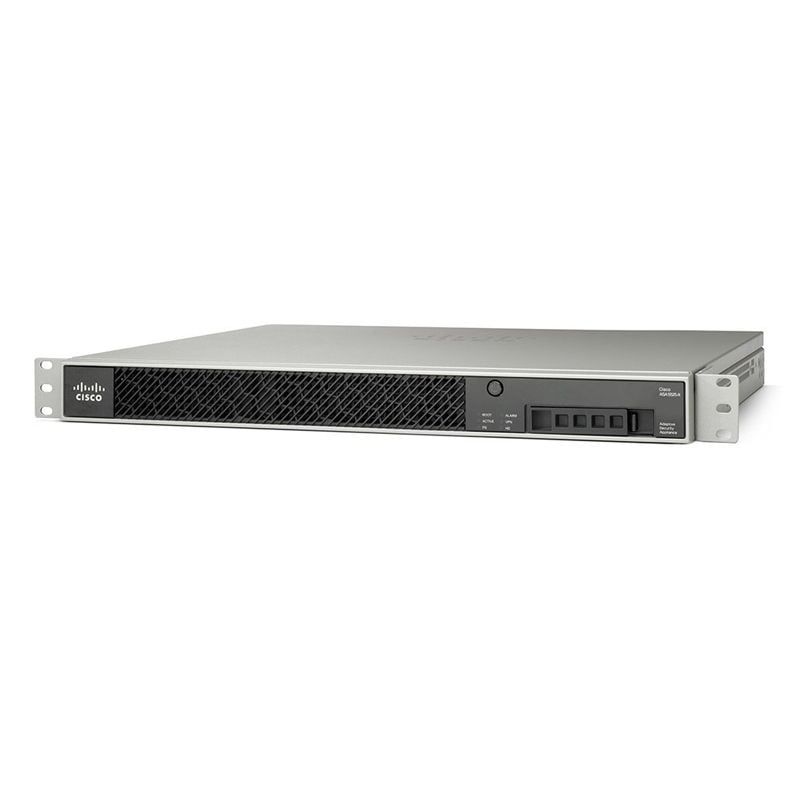

Description
Tips for Optimizing the Performance
Sure, here are some tips for optimizing the performance of the Cisco Firepower Security appliance ASA5525-FTD-K9:
- Use the latest firmware version: Ensure that your ASA5525-FTD-K9 has the latest firmware version installed. This will ensure that you have access to the latest features and improvements, as well as addressing any known issues or vulnerabilities.
- Optimize your firewall rules: Configure your firewall rules in a way that allows legitimate traffic to pass through while blocking unauthorized traffic. This will help prevent unnecessary traffic from passing through the appliance and optimize the device’s performance.
- Optimize IPS rules: Configure your Intrusion Prevention System (IPS) rules in a way that allows it to detect and block malicious traffic, while minimizing the impact on the device’s performance. Be selective in enabling IPS rules based on your organization’s security requirements.
- Use traffic shaping: Implement traffic shaping to control the amount of traffic that passes through the ASA5525-FTD-K9. This will help prioritize network traffic and optimize the device’s performance.
- Optimize SSL decryption: If you are using SSL decryption, configure it to decrypt only the traffic that is necessary to avoid the unnecessary processing of encrypted traffic. This can help reduce the performance impact on the device.
- Use high-performance hardware: Deploy the ASA5525-FTD-K9 on high-performance hardware to maximize its processing power and speed. This can help the device to handle higher traffic loads and reduce the processing time for security features.
- Monitor device performance: Regularly monitor the performance of the ASA5525-FTD-K9 using the monitoring tools provided by the device. This can help identify any bottlenecks or performance issues that may need to be addressed.
Understanding the licensing Model
The Cisco ASA5525-FTD-K9 is a Firepower Security appliance that offers a variety of network security features such as firewall, VPN, intrusion prevention system (IPS), malware protection, URL filtering, and more. Like most Cisco security products, the ASA5525-FTD-K9 has a licensing model that determines which features are available and the maximum throughput capacity of the device.
Here are some of the important aspects of the ASA5525-FTD-K9’s licensing model:
- Base License: The ASA5525-FTD-K9 comes with a Base License that provides basic functionality, such as firewall, VPN, and IPS. This license allows the appliance to operate at a maximum throughput of 1.2 Gbps.
- Security Plus License: The Security Plus License is an optional upgrade that provides additional functionality such as URL filtering, malware protection, and increased VPN and IPS throughput. With this license, the ASA5525-FTD-K9 can operate at a maximum throughput of 2 Gbps.
- Threat Defense License: The Threat Defense License is a newer licensing model that consolidates all of the security features into a single license. This license includes all of the features provided by the Base and Security Plus licenses, as well as advanced threat protection capabilities such as file and AMP inspection. The Threat Defense License also allows the ASA5525-FTD-K9 to operate at a maximum throughput of 2 Gbps.
- Subscription Licenses: In addition to the Base, Security Plus, and Threat Defense Licenses, the ASA5525-FTD-K9 also requires subscription licenses for some of its security features, such as URL filtering and malware protection. These licenses are typically annual subscriptions and must be renewed to maintain the functionality of these features.
- License Management: The ASA5525-FTD-K9’s licensing can be managed using the Cisco Smart Software Manager (CSSM) or the Cisco License Manager (CLM). These tools allow network administrators to purchase, manage, and track their licenses across multiple devices.
Deployment and Configuration Options
The Cisco Firepower Security Appliance ASA5525-FTD-K9 is a versatile network security solution that can be deployed in various network environments to provide advanced security capabilities such as firewall, VPN, Intrusion Prevention System (IPS), and malware protection.
Here are some deployment and configuration options for the ASA5525-FTD-K9:
- On-premise deployment: The ASA5525-FTD-K9 can be deployed on-premise to secure the network perimeter and protect the internal network from external threats. It can be configured to use NAT (Network Address Translation) to translate private IP addresses to public IP addresses for internet communication.
- Remote access VPN deployment: The ASA5525-FTD-K9 can be configured to allow remote access VPN connectivity for remote users to access the network securely. It supports various VPN protocols such as SSL VPN and IPsec VPN.
- Site-to-site VPN deployment: The ASA5525-FTD-K9 can also be configured to establish site-to-site VPN connectivity between multiple locations to secure the communication between them. It supports various VPN protocols such as IPsec VPN and GRE (Generic Routing Encapsulation) tunnels.
- High Availability deployment: The ASA5525-FTD-K9 can be deployed in a high availability configuration to ensure maximum uptime and failover protection. It supports various high availability modes such as Active/Standby and Active/Active.
- Virtual deployment: The ASA5525-FTD-K9 can be deployed as a virtual machine on a hypervisor such as VMware or Hyper-V to provide network security in a virtualized environment.
- Cloud deployment: The ASA5525-FTD-K9 can be deployed in the cloud to provide network security for cloud workloads. It supports cloud platforms such as Amazon Web Services (AWS) and Microsoft Azure.
To configure the ASA5525-FTD-K9, you can use Cisco’s Firepower Management Center (FMC) or the Firepower Device Manager (FDM) for a simplified interface. You can configure policies to control traffic flow, configure IPS rules to detect and prevent intrusions, and configure URL filtering and malware protection policies to protect against threats. Additionally, you can use the FMC to monitor the device’s performance and generate reports to track the security posture of your network.
Main Information about this Cisco ASA5525-FTD-K9
- Manufacturer: Cisco
- Part Number or SKU # ASA5525-FTD-K9
- Product Line: ASA
- Product Name: ASA 5525-X with Firepower Threat Defense
- Product Type: Security appliance
Technical Information of Firepower appliance
- Total Number of Ports: 8
- Connectivity Technology: Wired
- Data Link Protocol Ethernet, Fast Ethernet, Gigabit Ethernet
- Throughput: 600 Mbps
Performance of 8 Ports Security appliance
- Firewall throughput: 2 Gbps ¦ VPN throughput: 300 Mbps ¦ Connection rate: 20000 connections per second ¦ Firewall + intrusion prevention
- Capacity IPSec VPN: 750 ¦ SSL VPN peers: 2 ¦ Concurrent sessions: 500000 ¦ Virtual interfaces (VLANs): 200 ¦ Security contexts: 2
Expansion / Connectivity for Firepower Threat Defense
- Expansion Slots: 1 (total) / 1 (free) x expansion slot
- Interfaces 8 x 1000Base-T – RJ-45 ¦ 1 x 1000Base-T (management) – RJ-45 ¦ 1 x management – RJ-45 ¦ 2 x USB 2.0 – Type A
Processor / Memory / Storage
- RAM: 8 GB
- Flash Memory: 8 GB
Power
- Power Device: Internal power supply
- Installed Qty: 1
- Max Supported Qty: 1
- Voltage Required: AC 120/230 V (50/60 Hz)
- Power: Provided 400 Watt
- Software / System Requirements:
- Software Included Drivers & Utilities, Cisco Threat Defense 6.0.1
Dimensions & Weight
- Height: 1.7 Inch
- Width: 16.9 Inch
- Depth: 15.6 Inch
- Weight: 14.99 LBS
Miscellaneous
- Compliant Standards VCCI, C-Tick, EN 61000-3-2, ICES-003, EN 61000-3-3, EN55024, EN55022 Class A, CISPR 22, UL 60950-1, IEC 60950-1, EN 60950-1, FCC Part 15 B Class A, CAN/CSA C22.2 No. 60950-1-07, ANSI C63.4-2009


