

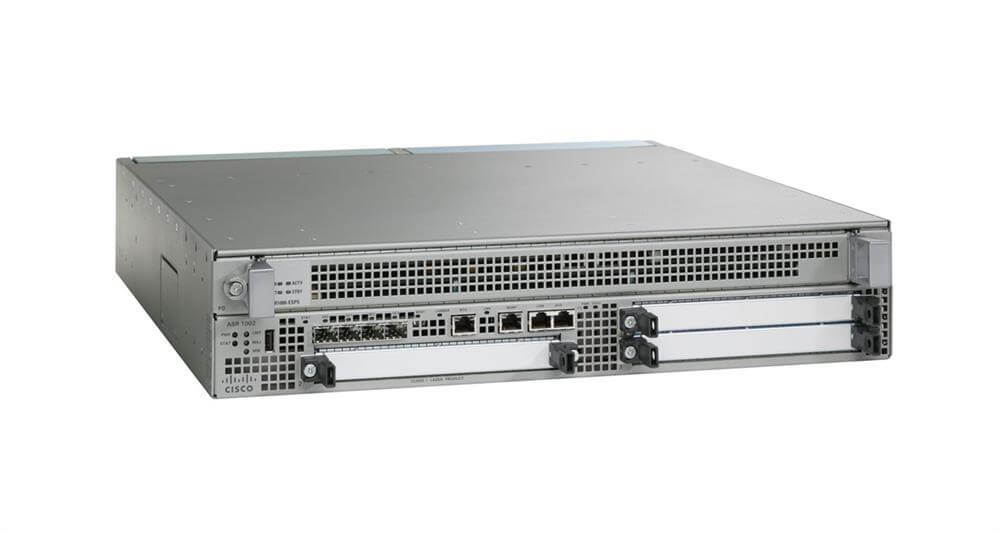
Description
Key Features of Service Router
- High-Performance Routing: The ASR1002-10G/K9 offers advanced routing capabilities with a high-performance processor and large memory capacity, allowing for efficient handling of large amounts of data traffic.
- 10 Gigabit Ethernet Interface: The router features 10 Gigabit Ethernet interfaces, providing high-speed connectivity for large-scale network deployments.
- Advanced Quality of Service (QoS): The router includes advanced QoS features, such as traffic shaping, rate limiting, and priority queuing, to ensure optimal performance and reliability.
- Virtualization Capabilities: The ASR1002-10G/K9 supports virtualization through the use of Cisco’s Virtual Services Platform, allowing for the deployment of multiple virtual routers on a single physical device.
- Network Security: The router includes built-in security features, such as firewall, VPN, and intrusion prevention, to protect against network threats.
- Scalability: The ASR1002-10G/K9 is designed to be scalable and can be easily expanded as network requirements change.
- Management and Monitoring: The router offers comprehensive management and monitoring capabilities, including the ability to monitor and troubleshoot network performance and to configure and manage the router remotely.
- Carrier-Grade Reliability: The ASR1002-10G/K9 is designed for use in mission-critical environments and offers carrier-grade reliability, with redundant power supplies and cooling systems.
Configuration and Management
- Access the ASR1002-10G/K9 router through a console or SSH connection.
- Configure the basic settings such as hostname, IP address, and default gateway.
- Configure the interfaces for the router. This includes assigning IP addresses, configuring VLANs, and enabling routing protocols such as OSPF or BGP.
- Configure Quality of Service (QoS) settings to manage traffic flow and prioritize certain types of traffic.
- Configure security features such as access control lists (ACLs) and firewall rules to protect the network from unauthorized access and attacks.
- Configure Virtual Routing and Forwarding (VRF) instances to segment the network and isolate traffic.
- Configure VPN connections for remote access and site-to-site connections.
- Monitor the router’s performance and troubleshoot any issues that arise. This can be done through the use of tools such as SNMP, syslog, and Cisco’s Performance Monitoring (PerfMon) feature.
- Regularly update the router’s firmware and software to ensure it is running the most current version.
- Perform regular backups of the router’s configuration to ensure that it can be easily restored in the event of a failure.
Troubleshooting and Maintenance
Verify the Router Configuration:
- Check the router’s configuration and ensure that it is properly configured for the network requirements.
- Verify that the correct interfaces and protocols are configured, and that the routing tables are correct.
Check the Router Connectivity:
- Verify that the router can connect to the other devices on the network.
- Check the link status of the interfaces, and ensure that they are up and running.
Check for Errors and Alarms:
- Check the router’s logs for any errors or alarms that may indicate a problem with the router.
- Investigate any errors or alarms that are present and take appropriate action to resolve the issue.
Check the Router Performance:
- Monitor the router’s performance to ensure that it is operating at optimal levels.
- Check the CPU and memory usage, and ensure that they are within normal ranges.
Check the Router Security:
- Verify that the router’s security features are enabled and configured correctly.
- Check the firewall and access control lists to ensure that they are properly configured.
Check the Router Software:
- Verify that the router’s software is up-to-date and that all necessary patches and updates have been applied.
- Check for any software bugs or compatibility issues that may be causing problems with the router.
Schedule Regular Maintenance:
- Schedule regular maintenance for the router to ensure that it is operating at optimal levels.
- Perform regular backups of the router’s configuration to ensure that it can be easily restored in case of a failure.
Contact Cisco Support:
- If the issue cannot be resolved through the above troubleshooting steps, contact Cisco support for further assistance.
- Provide them with the details of the issue and the steps taken to resolve it.
Detail Description:
- Manufacturer Cisco Systems, Inc
- Manufacturer Part Number ASR1002-10G/K9
- Type: Networking
- Sub-Type: 10 Gigabit
- Brand Name Cisco
- Product Series 1000
- Product Model ASR 1002
- Product Name ASR 1002 Aggregation Service Router
- Product Type Router
I/O Expansions
- Number of Total Expansion Slots 8
- Expansion Slot Type Embedded Service Processor
- Expansion Slot Type SFP (mini-GBIC)
- Expansion Slot Type Shared Port Adapter
Memory
- Standard Memory 4 GB
- Flash Memory 1 GB
Miscellaneous
- Package Contents-
- ASR 1002 Aggregation Service Router
- ASR1000-ESP10 Module


