


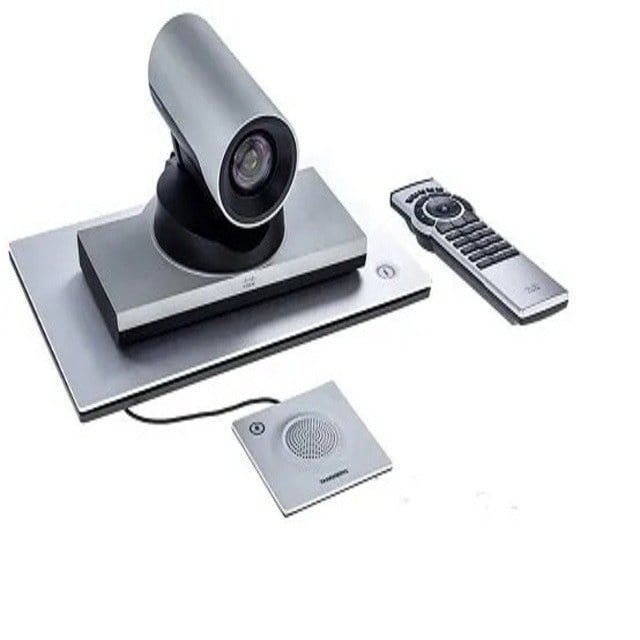
Description
Product overview for the Cisco CTS-SX20-PHD4X-K9
The Cisco CTS-SX20-PHD4X-K9 Telepresence System SX20 Quick Set with Precision Camera Video Conferencing Kit is a versatile and advanced communication solution designed for high-quality video conferencing. In this article, we will delve into the details of this video conferencing kit, its features, benefits, and how it can transform your communication experience.
Cisco Telepresence
Before we dive into the specifics of the Cisco CTS-SX20-PHD4X-K9, it’s important to understand the Camera Video concept of telepresence. Telepresence is a technology that allows individuals or groups to meet and collaborate over a distance as if they were in the same room. It provides a lifelike and immersive experience, making it an ideal choice for businesses, organizations, and institutions to conduct remote meetings, presentations, and training sessions.
Telepresence systems are equipped with high-quality audio and video components, creating a seamless and realistic connection between remote participants. Cisco, a leading global technology company, offers a range of telepresence solutions, and the SX20 Quick Set is one of its notable offerings.
Overview of Cisco CTS-SX20-PHD4X-K9
The Cisco CTS-SX20-PHD4X-K9 Telepresence System SX20 Quick Set is a comprehensive video conferencing kit that includes everything you need to set up a high-quality telepresence system. Let’s break down its main components and features:
Precision Camera
One of the key components of this kit is the Precision Camera. This camera is designed to capture high-definition video with remarkable clarity. It offers superior image quality, ensuring that every detail is visible during your video conferences. Whether you’re presenting documents, showcasing products, or discussing important matters, the Precision Camera will deliver sharp and clear visuals.
Codec
The codec is the heart of the telepresence system. It is responsible for processing audio and video signals, ensuring that the communication is seamless and of the highest quality. The SX20 Quick Set is equipped with a powerful codec that supports various video standards, making it compatible with a wide range of conferencing platforms.
Audio
Crystal-clear audio is essential for effective communication, and the Cisco SX20 Quick Set does not disappoint. It features high-fidelity audio components that capture voices with precision and clarity. Whether you’re speaking or listening, you can expect excellent sound quality.
Remote Control
To make your video conferencing experience user-friendly, the kit comes with a remote control. This enables you to navigate the system, adjust settings, and control the camera with ease. It’s a simple and intuitive way to manage your telepresence sessions.
Cables and Accessories
Cisco has thought of everything when it comes to setting up your telepresence system. The kit includes all the necessary cables and accessories to ensure a hassle-free installation. From power cables to HDMI cables, you’ll have everything you need to get started.
Wall Mount
For a streamlined and professional look, the SX20 Quick Set can be wall-mounted. This option not only saves space but also provides a clean and organized setup for your video conferencing room.
Features and Benefits of Cisco CTS-SX20-PHD4X-K9
Now that we’ve covered the main components of the Cisco CTS-SX20-PHD4X-K9 Telepresence System SX20 Quick Set, let’s explore the features and benefits in more detail.
High-Quality Video
The Precision Camera included in this kit captures high-definition video, ensuring that your video conferences are sharp and lifelike. Whether you’re sharing presentations or collaborating on projects, the superior video quality enhances your communication.
Compatibility
The Cisco SX20 Quick Set is compatible with a variety of video conferencing platforms, making it a versatile choice for businesses and organizations. Whether you prefer Cisco’s own Webex platform or other popular conferencing solutions, this kit can seamlessly integrate into your existing setup.
Excellent Audio
Crystal-clear audio is a must for effective communication. This telepresence system delivers exceptional audio quality, allowing participants to hear and be heard with precision. Whether you’re in a small huddle room or a larger conference space, the audio performance remains consistently high.
User-Friendly Remote Control
The included remote control makes it easy to manage your video conferencing sessions. You can adjust camera angles, volume, and other settings with the press of a button. This simplicity enhances the user experience and reduces the learning curve for new users.
All-in-One Kit
One of the major benefits of the Cisco SX20 Quick Set is that it provides everything you need in a single package. This eliminates the need to source individual components and ensures that all the parts are designed to work seamlessly together. The included accessories and cables simplify the setup process.
Wall Mount Option
The option to wall-mount the system adds flexibility to your setup. It allows you to optimize your space and create a clean, organized appearance. Whether you have limited space or want to achieve a professional look, the wall mount option is a valuable feature.
Cost-Effective
Investing in the Cisco CTS-SX20-PHD4X-K9 Telepresence System is a cost-effective solution for businesses and organizations. It provides high-quality video conferencing capabilities without the need for a complex and expensive installation. This affordability makes it an attractive option for both small and large enterprises.
Use Cases for Cisco CTS-SX20-PHD4X-K9
The Cisco SX20 Quick Set with Precision Camera Video Conferencing Kit is suitable for a wide range of use cases. Here are some scenarios where this telepresence system shines:
Business Meetings
For businesses of all sizes, the Cisco SX20 Quick Set is an excellent choice for conducting remote meetings. Whether you’re connecting with colleagues, clients, or partners, the high-quality video and audio ensure that your discussions are productive and engaging.
Remote Collaboration
In an increasingly interconnected world, remote collaboration is more important than ever. This kit enables teams from different locations to work together seamlessly. Whether it’s a product design session or a strategy meeting, the lifelike experience promotes effective collaboration.
Training and Education
Educational institutions can benefit from the Cisco SX20 Quick Set as well. It’s a valuable tool for conducting virtual classes, workshops, and seminars. The clear visuals and audio enhance the learning experience for both students and instructors.
Healthcare
Telemedicine has become a vital part of healthcare, and the Cisco telepresence system supports medical professionals in conducting remote consultations. Patients and doctors can connect with ease, allowing for efficient healthcare delivery, especially in situations where in-person visits are challenging.
Government and Public Sector
Government agencies and public sector organizations can use this technology for various purposes, such as remote hearings, inter-agency collaboration, and public outreach. The Cisco SX20 Quick Set enhances the transparency and accessibility of government proceedings.
How to Set Up the Cisco CTS-SX20-PHD4X-K9 Telepresence System
Setting up the Cisco CTS-SX20-PHD4X-K9 Telepresence System SX20 Quick Set is a straightforward process. Here’s a step-by-step guide to get you started:
Unbox the Kit
Begin by unboxing the Cisco SX20 Quick Set kit. Ensure that all the components are present and in good condition. You should find the Precision Camera, codec, remote control, cables, and accessories.
Choose Your Setup Location
Determine the ideal location for your telepresence system. Whether you opt for a wall-mounted setup or place it on a suitable surface, make sure it provides a clear line of sight and easy access for participants.
Mount the Camera (If Wall-Mounting)
If you’ve chosen to wall-mount the system, follow the instructions provided for camera installation. Ensure it is securely attached and properly aligned.
Connect Cables
Connect the necessary cables to the codec. This typically includes power cables, HDMI cables, and any other required connections. The kit comes with the essential cables, making this step simple.
Connect to Network
Connect the system to your network. This is crucial for establishing a connection with remote participants and accessing conferencing platforms.
Power On
Power on the Cisco SX20 Quick Set by following the provided instructions. The system will go through a startup sequence, and you’ll see the lights and indicators on the codec.
Configure Settings
Using the remote control, configure the settings according to your preferences. You can adjust camera angles, audio settings, and other parameters to optimize your video conferencing experience.
Test the System
Before your actual video conference, it’s a good idea to test the system to ensure everything is functioning correctly. You can do this by initiating a test call or by connecting with a colleague for a brief trial run.
Start Video Conferencing
Once you’re satisfied with the setup and testing, you’re ready to start video conferencing. Use your preferred conferencing platform or the one that the system is compatible with. Invite participants, schedule meetings, and enjoy high-quality telepresence communication.
General Information about Cisco CTS-SX20-PHD4X-K9
- Manufacturer: Cisco
- Model Number or SKU# CTS-SX20-PHD4X-K9
- Product Type: Telephony
Technical Information for Cisco Telepresence
- ITU-T Recommendation H.323
- ITU-T Recommendation H.460.18/19
- Video Bridging Point-to-Point
Camera
- Image Sensor Size 1/3
- Image Sensor Type CMOS
Video
- Graphics Modes WUXGA
- Maximum Video Resolution 1920 x 1080
- Maximum Frame Rate 60 fps
- Video Encoding H.263
- Video Encoding H.263+
- Video Encoding H.264
- Video Encoding H.239
Audio
- Microphone Form Factor External
- Audio Encoding G.711
- Audio Encoding G.722
- Audio Encoding G.722.1
- Audio Encoding AAC-LD
Network and Communication
- Network Technology 10/100/1000Base-T
- Ethernet Technology Gigabit Ethernet
Interfaces/Ports of Cisco CTS-SX20-PHD4X-K9 Video Conference Equipment
- DVI In Yes
- HDMI In Yes
- HDMI Out Yes
- Auxiliary Audio In Yes
- Auxiliary Audio Out Yes
- Network (RJ-45) Yes
- USB Yes
- Number of Network (RJ-45) Ports 1
- Number of DVI In 1
- Number of HDMI Inputs 1
- Number of HDMI Outputs 2
- Number of Auxiliary Audio In 2
- Number of Auxiliary Audio Out 1
- Number of Audio Lines in 2
- Number of Audio Line Out 1
Miscellaneous
- Package Contents-
- TelePresence SX20 Quick Set With Precision HD 1080p 4x Camera
- SX20 Codec
- Cisco TelePresence Table Microphone 20
- Remote Control
- Cables
- Power Supply
In summary, the Cisco CTS-SX20-PHD4X-K9 Telepresence System SX20 Quick Set with Precision Camera Video Conferencing Kit is a powerful solution for businesses, educational institutions, healthcare providers, and government organizations looking to enhance their communication capabilities. Its high-quality video, excellent audio, user-friendly features, and compatibility with various conferencing platforms make it a valuable investment.
With the step-by-step setup guide and maintenance tips provided in this article, you can confidently install and use this telepresence system to conduct remote meetings, collaborate with colleagues, deliver educational content, offer telemedicine services, and more. Whether you’re connecting with individuals across the street or across the globe, the Cisco SX20 Quick Set brings people together in a lifelike and immersive way.
As technology continues to shape the way we communicate and collaborate, Cisco’s commitment to innovation ensures that its telepresence solutions remain at the forefront of the industry. The Cisco CTS-SX20-PHD4X-K9 Telepresence System is a prime example of its dedication to providing cutting-edge communication tools for a connected world.


