Description
Performance and Scalability
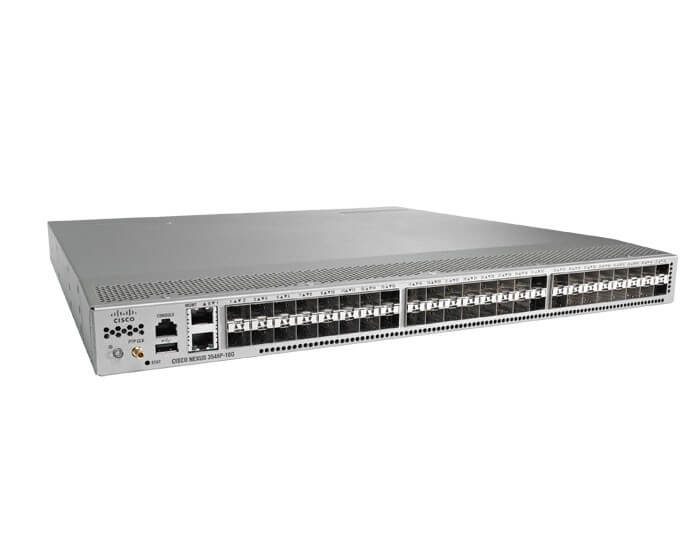
The N3K-C3548P-BD-L3A Cisco Nexus 3548 Manageable Switch is a layer 3 switch designed for data center use. It offers high performance and scalability, making it an excellent choice for organizations with growing networking needs.
Performance: The N3K-C3548P-BD-L3A switch offers a high-performance switching fabric with a switching capacity of up to 960 Gbps. It also features low-latency forwarding, which enables it to handle high-bandwidth applications such as video streaming, online gaming, and large file transfers with ease. Additionally, the switch supports jumbo frames, which allows for the efficient transfer of large data packets, reducing the overhead associated with smaller frames.
Scalability: The N3K-C3548P-BD-L3A switch offers excellent scalability features, making it suitable for organizations with growing networking needs. The switch supports up to 48 1/10-Gigabit Ethernet (GE) ports and 4 40-Gigabit Ethernet (GE) ports, providing ample connectivity options for devices in the data center. The switch also supports Virtual Port Channel (vPC) technology, which enables it to provide a virtualized port channel capability to end devices, allowing for increased redundancy and scalability.
Configuration and Deployment Process
The Cisco Nexus 3548 is a high-performance, low-latency, and high-density Ethernet switch designed for data center deployments. The switch can be managed using Cisco’s NX-OS software, which provides a rich set of features for configuration and deployment.
Here are the key steps in the configuration and deployment process of the N3K-C3548P-BD-L3A Cisco Nexus 3548 switch:
- Physical installation: The first step is to physically install the switch in a rack or cabinet. This involves mounting the switch and connecting the power supply and network cables.
- Basic configuration: Once the switch is powered on, you can access it using a console cable or a network connection. You will need to perform some basic configuration, such as setting the hostname, IP address, and default gateway. This can be done using the command-line interface (CLI) or a web-based graphical user interface (GUI).
- VLAN configuration: You will need to configure the VLANs on the switch to segment the network and control the flow of traffic. You can create VLANs using the CLI or GUI and assign ports to each VLAN.
- Layer 3 configuration: The N3K-C3548P-BD-L3A switch supports Layer 3 routing, which allows you to route traffic between different VLANs or subnets. You will need to configure the routing protocol, such as OSPF or BGP, and configure the routing table.
- Quality of service (QoS) configuration: QoS allows you to prioritize network traffic based on the type of application or service. You can configure QoS policies on the switch to ensure that critical applications receive the necessary bandwidth and latency.
- Security configuration: The switch provides a range of security features, such as access control lists (ACLs), port security, and 802.1x authentication. You will need to configure these features to protect the network from unauthorized access and attacks.
- Deployment: Once the switch is fully configured, you can deploy it in the data center. You will need to connect the switch to other network devices, such as servers, routers, and firewalls, and ensure that the network is functioning correctly.
Power Management and Energy Efficiency
The N3K-C3548P-BD-L3A Cisco Nexus 3548 Manageable Switch is designed with power management and energy efficiency in mind. It offers a range of features and functionalities that allow users to maximize power savings while maintaining high performance.
One of the key features of the N3K-C3548P-BD-L3A is its Energy Efficient Ethernet (EEE) technology. This technology enables the switch to automatically detect and manage power usage based on the network traffic, reducing power consumption during low-traffic periods.
The switch also includes advanced power management features such as the ability to set power budgets, prioritize power usage, and monitor power consumption in real-time. These features help ensure that the switch is operating at optimal power levels while maintaining network performance.
In addition to its power management features, the N3K-C3548P-BD-L3A also includes a range of energy-efficient hardware components such as low-power processors, power-efficient fans, and energy-efficient power supplies. These components work together to minimize power usage and reduce overall energy consumption.
General Information:
- Manufacturer Cisco Systems, Inc
- Manufacturer Part Number N3K-C3548P-BD-L3A
- Brand Name Cisco
- Product Line Nexus
- Product Series 3000
- Product Model 3548
- Product Name Nexus 3548 Switch
- Product Type Layer 3 Switch
Interfaces/Ports
- Token Ring Port No
- LRE Port No
- Bypass No
- Modular No
- Management Port Yes
- USB Yes
- Stack Port No
Media & Performance
- Media Type Supported Twisted Pair
- Ethernet Technology 10 Gigabit Ethernet
- Ethernet Technology Gigabit Ethernet
- Network Technology 10/100/1000Base-T
I/O Expansions
- Number of Total Expansion Slots 48
- Expansion Slot Type SFP+
- Shared SFP Slot No
- Number of SFP+ Slots 48
Network & Communication
- Layer Supported 3
- Management & Protocols
- Manageable Yes
- Management-
- RMON
- VLAN
- QoS
- DHCP
- MIB II
- CLI
- Telnet
- Syslog
- SNMP v1, v2, and v3
Memory
- Flash Memory 2 GB
- Power Description
- PoE (RJ-45) Port No
- Input Voltage 110 V AC
- Input Voltage 220 V AC
- Power Source Power Supply
- Redundant Power Supply Yes