Description
Easy Installation and Maintenance
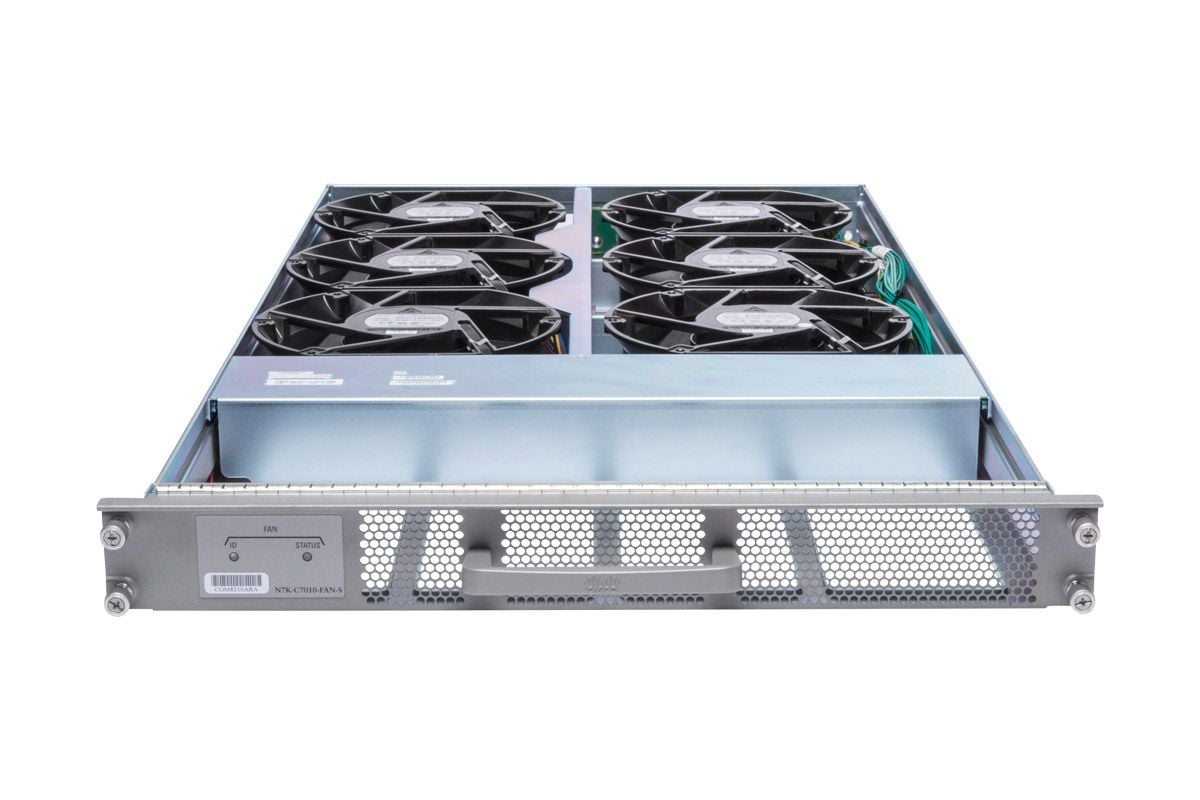
The N7K-C7010-FAN-S Cisco Nexus 7000 10 Slot System Fan is designed for easy installation and maintenance, making it a reliable cooling solution for your Nexus 7000 series switch. Here are the steps for easy installation and maintenance of the fan:
- Preparation: Before installation, review the documentation and gather all necessary tools and equipment.
- Removal of old fan: To replace an existing fan, disconnect the power and data cables and then unscrew the mounting screws to remove it from the switch.
- Installation of new fan: Connect the power and data cables to the new fan and secure it in place with the mounting screws.
- Fan operation verification: Monitor the system status and temperature readings to ensure that the fan is operating correctly. If it isn’t, check the power and data cables for loose connections.
- Cleaning: Regularly clean the fan to remove any debris or dust that may have accumulated on the blades or in the fan housing. Use a soft cloth or air duster to gently remove the debris.
- Replacement: If the fan is not operating correctly, even after cleaning, it may be necessary to replace it. Ensure that you use a replacement fan that is compatible with your Nexus 7000 series switch.
Maximizing Cooling Efficiency
Maximizing cooling efficiency of the N7K-C7010-FAN-S Cisco Nexus 7000 10 Slot System Fan involves a few best practices:
- Proper placement: Make sure that the fan is installed in the correct orientation and location within the switch to ensure optimal airflow and cooling efficiency.
- Maintenance: Regularly clean the fan to remove any debris or dust that may have accumulated on the blades or in the fan housing.
- System monitoring: Monitor the system temperature readings to ensure that the fan is operating correctly and providing adequate cooling to the switch.
- Fan replacement: If the fan is not operating correctly, even after cleaning, it may be necessary to replace it. Ensure that you use a replacement fan that is compatible with your Nexus 7000 series switch.
- Power management: Configure power management settings that are optimized for cooling efficiency. This may include adjusting fan speeds based on system temperature, reducing the power consumption of other components within the switch, and monitoring system utilization to avoid overloading the switch.
By following these best practices, you can help to ensure that the N7K-C7010-FAN-S Cisco Nexus 7000 10 Slot System Fan provides optimal cooling efficiency for your switch. This, in turn, can help to increase the overall reliability and longevity of the switch.
Troubleshooting and Maintenance
The following steps can help troubleshoot and maintain the N7K-C7010-FAN-S Cisco Nexus 7000 10 Slot System Fan:
- Monitoring: Use the built-in monitoring tools and commands to check the fan status and identify any potential issues.
- Cleaning: Regularly clean the fan to remove any debris or dust that may have accumulated on the blades or in the fan housing.
- Power management: Verify that the fan is getting adequate power and that the power management settings are optimized for cooling efficiency.
- Fan replacement: If the fan is not functioning correctly, even after cleaning, it may be necessary to replace it. Make sure to use a replacement fan that is compatible with your Nexus 7000 series switch.
- System monitoring: Monitor the system temperature readings to ensure that the fan is providing adequate cooling to the switch.
- Software upgrades: If you are encountering fan-related issues, verify that you are running the latest software version for your switch. Software upgrades may resolve fan-related issues.
By following these steps, you can help troubleshoot and maintain the N7K-C7010-FAN-S Cisco Nexus 7000 10 Slot System Fan. This, in turn, can help to ensure that the fan continues to provide optimal cooling efficiency for your switch, maximizing network uptime and reducing the risk of component failure.
Main Specifications
- Manufacturer: Cisco
- Manufacturer Part Number: N7K-C7010-FAN-S
- Product Type : Fan Tray
Compatibility
- Cisco Nexus 7000 Series Chassis
- Environmentally Friendly: Yes