



Description
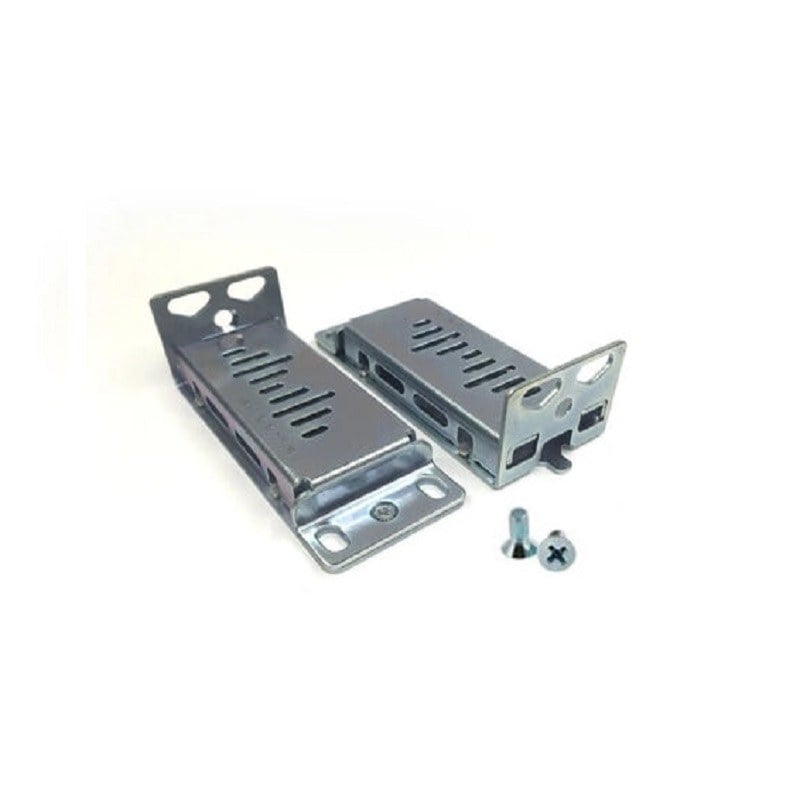
Product overview for the Cisco RCKMNT-19-CMPCT
The Cisco RCKMNT-19-CMPCT Rack Mounting Kit is designed for mounting Cisco Catalyst 3560 and 2960 Series Compact Switches in a standard 19-inch rack. This kit is a valuable accessory for organizations looking to optimize their network infrastructure, save space, and enhance network management. In this article, we will delve into the details of the Cisco RCKMNT-19-CMPCT Rack Mounting Kit, its features, benefits, and process, providing a comprehensive guide for network professionals and IT administrators.
Understanding Cisco Catalyst 3560 and 2960 Series Compact Switches
Before we explore the Cisco RCKMNT-19-CMPCT Rack Mounting Kit, it’s essential to understand the Catalyst 3560 and 2960 Series Compact Switches it’s designed for.
Cisco Catalyst 3560 Series Compact Switches: The Cisco Catalyst 3560 Series is a line of enterprise-class switches that offer advanced features for improved network performance and security. These switches are known for their reliability and scalability, making them an ideal choice for businesses of all sizes. The compact version of the Catalyst 3560 Series is designed to fit in tight spaces while maintaining high performance.
Cisco Catalyst 2960 Series Compact Switches: The Cisco Catalyst 2960 Series is another widely-used switch family that provides cost-effective solutions for small and medium-sized businesses. These switches are known for their energy efficiency and ease of deployment. The compact version of the Catalyst 2960 Series is suitable for locations with limited space.
The Importance of Rack Mounting
Rack mounting is a common practice in data centers, network closets, and server rooms. It involves securing networking and IT equipment, such as switches, routers, and servers, in a standardized rack or cabinet. Rack mounting offers several advantages:
- Space Optimization: Rack mounting helps efficiently utilize limited floor space. It allows you to stack multiple devices in a vertical arrangement, reducing clutter and making it easier to manage and maintain your equipment.
- Cable Management: A well-organized rack setup improves cable management. Cables can be neatly routed, labeled, and secured, reducing the risk of cable tangling and making it easier to troubleshoot and upgrade equipment.
- Cooling and Ventilation: Racks are typically designed with ventilation and cooling in mind. Proper airflow ensures that networking equipment remains within optimal operating temperatures, reducing the risk of overheating and equipment failure.
- Accessibility: Rack mounting provides easy access to equipment for maintenance and troubleshooting. It minimizes the need to handle individual devices directly, reducing the risk of damage.
The Cisco RCKMNT-19-CMPCT Rack Mounting Kit
The Cisco RCKMNT-19-CMPCT Rack Mounting Kit is a specialized accessory designed for the rack mounting of Cisco Catalyst 3560 and 2960 Series Compact Switches. Let’s take a closer look at this kit’s features and benefits.
Features of the Cisco RCKMNT-19-CMPCT Rack Mounting Kit:
- Designed for Compact Switches: The Cisco RCKMNT-19-CMPCT Kit is specifically designed for Cisco Catalyst 3560 and 2960 Series Compact Switches, ensuring a precise fit and secure mounting.
- 19-Inch Rack Compatibility: The kit is compatible with standard 19-inch racks, making it suitable for most data center and network infrastructure setups.
- Durable Construction: The kit is constructed with durable materials to withstand the weight of the mounted switch and provide long-lasting performance.
- Easy: The Cisco RCKMNT-19-CMPCT Kit includes all necessary hardware and instructions for straightforwardly reducing the time and effort required for setup.
- Space-Saving Solution: By securely mounting the switches in a rack, this kit helps save valuable floor space and ensures an organized and tidy network setup.
Benefits of Using the Cisco RCKMNT-19-CMPCT Rack Mounting Kit:
- Improved Network Aesthetics: The kit helps create a neater and more professional-looking network setup by eliminating the need for individual shelf or desk placement of switches.
- Enhanced Cooling: Rack mounting promotes better airflow around the switches, helping to maintain optimal operating temperatures and preventing overheating.
- Easier Maintenance: With switches securely mounted in the rack, maintenance and troubleshooting become more accessible, reducing downtime and improving network reliability.
- Reduced Cable Clutter: The rack setup encourages organized cable management, reducing the risk of tangled or damaged cables.
- Optimized Space Usage: Valuable floor space is used more efficiently, allowing for the addition of other networking equipment or expansion of the IT infrastructure.
The Cisco RCKMNT-19-CMPCT Rack Mounting Kit
To make the most of the Cisco RCKMNT-19-CMPCT Rack Mounting Kit, a proper process is essential. Here is a step-by-step guide on how to install the kit and securely mount your Cisco Catalyst 3560 or 2960 Series Compact Switches in a standard 19-inch rack.
Note: Before you begin, ensure that you have the necessary tools, including a screwdriver and a level, and that you’ve read and understood the kit’s instructions.
- Prepare the Rack: Before installing the Cisco RCKMNT-19-CMPCT Kit, make sure your 19-inch rack is level and secured in its intended location. This ensures a stable and safe environment for your network equipment.
- Unpack the Kit: Carefully unpack the Cisco RCKMNT-19-CMPCT Kit and verify that you have all the components required for the. The kit typically includes brackets, screws, and instructions.
- Attach the Brackets: Locate the rack-mounting brackets included in the kit. Depending on your rack’s configuration, these brackets may need to be attached to the sides of the Cisco Catalyst 3560 or 2960 Series Compact Switch. Use the provided screws and a screwdriver to secure the brackets to the switch.
- Position the Switches: With the brackets attached, position the Cisco Catalyst switches within the 19-inch rack. Make sure they are aligned with the mounting holes on the rack’s vertical rails.
- Secure the Switches: Using the screws included in the kit, secure the switches to the rack’s vertical rails through the brackets. Ensure that the switches are tightly fastened to prevent any movement or instability.
- Cable Management: Organize and manage the network cables connected to the switches. Proper cable management is crucial for maintaining a clean and efficient network setup.
- Power On and Test: Once the switches are securely mounted and cables are properly managed, power on the switches and test their functionality. Ensure that the network connections are functioning correctly.
- Documentation: Update your network documentation to reflect the new rack-mounted configuration. This step is essential for future reference and troubleshooting.
General Information about Cisco RCKMNT-19-CMPCT
- Manufacturer: Cisco
- Model Number or SKU# RCKMNT-19-CMPCT
- Product Type: Rack Mounting
Performance of the Rack Mounting
- External Form Factor
Compatibility
- The Cisco Catalyst 3560 and Catalyst 2960 Series Compact Switches are compatible with a wide range of network devices, including routers, servers, and desktop computers.
- These switches are designed to support a variety of networking protocols and standards, including IPv4, IPv6, SNMP, and QoS.
- The switches support a range of security features, including access control lists (ACLs), port security, and MAC address filtering.
- The switches also support a variety of management and configuration options, including web-based GUI, Cisco Network Assistant, and command-line interface (CLI).
- In terms of hardware compatibility, the switches support a range of modules and expansion cards, including fiber optic transceivers, power over Ethernet (PoE) modules, and stacking modules.
- The switches are designed to be compact and easy to deploy, making them ideal for small and medium-sized businesses, as well as branch offices and remote locations.
In summary, the Cisco RCKMNT-19-CMPCT Rack Mounting Kit is a valuable accessory for network professionals and IT administrators looking to optimize their network infrastructure, improve cable management, and save space. By securely mounting Cisco Catalyst 3560 and 2960 Series Compact Switches in a standard 19-inch rack, this kit helps enhance network aesthetics, cooling, and accessibility.
Proper the kit ensures that your network equipment is stable, organized, and easily maintainable. With the Cisco RCKMNT-19-CMPCT Kit, you can maximize the efficiency and reliability of your network while maintaining a professional and tidy appearance.
If you’re considering rack mounting your Cisco Catalyst 3560 or 2960 Series Compact Switches, the Cisco RCKMNT-19-CMPCT Rack Mounting Kit is a valuable investment that can contribute to the success of your network infrastructure.


