

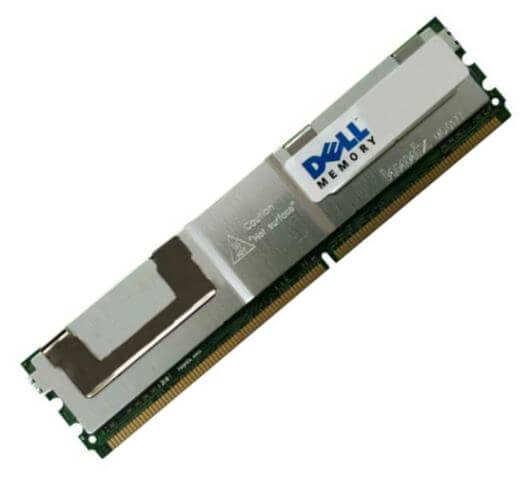

Description
Benefits of Registered Memory
Registered memory, also known as buffered memory, is a type of memory module that provides certain benefits over unregistered memory. Here are some benefits of using registered memory:
- Improved stability: Registered memory has a register, or buffer, that sits between the memory module and the memory controller. This buffer reduces the electrical load on the memory controller, which can improve stability and reduce the risk of data errors.
- Higher memory capacity: Registered memory can support higher memory densities than unregistered memory. This is because the buffer in registered memory reduces the electrical load on the memory controller, which allows for more memory chips to be installed on the module.
- Better signal integrity: The buffer in registered memory also helps to improve signal integrity, which is the quality of the electrical signal between the memory module and the memory controller. This can result in fewer errors and better system performance.
- Lower power consumption: Registered memory typically consumes less power than unregistered memory. This is because the buffer in registered memory helps to reduce the electrical load on the memory controller, which can result in lower power consumption.
- Compatibility: Registered memory is compatible with a wide range of computer systems, including servers and workstations. This makes it a good choice for users who need high-capacity memory that is reliable and stable.
Advantages of ECC Memory
ECC (Error Correction Code) memory is a type of memory module that includes extra data bits that can detect and correct memory errors. Here are some advantages of using ECC memory:
- Improved reliability: ECC memory can detect and correct memory errors, which helps to improve system reliability and reduce the risk of data corruption or loss. This is especially important for systems that handle critical data, such as servers and workstations.
- Better data integrity: ECC memory can help to maintain the integrity of data stored in memory. By detecting and correcting errors, ECC memory ensures that data is stored and retrieved accurately, which can be critical in applications such as scientific computing or financial transactions.
- Increased system uptime: By detecting and correcting memory errors, ECC memory can help to reduce system crashes and downtime. This can improve system uptime and reduce the need for maintenance and troubleshooting.
- Greater system performance: Although ECC memory includes extra data bits for error correction, it can still provide high performance. In fact, some studies have shown that ECC memory can actually provide better performance than non-ECC memory in certain situations.
- Compatibility: ECC memory is compatible with a wide range of computer systems, including servers, workstations, and some desktops. This makes it a good choice for users who need reliable memory for critical applications.
ECC memory is a good choice for users who need reliable, high-performance memory for their computer system. It offers improved reliability, better data integrity, increased system uptime, and compatibility with a wide range of systems. However, ECC memory can be more expensive than non-ECC memory, and it may not be necessary for all computer systems. Users should check their system’s specifications to determine whether ECC memory is compatible and appropriate for their needs.
Using Dell Memory in Dell Systems
Using Dell memory in Dell systems can provide a number of benefits, including improved performance, compatibility, and reliability. Here are some things to keep in mind when using Dell memory in Dell systems:
- Compatibility: Dell memory is designed to be compatible with Dell systems, which means that it should work seamlessly with your system. When upgrading or replacing memory, it’s important to check your system’s specifications to ensure that the memory is compatible.
- Performance: Dell memory is designed to provide high performance and reliability in Dell systems. Using Dell memory can help to ensure that your system is running at its best, and can help to reduce the risk of system crashes and errors.
- Warranty: Dell memory is covered by Dell’s warranty, which means that you can have peace of mind knowing that your memory is backed by Dell’s support team. If you experience any issues with your Dell memory, you can contact Dell for assistance.
- Installation: When installing Dell memory, it’s important to follow the manufacturer’s instructions carefully. This can help to ensure that the memory is installed correctly and that it is functioning as expected.
- Upgrades: If you’re upgrading your system’s memory, it’s important to ensure that you’re using the correct type and speed of memory. Dell offers a variety of memory options for their systems, so be sure to check the specifications before making a purchase.
Using Dell memory in Dell systems can provide a number of benefits, including improved performance, compatibility, and reliability. When upgrading or replacing memory, be sure to check your system’s specifications and follow the manufacturer’s instructions carefully to ensure that your memory is installed correctly and functioning as expected. If you have any issues with your Dell memory, be sure to contact Dell for assistance.
General information:
- Manufacturer: Dell
- Manufacturer part number: 0X3R5M
- Type: Memory (RAM)
- Sub-Type: Pc3-10600
- Product name: 8gb ddr3 sdram memory module
Technical Information:
- Storage capacity: 8gb
- Memory technology: ddr3 sdram
- Number of modules: 1x 8gb
- Memory speed: 1333mhz ddr3-1333/pc3-10600
- Data integrity check: ecc chipkill
- Signal processing: dual rank, registered
- Cas latency timings: cl9
- Ram features: fully buffered


