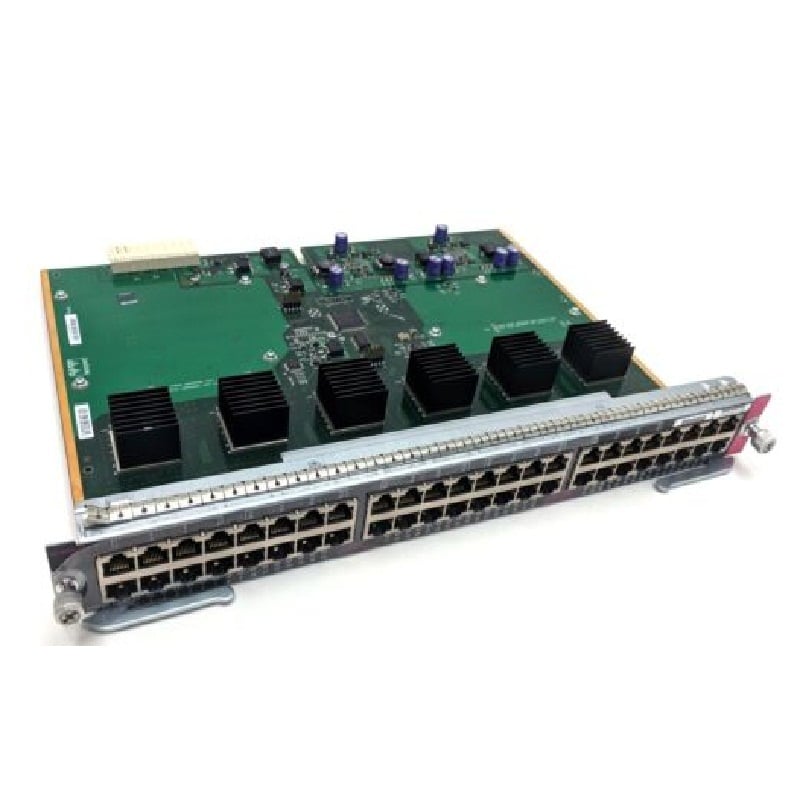
Description
Product Specification Dell 210-APWZ Switch
In the ever-evolving landscape of networking solutions, having a reliable and efficient switch is the cornerstone of seamless data management. The Dell 210-APWZ Switch, with its 48-managed ports and rack-mountable design, is a noteworthy player in the market. This comprehensive guide aims to delve into the intricate details of the Dell 210-APWZ managed Switch, providing valuable insights into its features, benefits, and potential considerations for those seeking a robust networking solution.
Overview
The Dell 210-APWZ Switch is a networking powerhouse designed to meet the demands of modern business infrastructures. With
48 managed ports, it offers a substantial capacity for connecting multiple devices, making it an ideal choice for organizations with diverse networking needs.
Managed Switch Capabilities
One of the standout features of the Dell 210-APWZ Switch is its managed capabilities. This means it goes beyond the basic functions of an unmanaged switch, providing advanced features that empower network administrators with greater control over their network. These capabilities include VLAN support, Quality of Service (QoS), and robust security protocols.
The Power of 48 Ports
Having 48 managed ports on the Dell 210-APWZ Switch translates to scalability and flexibility. This abundance of ports enables organizations to expand their network infrastructure without compromising on performance. Whether it’s connecting computers, printers, servers, or other networking devices, this switch has the capacity to handle the load.
Gigabit Ethernet Speeds
In the fast-paced digital era, speed is everything. The Dell 210-APWZ Switch doesn’t disappoint, supporting Gigabit Ethernet speeds. This ensures high-performance data transfer rates, making it well-suited for bandwidth-intensive tasks and applications that require swift and reliable connectivity.
Space Optimization
For businesses grappling with limited space in their data centers or server rooms, the rack-mountable design of the Dell 210-APWZ Switch is a game-changer. This feature allows seamless integration into existing rack setups, promoting a clean and organized networking infrastructure. The switch becomes a space-saving solution, contributing to a more efficient and streamlined workspace.
VLAN Support
Virtual Local Area Networks (VLANs) are a fundamental aspect of network segmentation and organization. The Dell 210-APWZ Switch’s VLAN support allows administrators to create distinct virtual networks within a physical network, enhancing efficiency and security. This feature proves invaluable in scenarios where different departments or teams require isolated network environments.
Quality of Service (QoS)
In the realm of networking, not all data is created equal. The Quality of Service (QoS) feature on the Dell 210-APWZ Switch enables administrators to prioritize certain types of data, ensuring that critical applications receive the bandwidth they need. Whether it’s voice-over IP (VoIP) calls or video conferencing, QoS guarantees a seamless user experience by preventing latency and packet loss.
Robust Security Protocols
Security is a top priority in any networking environment. The Dell 210-APWZ Switch comes equipped with robust security protocols to safeguard against unauthorized access and potential cyber threats. Features such as port security, access control lists (ACLs), and secure shell (SSH) encryption contribute to a comprehensive security framework, providing peace of mind to network administrators.
Network Performance
The Dell 210-APWZ Switch doesn’t just offer an abundance of ports; it excels in delivering consistent and reliable network performance. With Gigabit Ethernet speeds and managed capabilities, the switch ensures that data flows seamlessly, meeting the demands of bandwidth-hungry applications and large-scale data transfers.
Reliability in Mission-Critical Environments
For businesses operating in mission-critical environments where downtime is not an option, the reliability of networking equipment is paramount. The Dell 210-APWZ Switch, with its sturdy build and advanced features, is designed to minimize downtime and provide a stable networking infrastructure. Redundancy options and failover mechanisms further enhance the switch’s reliability in high-stakes scenarios.
Cost Considerations
While the Dell 210-APWZ Switch offers a plethora of features, organizations must consider budget constraints. Managed switches, in general, tend to be pricier than their unmanaged counterparts. However, the investment may be justified by the enhanced control and capabilities provided by the switch.
Learning Curve for Management
The advanced features of a managed switch bring with them a learning curve, especially for those unfamiliar with the intricacies of network management. Organizations should factor in training and education for their IT staff to fully leverage the capabilities of the Dell 210-APWZ Switch.
General Information about the Dell
- Manufacturer: Dell
- Part Number or SKU# 210-APWZ
- Product Type: 48 Ports Switch
Technical Details
- Enclosure Type: Rack-mountable 1U
- Subtype: Gigabit Ethernet
Performance
- Switching Fabric Bandwidth: 260 Gbps
- Forwarding Performance: 193 Mpps
- Stacking Bandwidth: 21 Gbps
Capacity
- IPv4 Routes (Static): 1024
- IPv6 Routes (Static): 1024
- IPv4 Routes (Dynamic): 8160
- IPv6 Routes (Dynamic): 4096
- Maximum Member Ports Per LAG: 8
- Maximum Dynamic Ports Per Switch Stack: 144
- LAG Groups: 128
- OSPF Routes: 8160
- RIP Routes: 512
- ECMP Next Hops Per Route: 4
- ECMP Groups: 64
- VLAN Routing Interfaces: 128
- VLANs Supported: 4094
- Multicast Entries (IPv4): 1536
- Multicast Entries (IPv6): 512
- ARP Entries: 6144
- NDP Entries: 400
- ACL: 100
- Maximum Rules Per ACL: 1023
- Max ACL Rules System-wide: 4096
- Maximum ACL Rules Per Interface (IPv4) Egress Rules: 1024
- Maximum ACL Rules Per Interface (IPv4) Ingress Rules: 3072
- Maximum ACL Rules Per Interface (IPv6) Egress Rules: 512
- Maximum ACL Rules Per Interface (IPv6) Ingress Rules: 1021
- Maximum VLAN Interfaces With ACLs Applied: 24
- MAC Address Table Size: 32k Entries
Features
- Flow Control, MDI/MDI-X Switch, Auto-negotiation, ARP Support, VLAN Support, Port Mirroring, DiffServ Support, Weighted Round Robin (WRR) Queuing, Broadcast Storm Control, IPv6 Support, Rapid Spanning Tree Protocol (RSTP) Support, Multiple Spanning Tree Protocol (MSTP) Support, Access Control List (ACL) Support, Quality of Service (QoS), STP Root Guard, IPv4 Support, LLDP Support, Link Aggregation Control Protocol (LACP), Energy Efficient Ethernet, Management Information Base (MIB), Dynamic VLAN Support (GVRP), Dual Firmware Images, Network Access Control (NAC), Neighbor Discovery Protocol (NDP), Tagged VLAN, Redundant Fans, Protocol-based VLANs Support
- RAM: 2 GB
- Flash Memory: 1 GB
Expansion/Connectivity
- Interfaces:
- 48 x Gigabit LAN RJ-45
- 2 x 10Gbit LAN SFP+
- 2 x Gigabit LAN RJ-45/SFP
- 1 x Serial (RS-232) RJ-45 Management
- 1 x USB Type A
- 2 x Network Stack Device
Power
- Power Device: Internal Power Supply – Hot-plug
- Installed Qty: 1 (installed) / 2 (max)
- Power Redundancy: Optional
- Power Redundancy Scheme: 1+1 (with Optional Power Supply)
- Power Provided: 200 Watt
Outline, the Dell 210-APWZ Switch stands as a formidable networking solution with its 48-managed ports, rack-mountable design, and advanced capabilities. Whether it’s optimizing space, enhancing security, or ensuring high-speed data transfer, this switch caters to the diverse needs of modern businesses. While considerations such as cost and a learning curve exist, the benefits offered by the Dell 210-APWZ Switch position it as a worthwhile investment for organizations prioritizing a robust and scalable networking infrastructure.