
Description
Enhanced Data Protection
The Dell 342-5570 4TB 7.2K RPM SAS-6GBPS Hard Drive offers enhanced data protection through a number of features that help to ensure the integrity and security of stored data. These include:
- Error Correction Code (ECC): This feature detects and corrects any errors that may occur in the data transmission process, thus minimizing the risk of data corruption.
- Hot-Plug Support: This feature allows the hard drive to be replaced or removed without shutting down the system, minimizing downtime and ensuring business continuity.
- RAID Support: The Dell 342-5570 4TB 7.2K RPM SAS-6GBPS Hard Drive is compatible with RAID configurations, which provide an additional level of data protection by mirroring data across multiple drives.
- Self-Encrypting Drive (SED) Option: This feature allows for data encryption, protecting sensitive data from unauthorized access.
- SAS Interface: SAS (Serial Attached SCSI) is a high-speed data transfer protocol that provides enhanced data protection by allowing multiple drives to be connected to a single controller.
- Advanced Format Technology: This feature increases the physical sector size on the drive from 512 bytes to 4096 bytes, reducing the number of errors and improving data integrity.
Overall, the Dell 342-5570 4TB 7.2K RPM SAS-6GBPS Hard Drive offers enhanced data protection through a combination of hardware and software features that help to ensure the integrity and security of stored data.
Installation and Setup
Installing and setting up the Dell 342-5570 4TB 7.2K RPM SAS-6GBPS Hard Drive is a straightforward process that can be done by anyone with basic computer knowledge. Here are the steps for installation and setup:
- First, ensure that your computer is turned off and unplugged. Open the computer case and locate the hard drive bay.
- Carefully remove the old hard drive from the bay by releasing any locking mechanisms or screws that are holding it in place.
- Insert the Dell 342-5570 4TB 7.2K RPM SAS-6GBPS Hard Drive into the bay, making sure that it is securely fastened in place.
- Connect the SAS cable from the hard drive to the SAS controller on the motherboard.
- Close the computer case and plug the computer back in.
- Turn on the computer and go into the BIOS settings. Under the storage section, make sure the SAS controller is set to recognize the new hard drive.
- Once the hard drive is recognized by the computer, you can then proceed to format it and install the operating system.
- After the operating system is installed, you can then start using the new hard drive for storage and data backup.
It is important to note that before you start the installation process, make sure you have all the necessary tools and cables, and also make sure to backup important data before installing the new hard drive.
Energy Efficiency
The Dell 342-5570 4TB 7.2K RPM SAS-6GBPS Hard Drive is designed to be energy efficient, which means it uses less power to operate compared to other hard drives. This can help reduce the overall energy consumption of the device it is installed in, which can lead to cost savings and a reduction in environmental impact.
One of the ways this hard drive achieves energy efficiency is through its 7200 RPM (revolutions per minute) rotation speed. This is a slower speed than some other hard drives, which can run at higher speeds of up to 15,000 RPM. The slower speed means the hard drive requires less power to operate, which can help reduce energy consumption.
Additionally, the Dell 342-5570 4TB 7.2K RPM SAS-6GBPS Hard Drive also uses a SAS-6GBPS interface, which is designed to be more energy efficient than other interfaces such as SATA. SAS-6GBPS hard drives use less power to transfer data, which can also help reduce energy consumption.
Specifications
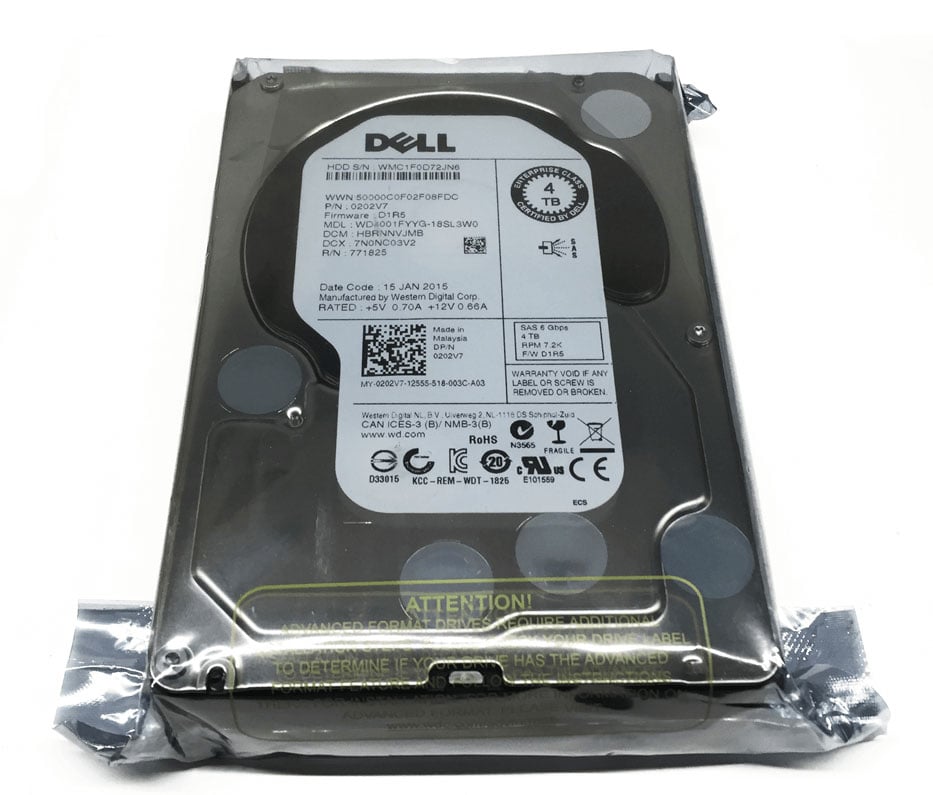
Dell Part : 342-5570
Device Type : Hard Drive – Hot-Swap
Form Factor : 3.5
Interface : Serial Attached SCSI 2
Capacity :4TB
Performance
Spin Speed : 7200 RPM
Drive Transfer Rate : 600 MBPS (External)
Interfaces : 1 X Serial Attached SCSI 2
Compatible Bays : 1 X Hot-Swap – 3.5
Compaitibility
Poweredge C5220
Poweredge C6145
Poweredge C6220
Poweredge R320
Poweredge R415
Poweredge R420
Poweredge R515
Poweredge R520
Poweredge R720
Poweredge R720XD
Poweredge T320
Poweredge T420
Poweredge T620
Powervault MD3200
Powervault MD3200I
Powervault MD3220
Powervault MD3220I